

Best Pick Overall
The right Amazon Music downloader depends on your needs: TuneFab, TuneBoto, and AudFree are suitable for batch conversion and flexible output settings; DoubleDouble works for occasional browser-based downloads; Telegram GlomaticoBlueMusicBot is convenient for mobile use; and Apowersoft or Audacity are options for real-time recording.
For offline listening within Amazon Music, the official app remains the simplest option.
Amazon Music gives subscribers access to millions of songs, but downloading them for offline listening doesn't necessarily mean you can keep the tracks as regular audio files. If you want more flexibility over playback, storage, or device compatibility, a dedicated Amazon Music downloader may be worth considering.
To help you find a suitable option, we tested 7 popular Amazon Music downloaders across key factors including audio quality, download stability, output formats, ease of use, and supported devices. The following review breaks down their actual performance so you can choose a downloader based on what matters most to you.

Which One Is the Best Amazon Music Downloader?
The right Amazon Music downloader depends on what you actually need. Some tools are designed for fast batch conversion, while others focus on simple single-track downloads or real-time recording. For a quick overview, here are the main differences:
| Downloader | Best For | Output Formats | Audio Quality | Speed | Batch Download | ID3 Tags | Availability |
| TuneFab | Best overall | MP3, M4A, WAV, FLAC, ALAC, AIFF, AAC | Up to 24-bit lossless FLAC | Fast | Yes | Yes | Available |
| TuneBoto | Flexible settings | MP3, AAC, WAV, AIFF, FLAC, ALAC | Up to 24-bit lossless FLAC | Fast | Yes | Yes | Available |
| AudFree | High-quality conversion | MP3, FLAC, WAV, AAC, AIFF, M4A, M4B | Up to 24-bit lossless FLAC | Fast | Yes | Yes | Available |
| Double Double | Quick online downloads | FLAC | Depends on source | Medium | No | Yes | Available |
| Telegram Bot | Mobile-friendly downloads | FLAC | Depends on source | Medium | Yes | Yes | Availability may vary |
| Apowersoft | Real-time recording | MP3, M4A, FLAC, WAV, etc. | Recording quality | 1× real time | No | Yes | Available |
| Audacity | Free recording & editing | WAV, MP3, OGG, etc. | Recording quality | 1× real time | No | Manual | Available |
Note: To make our audio quality assessment more objective, we also use Spek to analyze the downloaded files after conversion. We check their bitrate and frequency spectrum to verify whether the output quality matches the format and quality settings selected in the downloader.
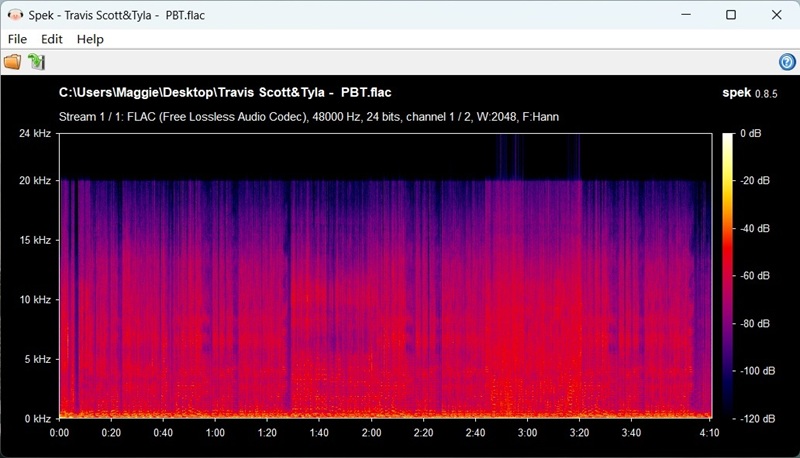
This additional check helps us identify cases where a downloader may label an output as lossless or high-resolution without actually delivering the expected audio characteristics.
How We Compare Amazon Music Downloaders
To make the comparison more useful, we focus on factors that directly affect everyday downloading.
- Output Formats
We check which formats each tool actually provides, such as MP3, M4A, WAV, AAC, FLAC, ALAC, etc. More formats aren't automatically better. MP3 is convenient for compatibility and storage, while FLAC and other lossless formats are more suitable when preserving high-quality audio is a priority.
- Audio Quality
For converters, the result depends on the source and selected output settings. For recording tools, the final quality also depends on playback and recording configuration.
- Download Speed
Converter-based tools can process tracks faster than real-time recording in many workflows. We measure this using the same test tracks and device where possible.
- Metadata Preservation
We check whether exported files retain information such as:
- Song title
- Artist
- Album
- Track number
- Album artwork
This is particularly important if you're building a large local music library.
- Batch Download
Batch downloading measures whether a tool can process multiple Amazon Music tracks in one task instead of requiring you to download each song individually. For tools that support batch downloading, we also record the number of tracks processed in a single task and whether all selected files are exported successfully.
Detailed Review of Best 7 Downloaders for Amazon Music
1. TuneFab Amazon Music Converter
Best for: Fast batch downloads and flexible output formats.
TuneFab Amazon Music Converter is a desktop Amazon Music downloader designed for users who want to save Amazon Music tracks, albums, and playlists as regular audio files. It supports FLAC for lossless audio and MP3 at 320kbps depending on the source and selected settings, ensuring you get the best possible sound quality when downloading from Amazon Music Prime, Unlimited, or HD.
Built with a powerful embedded Amazon Music web player, TuneFab makes it easy to browse, select, and download music with just a drag-and-drop. Whether you're downloading a single track or an entire playlist, the tool delivers up to 35X faster batch download speed without compromising quality.
Plus, it preserves ID3 tags preservation, making post-download music management smooth and intuitive. With strong stability and a high download success rate, TuneFab Amazon Music Converter is a recommended choice for anyone looking to download and enjoy Amazon Music offline.

| What We Like | What to Consider | Test snapshot |
| -Supports multiple popular output formats -Batch downloads tracks, albums, and playlists -Preserves common ID3 metadata -Offers customizable bitrate and sample rate -Built-in Amazon Music web player -Faster than real-time recording for large batches |
-Requires desktop installation -Full conversion features require a paid license -Free trial has conversion limitations |
OS: Windows 11 Sample: 3 tracks, ~3.5 minutes each Successful conversions: 3/3 Download duration: About 3~3.5 minutes |
Tip: Apply the code TFWELCOME to enjoy 10% off your Tunefab purchase.
More Reading: TuneFab Amazon Music Converter Review: As Good as It Can Get
User review:

2. TuneBoto Amazon Music Converter
Best for: Users who want more control over output settings rather than the simplest possible workflow.
TuneBoto Amazon Music Converter is also a reliable Amazon Music playlist downloader, equipped with batch download ability to save Amazon Music singles, podcasts, albums, and playlists of Amazon Music Prime and Unlimited icons at 10X quicker speed at max. Moreover, it provides more customization settings to allow you to determine output settings from 6 different formats and customized quality parameters such as Bitrate, SampleRate, etc. accordingly.
A surprising feature of TuneBoto Amazon Music Converter should be its 2 modes to download Amazon Music playlists - the traditional URL copy-and-paste and also the built-in web player. Nevertheless, some users reported that this actually leads to instability because of conflicts that occurred during the music synchronization with the Amazon Music program. It will also consume a higher CPU and lags the computer's performance.

| What We Like | What to Consider | Test snapshot |
| -Multiple output formats -Batch conversion support -Customizable audio parameters -Preserves track metadata -Suitable for albums and playlists |
-Requires desktop installation -Full conversion features require a paid license -Free trial has conversion limitations |
OS: Windows 11 Sample: 3 tracks, ~3.5 minutes each Successful conversions: 3/3 Download duration: About 7~7.5 minutes |
3. AudFree Amazon Music Converter
Best for: Users who prioritize output flexibility and high-quality conversion.
The AudFree Amazon Music Converter is another powerful and flexible music downloader for those looking to enjoy Amazon digital music downloads. Designed with a clean UI and excellent compatibility, this tool allows you to download and convert Amazon Music from Prime, Unlimited, and HD in high-quality formats like MP3 and FLAC for offline listening. What's more, with batch download functionality and full metadata retention (ID3 tags, album, artist, etc.), AudFree ensures organized, high-fidelity downloads for every track.

| What We Like | What to Consider | Test snapshot |
| -Multiple output formats -Batch conversion -Metadata preservation -Customizable output settings -Supports high-quality output options |
-Desktop software required -Free version has significant conversion limits -May offer more settings than casual users need |
OS: Windows 11 Sample: 3 tracks, ~3.5 minutes each Successful conversions: 3/3 Download duration: About 5.5~6 minutes |
4. Double Double
Best for: Users who only need an occasional single-track download and don't want to install desktop software.
If you're looking for a lightweight Amazon Music downloader online, DoubleDouble is a web-based tool designed to download individual Amazon Music tracks in FLAC. Unlike traditional software, it offers a clean interface and direct access without installing anything on your device. It retains full ID3 tags, including title, artist, and album info, making it easy to organize downloaded music.
While DoubleDouble works well for single-track Amazon Music download tasks, it lacks support for playlist downloads, and can't output as MP3 format. If you're looking for a more powerful and flexible tool, TuneFab Amazon Music Converter is a superior alternative to online-only tools like DoubleDouble, whether you want to build a full offline collection or output your Amazon digital music downloads as lossless MP3.

| What We Like | What to Consider | Test snapshot |
| -No software installation -Simple browser-based workflow -Suitable for individual tracks -Supports FLAC output -Retains available metadata |
-Limited playlist functionality -Fewer output options than desktop converters -Web availability can change -Not ideal for large music libraries |
OS: Windows 11 Sample: 3 tracks, ~3.5 minutes each Successful conversions: 2/3 Download duration: About 8~8.5 minutes in total |
5. Telegram GlomaticoBlueMusicBot
Best for: Users who prioritize convenience and already use Telegram as part of their workflow.
In the Telegram app, there is a popular Amazon Music downloader Telegram bot, @GlomaticoBlueMusicBot, that works well to download single tracks, albums, and even full Amazon Music playlists in high-quality FLAC format.
This bot is one of the few tools that combines convenience, quality, and flexibility. All downloaded files retain full ID3 metadata, including song title, artist, album, and more. As a free tool, it offers an excellent user experience, especially for mobile-first users looking for an Amazon downloader online alternative.

| What We Like | What to Consider | Test snapshot |
| -Works through Telegram -Convenient for mobile users -Supports tracks and playlists -No dedicated desktop installation |
-Availability may change -Depends on Telegram and bot operation -Limited output customization -Less suitable for managing a large local music library |
OS: Windows 11 Sample: 3 tracks, ~3.5 minutes each Successful conversions: 3/3 Download duration: About 8~9 minutes in total |
6. Apowersoft Streaming Audio Recorder
Best for: Recording individual songs, clips, or other audio content when batch conversion isn't necessary.
Apowersoft Streaming Audio Recorder offers a different approach to downloading Amazon Music by capturing the streaming audio directly from your computer. Though it’s not a Amazon Music downloader online now, it’s still a reliable method to save your favorite tracks for offline listening in popular formats like MP3, AAC, FLAC, WMA, etc., and offers editing options to trim or enhance recordings. It is an excellent choice for you if you're seeking a way to record Amazon Prime music more flexibly instead of downloading complete track at a time.
NOTE: Since it records in real time, this tool is better suited for capturing short excerpts, like a song’s chorus or instrumental part. In contrast, converter-based tools like TuneFab Amazon Music Converter can fetch full tracks in bulk at faster speeds using backend decryption.
100% Secure
100% Secure

| What We Like | What to Consider | Test snapshot |
| -Real-time audio recording -Multiple output formats -Useful for short clips or specific sections -Includes basic editing features -Can record audio from different sources |
-Recording takes the same amount of time as playback -Not ideal for large playlists -May require additional audio configuration -Output quality depends on the recording setup and source |
OS: Windows 11 Sample: 3 tracks, ~3.5 minutes each Successful conversions: 3/3 Download duration: 1X real-time |
7. Audacity
Best for: Users who want a free recording and editing tool and don't mind a manual workflow.
Audacity is also a professional audio recorder that can directly record music from Amazon Music to your computer. It provides a free and cross-platform function to help download Amazon Music with high recording quality. With powerful built-in editing functions, it allows you to edit the music before saving it to common audio files for playing offline. Although the interface and functions may be a little complex for non-techies to handle, it is still a reliable, free and open-source Amazon Music converter to download Amazon Music.

| What We Like | What to Consider | Test snapshot |
| -Free and open source -Windows, macOS, and Linux support -Powerful basic audio editing tools -Multiple export options -No dedicated Amazon Music subscription to the recorder itself |
-Real-time recording -More complicated for beginners -Manual editing and track splitting may be required -Not designed specifically for Amazon Music |
OS: Windows 11 Sample: 3 tracks, ~3.5 minutes each Successful conversions: 3/3 Download duration: 1X real-time |
What Are the Benefits of an Amazon Music Downloader?
A reliable downloader lets you save music forever and enjoy playback anywhere. Whether you're using an Amazon Music to MP3/FLAC downloader, these tools make Amazon digital music downloads more convenient and flexible across all devices. Below are the key benefits:
1. Enjoy true offline playback without the Amazon Music APP: Use a downloader to download songs, and you can easily listen to music offline anytime, anywhere.
2. Keep your favourite music forever: Convert and store your favorite tracks with an Amazon playlist downloader for permanent access.
3. Play on any device with maximum compatibility: Download Amazon songs to MP3, FLAC, or other popular formats for smooth playback across phones, tablets, speakers, and more.
4. Organize and personalize your music library: Easily sort songs, albums, and playlists from Amazon digital music downloads into custom folders, which is great for collectors.
5. Save data and battery while listening: Downloading music with downloaders reduces streaming consumption and saves power on mobile devices.
Are Amazon Music Downloaders Safe and Legal?
Safety and legality depend on both the tool and how you use it.
Before installing or using any third-party downloader, check where the software comes from, avoid suspicious installers or websites, and review the permissions it requests. A tool should not need unnecessary access to unrelated personal data or account credentials.
You should also check the terms of the music service and your local copyright rules. Downloading or converting streaming content may be restricted depending on the service, content, and intended use. The safest approach is to use official offline-download features where they meet your needs and only use third-party tools for content you are authorized to access and download.
For third-party software, we also recommend checking its current availability, official download source, privacy policy, and update status before installation.
FAQs About Amazon Music Downloader
Q1: Can you download music from Amazon Music?
Definitely yes. You can subscribe to Amazon Music's premium plans such as Amazon Music Prime, Amazon Music Unlimited, or Amazon Music HD to activate the offline dowload function. Third-party downloaders can even help you download streaming Amazon Music to computer as local files for later streaming on all devices.
Q2: Can I Download Amazon Music to My iPhone?
Of course you can. Generally, the way to download Amazon Music to your iPhone or other mobile devices is to download a mobile version of Amazon App, and then purchase Amazon Premium to freely listen to and offline Amazon music you like. But the trouble is, the downloaded songs cannot be transferred or played outside the Amazon App, and you still need to find a better way to do so.
In this case, the best solution is to use a reliable Amazon Music downloader, such as TuneFab Amazon Music Converter, to download Amazon Music to MP3 files. Then, you can simply transfer those music files to your iPhone or any mobile device you have.
Q3: Is It Better to Download or Record Amazon Music?
For large playlists, a dedicated converter is generally more efficient because it can process multiple tracks without requiring each song to play from beginning to end.
Recording tools can still be useful when you only need a short section or prefer a free editing-oriented workflow.
Final Verdict
The best Amazon Music downloader depends on what you value most.
TuneFab Amazon Music Converter is the most comprehensive choice in this comparison if you want batch downloading, multiple output formats, metadata preservation, and a streamlined desktop workflow.
TuneBoto and AudFree are alternatives for users who want flexible conversion settings. DoubleDouble is more suitable for occasional browser-based downloads, while Telegram GlomaticoBlueMusicBot offers a convenient mobile-oriented workflow.
If you prefer recording instead of direct conversion, Apowersoft Streaming Audio Recorder and Audacity provide different real-time recording approaches.
Whichever option you choose, check its current status and use it only with content you are authorized to download.