

"Is there a tool that can download an entire Spotify playlist? I don't want to download songs one by one manually."
"My Spotify playlist has over 1,000 tracks. What is the most efficient way to back up large Spotify playlists?"
If you've ever tried downloading a Spotify playlist, you've probably run into tools that can only save individual songs, fail halfway through large playlists, or miss tracks during batch downloads. To find out which options actually work, we tested dozens of Spotify playlist downloaders on desktop, mobile, and online platforms using playlists ranging from 10 to 100+ songs.
In this guide, you'll discover the 10 best Spotify playlist downloaders for saving entire playlists as MP3 and other formats, complete with our real-world results on speed, success rate, missing tracks, and large-playlist performance.
- Quick Answer: Which Spotify Playlist Downloader Works Best?
- Spotify Playlist Downloader Comparison: Features at a Glance
- How We Tested These Spotify Playlist Downloaders
- Best Desktop Spotify Playlist Downloader for Windows, Mac
- Best Free Spotify Playlist Downloader Online
- Best Spotify Playlist Downloader App for Android, iPhone
- FAQs About Spotify Playlist Downloaders
- Final Words
Quick Answer: Which Spotify Playlist Downloader Works Best?
After testing Spotify playlist downloaders across Windows, Mac, Android, iPhone, and online platforms, we found that no single tool fits every situation. Some are better for downloading large playlists with hundreds of tracks, while others are more suitable for quick online downloads or mobile use.
- Best for large Spotify playlists (100+ tracks): TuneFab Spotify Music Converter
- Best Spotify playlist downloader online: TuneFab Online Spotify Downloader
- Best free Spotify playlist downloader for advanced users: spotDL
- Best Spotify playlist downloader for Android: SpotiFlyer
- Best for exporting Spotify playlists to MP3 with full ID3 tags: TuneFab Spotify Music Converter
These recommendations are based on the tools' tested capabilities and limitations. Check the individual reviews below for details on download success rates, output quality, and supported features.
One thing to understand before you start: these tools are not the same as Spotify's offline download feature, which is designed for playback within the Spotify app. They are third-party tools that convert the audio into MP3 or M4A files you keep on the device. Do not redistribute, upload, sell, or use copyrighted music commercially without permission, and always check your local laws and Spotify's Terms of Use before using any downloader.
Spotify Playlist Downloader Comparison: Features at a Glance
The following table summarizes the main differences between the 10 Spotify playlist downloaders based on our testing data in October 2026. Free limits, output settings, and service availability may change, so verify the latest details before choosing a tool.
| Tool | Platform |
Max Quality |
Output Formats | Large Playlist Support | Batch Download |
Keeps Playlist Order | Custom Archive (by Playlist/Artist/Album) |
| TuneFab Spotify Music Converter 🥇 | Windows, Mac | 320kbps |
MP3, M4A, FLAC, WAV, ALAC, AIFF | ✔️ Unlimited | ✔️ | ✔️ | ✔️ |
| Allavsoft |
Windows, Mac | 320kbps | MP3, WAV, M4A, OGG, OPUS, etc. | ✔️ | ❌ | ❌ |
❌ |
| spotDL |
Windows, Mac, Linux | 320kbps | MP3, AAC, WAV, FLAC, OGG | ✔️ | ✔️ | ✔️ |
✔️ |
| TuneFab Online Spotify Downloader | Web Browser | 320kbps | MP3 | Limited | ✔️ |
❌ |
❌ |
| SpotiSongDownloader | Web Browser | 320kbps |
MP3, M4A | Limited | ⚠ Limited | ❌ |
❌ |
| SpotiDown | Web Browser | 320kbps |
MP3 | Limited | ✔️ | ❌ |
❌ |
| SpotiSaver | Web Browser | 320kbps | MP3 | Up to 100 tracks | ✔️ | ❌ |
❌ |
| SpotiFlyer | Android | 320kbps | MP3 | Limited | ✔️ | ❌ |
❌ |
| SpotifyPlaylistDownloader | Android | 256kbps | MP3, M4A | Limited | ✔️ | ❌ |
❌ |
| RoutineHub | iOS | 128kbps | MP3 | Limited | ❌ | ❌ | ❌ |
How We Tested These Spotify Playlist Downloaders
To make this Spotify playlist downloader review as practical as possible, we tested every tool under the same conditions and focused on what playlist users care about most: whether an entire playlist can be downloaded successfully, how long batch downloads take, and whether tracks, metadata, and file organization are preserved.
Test Environment
- Systems: Windows 11, macOS 26, Android 16, and iOS 26
- Network: Stable 500Mbps wired connection for desktop, same 5 GHz Wi-Fi for mobile
- Test Date: October 2026
- Test Versions: Listed separately in each product review
- Spotify Account: Free account
- Playlist Types Tested:
- A self-made playlist containing 10 songs
- Spotify Top Hits playlist (50 songs)
- A popular Spotify workout playlist with over 100 tracks
Key Factors to Consider
Downloading a single Spotify song is easy, but downloading an entire playlist often involves dozens or even hundreds of tracks. Based on our testing, these are the most important factors to consider in choosing the best downloader for Spotify playlists:
- Playlist processing: Can the tool accept a playlist link and process multiple tracks in one task?
- Correctly retrieved tracks: How many expected tracks were successfully obtained and matched to the correct songs?
- Processing time: How long did the task take under the recorded test conditions?
- Audio and metadata: What formats and quality settings are available, and are the downloaded files' actual properties consistent with their labels?
- Playlist organization: Are the original track order and file organization preserved?
- Access and limitations: Does the tool require registration, a subscription, extra software, or permissions that affect its usability?
10/50/100-Track Playlist Test Results
During testing, we found that playlist size had a significant impact on download performance. Most tools handled 10-song playlists without difficulty, but the differences became obvious when testing 50-track and 100-track playlists.
- Desktop downloaders generally delivered the highest success rates and fastest batch downloads.
- Many online Spotify playlist downloaders could parse playlist links but struggled with larger playlists.
- Android and iPhone solutions were convenient, but they often experienced slower speeds, missing tracks, or download failures.
For each tool below, we note whether it worked better for 10-track, 50-track, or 100+ track playlists, including the main limits we found during testing. Scroll down and check them out!
Related Guides: Want to compare Spotify downloaders across different devices or explore desktop conversion tools in more detail? See these guides:
Best Desktop Spotify Playlist Downloaders for Windows and Mac
Desktop Spotify playlist downloaders are the right choice if your playlists regularly exceed 50 tracks, if you care about consistent metadata and folder organization, or if you want to avoid browser session limits and daily batch caps. They require installation and are usually paid software, but they can offer the highest batch stability and the most control over output.
1. TuneFab Spotify Music Converter (Windows, Mac)
Best for: Users who want a desktop workflow for processing and organizing Spotify 100+ track playlists & library backups
Test Version: v4.0.14
| Test Metric | Performance Summary |
| 10-Track Playlist | 56 seconds (10/10 tracks matched and downloaded) |
| 50-Track Playlist | 5 minutes 15 seconds (50/50 tracks matched and downloaded) |
| 100-Track Playlist | 11 minutes 43 seconds (98/100 tracks matched and downloaded) |
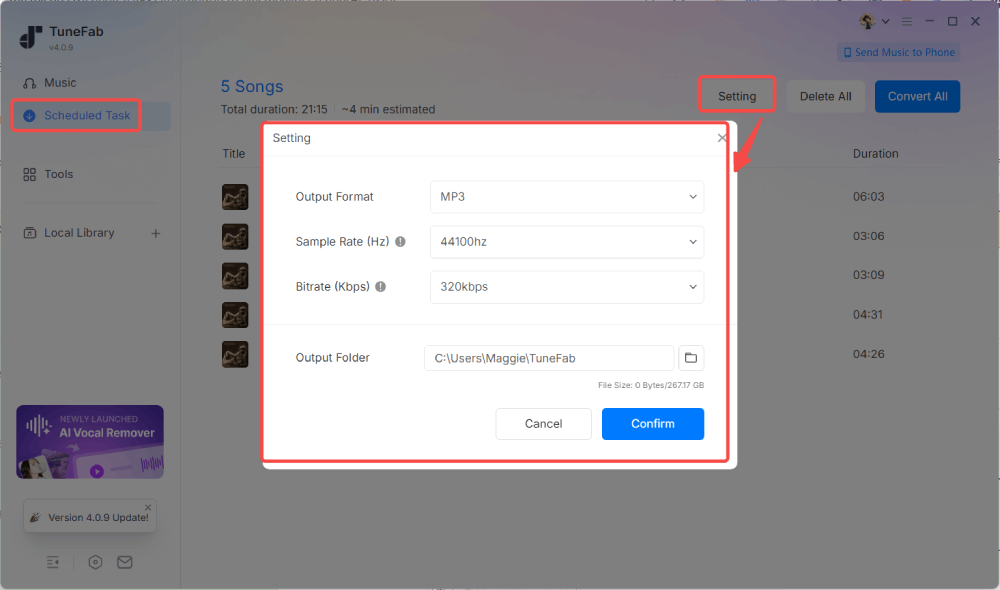
TuneFab Spotify Music Converter stands out when your goal is to download entire Spotify playlists rather than individual songs. Unlike many tools that require copying and pasting playlist links repeatedly, it features a built-in Spotify web player that provides direct access to your music library. Whether you're saving a 50-song playlist for a road trip or backing up a playlist with hundreds of tracks, you can queue everything at once and start batch downloading with a single click.
In our hands-on testing, the most impressive aspect was its consistency when handling large playlists. While many online and mobile tools began slowing down or missing tracks as playlist sizes increased, TuneFab successfully processed our 100+ track playlist test with fewer interruptions than the online and mobile tools we tried. It also preserves ID3 tags, supports MP3, FLAC, WAV, M4A, and other formats, and allows custom file naming and folder organization based on playlist metadata. These features make it especially useful for users managing large Spotify libraries offline.
For step-by-step instructions, read our full guide on how to download Spotify playlists with TuneFab Spotify Music Converter.
Pros:
- No need for the official Spotify app or pasting URLs to download Spotify playlists seamlessly.
- Offers the best audio quality up to 320 kbps and 48kHz.
- Supports batch downloading of Spotify playlists, with up to 3 simultaneous tasks.
- Preserves the ID3 tags of Spotify songs.
- Allows custom output file names and archive output tracks.
- Stable on large playlists with a high success rate in our tests.
Cons:
- Supports Windows and macOS only.
- The trial is limited.
2. Allavsoft (Windows, Mac)
Best for: Users who prioritize output-format flexibility and want to compare pricing with other desktop downloaders for Spotify playlists.
Test Version: v3.29.4.9738
| Test Metric | Performance Summary |
| 10-Track Playlist | 2 minutes 46 seconds (Only the first track was retrieved from the playlist URL, requiring entering each track URL.) |
| 50-Track Playlist | Failed (Parsed only the first track) |
| 100-Track Playlist | Failed (Parsed only the first track) |
Allavsoft stands out as a Spotify playlist downloader for users who want to export entire playlists in different audio formats. It can export Spotify playlists to a wide range of audio formats like MP3, M4A, WAV, WMA, AC3, RA, AU, Opus, etc. While its interface design looks outdated, the playlist download process is straightforward: simply paste a Spotify playlist link, choose your preferred format, and start the batch download. After that, you can manage the converted files locally for personal offline playback.
During our 2026 testing, Allavsoft encountered parsing issues with 50- and 100-track playlist links. It retrieved only the first track instead of parsing the entire playlist. For single-track or small-batch downloads, the tool worked as expected. However, for the specific job of downloading an entire playlist, it did not.
Moreover, our tests found that the free version is restricted, allowing only 5 playlist tracks to be downloaded. To download larger playlists without interruption, you will need to upgrade, with paid plans starting at $19.99. If you frequently back up large Spotify playlists, this limitation can quickly become a bottleneck.

Pros:
- Lower monthly cost than TuneFab.
- Supports wide output formats including MP3, WAV, M4A, WMA, OGG, OPUS, etc.
- Converts or merges local audio or video
- Grab videos from many websites, such as YouTube and Vimeo.
Cons:
- Failed to retrieve the complete playlist and returned only the first track during testing.
- Frequent Spotify account logins.
- Only supports downloading Spotify playlists via links
3. spotDL (Windows, Mac, Linux)
Best for: Technically comfortable users who want a free, open-source tool for downloading playlists from Spotify.
Test Version: v4.5.2
| Test Metric | Performance Summary |
| 10-Track Playlist | 3 minutes 30 seconds (10/10 tracks matched and downloaded) |
| 50-Track Playlist | 13 minutes 51 seconds (45/50 tracks matched and downloaded) |
| 100-Track Playlist | 27 minutes 47 seconds (84/100 tracks matched and downloaded) |
For users seeking a free Spotify playlist downloader on a computer, spotDL, an open-source GitHub project, offers a lightweight solution. It is particularly appealing for users who are comfortable with command-line tools and want to download large playlists without subscription fees or daily download limits. According to its GitHub page, this command-line tool processes Spotify playlist metadata and automatically matches track titles to third-party audio streams on YouTube/YouTube Music.
In our October 2026 tests, this occasionally resulted in missing tracks, incorrect matches, or different versions of the same song appearing in the final download, especially when handling 50- and 100-track playlists. Additionally, while there is no software-imposed limit, large playlist downloads can become less reliable as the playlist size increases. Very large playlist downloads may also become unstable because the tool relies on external audio sources and can run into rate limits during repeated requests.

Pros:
- Entirely free to use
- Multithreading function to download Spotify playlists quickly in batches
- Offers command-line configuration for users who want more control.
- No need to register or sign in with an account
Cons:
- Requires technical setup and may be difficult for beginners.
- Output quality depends on the matched source rather than Spotify's original stream.
- Most output tracks were saved at 128kbps in our tests; YouTube Premium accounts can reach up to 256kbps only.
- Large-scale Spotify playlist downloads may trigger temporary IP restrictions.
Best Free Spotify Playlist Downloaders Online
Online Spotify Playlist downloaders are convenient for occasional tasks because they can be accessed through a browser without installing a desktop application. However, free access may come with track limits, registration requirements, ads, or paid upgrades.
Additionally, some online downloader services change domains or URLs over time to bypass takedown notices. A page being accessible does not prove that its advertised features still work, so always verify the current active URL before entering personal details.
1. TuneFab Online Spotify Downloader
Best for: Users who want to download small Spotify playlists through a browser without installing desktop software.
Website: https://member.tunefab.com/personal#spotify-to-mp3
| Test Metric | Performance Summary |
| 10-Track Playlist | 1 minute 45 seconds (10/10 tracks matched and downloaded as ZIP) |
| 50-Track Playlist | 10 minutes 5 seconds (46/50 tracks matched and downloaded across 5 batches) |
| 100-Track Playlist | 18 minutes 49 seconds (95/100 tracks matched and downloaded across 10 batches) |
If you want an online Spotify playlist downloader with no installation, TuneFab's web-based version is a viable option. It is best suited for users who want to quickly download small Spotify playlists without installing desktop software. Accessible through major browsers, this TuneFab Online Spotify Downloader can convert Spotify playlists to MP3 with customizable 128kbps or 320kbps quality while preserving ID3 tags.
Based on our testing notes, the tool handled small playlist downloads smoothly and supports batch processing of up to 10 tracks at a time by default. Moreover, downloaded tracks can be packaged into a ZIP archive, making it easier to save and transfer small playlists or playlist batches.
However, larger playlists required more work: the 50-track and 100-track playlists had to be processed in 5 and 10 batches, respectively. So, it is more suitable for short playlists, albums, or occasional playlist backups rather than large music libraries. For users who regularly download playlists containing hundreds of songs, a desktop Spotify downloader remains the more reliable option.

Pros:
- A reliable online Spotify playlist downloader for quick, installation-free use.
- User-friendly interface with no ads.
- Bundles small playlist batches into a single ZIP file.
- Retains up to 320kbps audio quality and ID3 tags
Cons:
- Require a premium upgrade to unlock unlimited batch downloads.
- Only supports MP3 output.
2. SpotiSongDownloader
Best for: Users who occasionally want a browser-based workflow for smaller download tasks.
Website: https://spotisongdownloader.com/en4/
| Test Metric | Performance Summary |
| 10-Track Playlist | 5 minutes 32 seconds (10/10 tracks downloaded across 5 manual batches) |
| 50-Track Playlist | Failed (Can parse links, but download fails) |
| 100-Track Playlist | Failed |
SpotiSongDownloader is another popular online tool that allows you to download Spotify playlists for offline playback at no cost. It is mainly suited for users who need a free Spotify playlist downloader for occasional or small playlist downloads. Even better, it offers multiple output options, including a 128kbps M4A option and MP3 output options ranging from 64kbps to 320kbps. For shorter playlists, the tool provides a quick way to export tracks without installing additional software.
However, we found a noticeable limitation in guest mode. Without logging in, the tool can only batch download 2 songs at a time. When we attempted to download the entire playlist, the website prompted to log in or install its desktop tool. In our actual tests, although it could successfully parse all testing playlist links, neither downloading a full 50-track or 100-track playlist was completed. This may be inconvenient if you value privacy and prefer to avoid logging into third-party services.

Pros:
- Completely free to use.
- Offer several customizable output formats and quality options.
- Preserves basic ID3 tags, including artwork.
- Present a clean interface with no ads.
Cons:
- Guest users are limited to two tracks per batch.
- Failed to complete the 50-track and 100-track playlist downloads in our tests.
3. SpotiDown
Best for: Users who want to download a few tracks from a Spotify playlist online for free in one go.
Website: https://spotidown.app/en7
| Test Metric | Performance Summary |
| 10-Track Playlist | 3 minutes 29 seconds (10/10 tracks downloaded across 2 manual batches) |
| 50-Track Playlist | 18 minutes 57 seconds (42/50 tracks downloaded across 10 manual batches) |
| 100-Track Playlist | 31 minutes 14 seconds (83/100 tracks downloaded across 20 manual batches) |
SpotiDown is also a convenient and free Spotify playlist downloader online. Simply paste the Spotify playlist link into its webpage, and it will analyze and convert music from Spotify to MP3 format.
We tested SpotiDown with various scale playlists. Its parsing speed was impressive, but it can batch handle album/playlist free downloads for up to 5 tracks. If you have a playlist with 10 or 50 tracks, you may need to subscribe to the premium plan ($20/month) for higher efficiency. Otherwise, several manual downloads are required for one URL. Additionally, the output filenames automatically include the website's name, which means you will likely need to spend time manually renaming your files or using a bulk renamer tool.

Pros:
- Spotify playlist downloader for 320kbps MP3.
- Offer a high-speed parsing and download engine.
- No ads on the screen.
- Keep basic ID3 tags and metadata.
Cons:
- No customizable output settings.
- Filenames contain the SpotiDown tag, requiring manual renaming.
- Unstable domains, shifting between .app, .co, .com, and more.
4. SpotiSaver (Online)
Best for: Users who want to package Spotify playlist tracks into a ZIP archive online.
Website: https://spotisaver.net/en1
| Test Metric | Performance Summary |
| 10-Track Playlist | 4 minutes 12 seconds (10/10 tracks matched and downloaded as ZIP) |
| 50-Track Playlist | 14 minutes 46 seconds (46/50 tracks matched and downloaded as ZIP) |
| 100-Track Playlist | 29 minutes 7 seconds (89/100 tracks matched and downloaded as ZIP) |
SpotiSaver is one of the best Spotify playlist downloaders online for free. Its biggest advantage for playlist downloads is the ability to package tracks into a single ZIP archive. Instead of manually downloading songs one by one, you can save a small or medium-sized Spotify playlist batch to your computer or phone in one go, making playlist management much more convenient.
Our team also tested its performance with playlists of different sizes. The tool successfully loaded playlists containing up to 200 tracks, but the ZIP archive creation was limited to 100 tracks in our testing. For larger playlists, this means you may need to split downloads into multiple batches. Also, the output filename contained a "SpotiSaver" tag, making library organization less tidy. Overall, it works well for downloading small to medium-sized Spotify playlists, but very large playlists can still be restrictive.

Pros:
- Offers a free Spotify playlist downloader for small music libraries.
- Supports saving Spotify playlists in 320kbps MP3 offline.
- Accessible on both mobile and desktop browsers without installation.
Cons:
- A download attempt failed to start downloading due to high load.
- Batch download Spotify playlists with no more than 100 tracks.
- Premium features require a subscription.
- Filenames for free users require manual renaming.
Best Spotify Playlist Downloader Apps for Android and iPhone
Choose a mobile app when portability matters and you want to download playlists directly on your phone. But here is the honest catch: genuinely reliable Spotify playlist downloader apps are scarce. Most free Android/iOS options are either unmaintained, security-sensitive, or limited to small playlists, so set expectations before installing anything.
Tip for Mobile Users: Due to mobile app instability, the most reliable workflow for Android and iPhone is to batch-download playlists from Spotify on a desktop computer first using software like TuneFab, then sync the local MP3 files to your phone via USB, AirDrop, or local media sync.
1. SpotiFlyer (Android)
Best for: Android users who want to evaluate a free, link-based downloader for Spotify playlists.
Test Version: v3.6.4
| Test Metric | Performance Summary |
| 10-Track Playlist | 5 minutes 19 seconds (10/10 tracks matched and downloaded) |
| 50-Track Playlist | 27 minutes 21 seconds (37/50 tracks matched and downloaded) |
| 100-Track Playlist | 39 minutes 11 seconds (74/100 tracks matched and downloaded) |
SpotiFlyer is a free MP3 Spotify playlist downloader for Android. For the download process, just run SpotiFlyer, paste the Spotify playlists/albums link into the search box, tap the "Download" button, and you can get local MP3 files for free offline listening and share Spotify music with friends without any hassle.
During our performance review, SpotiFlyer handled a 10-track Spotify playlist to MP3 conversion smoothly, but it struggled with larger batches. It was common to see app crashes, download interruptions, and missing tracks. Also, since the tool does not fetch music directly from Spotify but relies on YouTube, its output quality and stability were inconsistent.
It is worth mentioning that the project's official GitHub repository lists v3.6.4 as its last stable release, published more than three years ago at the time of our review. This limited release history may indicate link parsing failures, incomplete downloads, and app crashes on newer Android versions.

Pros:
- Ideal for Spotify playlist download on Android devices.
- Support customizable audio quality for downloaded files.
- Preserve basic ID3 tag information.
- Free and easy to use.
Cons:
- A dated release history may increase compatibility and maintenance uncertainty.
- The success rate is low for large playlists, and sometimes it fails to download
- Occasional app crashes and link parsing failures
- Match and download audio from YouTube sources.
2. SpotifyPlaylistDownloader (Android)
Best for: Android users who want an app to save Spotify playlists to local storage.
Test Version: v1.15.0
| Test Metric | Performance Summary |
| 10-Track Playlist | 7 minutes 58 seconds (7/10 tracks matched and downloaded) |
| 50-Track Playlist | Failed |
| 100-Track Playlist | Failed |
SpotifyPlaylistDownloader is another handy free Spotify playlist downloader app designed for Android that allows users to save Spotify playlists as MP3/M4A files in SD cards or local storage for offline listening.
While it claims to search YouTube Music for the optimal matching streams, we noticed compressed audio quality, up to 256kbps. Also, its conversion speed can be a bit slower compared with other online or professional Spotify playlist downloaders. More importantly, its installation package is not certificated by Google Play Store, but can be downloaded in GitHub. We also noticed that the app requires permissions from unknown sources, which poses a security risk.

Pros:
- Easy operations to download Spotify playlists by links
- Support mainstream MP3 and M4A formats to output Spotify downloads
- Don't need to log in to your own Spotify account
- Free to use
- Support direct download to Android SD cards.
Cons:
- The output quality is compressed
- Sudden errors can occur
- Installation from unknown sources may pose security risks.
- Slower download speed compared to professional Spotify playlist downloaders.
3. RoutineHub (iOS)
Best for: iPhone users who are looking for a viable option to download Spotify playlists.
Shortcut Name: Spotify Playlist Downloader (by @Pola219)
| Test Metric | Performance Summary |
| 10-Track Playlist | 9 minutes 42 seconds (6/10 tracks matched and downloaded) |
| 50-Track Playlist | Failed |
| 100-Track Playlist | Failed |
For iOS users, RoutineHub provides a variety of free shortcuts that allows you to download entire playlists from Spotify only within a few taps. By adding a specific shortcut to your iPhone, you can parse a Spotify playlist link and the tool will automatically parse the link and get your Spotify playlist downloaded to your "Files" app.
However, it is important to note that music resources are extracted from YouTube rather than Spotify. Therefore, original sound quality and ID3 tags preservation can not be guaranteed. Some songs are unavailable as well, resulting in failure to download a full playlist from Spotify

Pros:
- Completely free of charge
- Able to download entire playlists from Spotify
- Easy to use
- No need to log in to your Spotify account.
Cons:
- Fail to parse the Spotify link from time to time
- No audio quality customization.
- Does not retain full ID3 tags.
- Slow download speed (one song per 1-2 minutes).
FAQs About Spotify Playlist Downloaders
Q1. Can I Download an Entire Spotify Playlist as MP3?
Yes. Many Spotify playlist downloaders allow you to convert entire playlists to MP3 files for offline listening. However, not every tool can successfully process large playlists. In our testing, desktop solutions generally delivered higher success rates and better playlist management features than online or mobile tools.
Q2. Do I need a Spotify Premium account to download playlists with these tools?
No. Most Spotify playlist downloaders work with both Spotify Free and Spotify Premium accounts. You can usually paste a playlist link or access your library directly without requiring a Premium subscription.
Q3. How to convert Spotify playlists on Android/iPhone?
To download Spotify playlists on your Android phone or iPhone, you can use SpotiFlyer for Android and RoutineHub for iOS, as mentioned. But since they are not secure and reliable to use, you can consider using professional software or a free online one to download Spotify playlists as local files, and then get Spotify downloaded playlists on Android or iOS devices without worries.
Q4. Does an Online Spotify Playlist Downloader Really Work?
It depends on the playlist size. Many online Spotify playlist downloaders work well for small playlists, but larger playlists often expose limitations such as download caps, missing tracks, ZIP restrictions, or slower processing speeds. This is why online tools are generally better suited for occasional downloads rather than large playlist backups.
Q5. Are free Spotify playlist downloaders safe?
Laws and platform rules vary by country and region. In general, downloaded or converted music should only be used for personal offline listening. Do not redistribute, upload, sell, or use copyrighted music commercially without permission. Always check your local laws and Spotify’s Terms of Use before using any Spotify playlist downloader.
Final Words
Our tests revealed a clear difference between Spotify playlist downloaders: while online tools and mobile apps can work for smaller downloads, many struggled to complete larger playlists without missing tracks or repeated download attempts.
If your goal is to download entire Spotify playlists, especially playlists containing dozens or hundreds of songs, a desktop downloader can be a more practical option. After evaluating all the tools in this guide, TuneFab Spotify Music Converter delivered the strongest overall performance for large playlist downloads thanks to its high success rate, support for multiple output formats, ID3 tag preservation, and flexible file organization features.