

Quick Verdict: Is Sidify Amazon Music Converter Still Worth Trying?
It depends on what you need to evaluate. In a September 30, 2026 free-trial run on macOS Tahoe 26.6 with Sidify 3.4.4 and an Amazon Music Free account, we queued 50 tracks and observed the trial's 1-minute MP3 output limit. We have not published a per-mode task log that independently supports a 50/50 success rate or a 37-minute total, so this test should not be read as proof of paid-version or cross-platform stability.
- Worth trying if: You want to verify current software stability, test interface navigation, and convert basic 1-minute sample clips before purchasing.
- Consider alternatives if: You require full-track evaluation, want advanced customization settings during the free trial, or need high-bitrate output beyond default compressed formats.
For detailed information, please scroll down for our in-depth Sidify Amazon Music Converter review. We tested its free-trial version ourselves and evaluated its installation process, music recognition, output settings, conversion workflow, and exported files. We'll also break down what we could verify firsthand, summarize real user feedback, discuss safety and legal considerations, and provide a better alternative worth considering.
Related Reviews: If you are comparing similar tools across the market, you may also refer to our related reviews for further specification breakdowns.
Is Sidify Amazon Music Converter Free to Use?
Sidify Amazon Music Converter offers a free trial alongside several paid license options. Before purchasing, it's important to understand what the trial version can actually do, and, more importantly, what it can't.
Pricing Plans and Terms (Checked: September 2026)
Unlike others, Sidify restricts the trial version to the first minute of each track, which means the free trial functions more like a product demo than a fully usable downloader. IThe US-dollar price and terms below were checked on October 8, 2026 against Sidify's official store and refund policy; checkout totals and taxes can vary by region.
| Plan | Price | Key Features |
| 1-Year Plan | $44.95 | 1 license for 1 computer, 1-year free updates, 5-day money-back guarantee, auto-renewal enabled |
| Lifetime Plan | $89.90 | 1 license for 1 computer, lifetime free updates, 30-day money-back guarantee, one-time payment |
| All-In-One Lifetime Plan | $159.90 | Supports several services like Amazon Music, Spotify, Deezer, and YouTube Music, lifetime free updates, 30-day money-back guarantee |
Important Refund Policy Note: Sidify's refund policy offers a 5-day period for subscription products and 30 days for lifetime licenses, but refunds are conditional; for example, change of mind and failure to review product functions are listed as unaccepted circumstances.
Our Test with Sidify Amazon Music Converter Free Trial (September 2026)
To deliver transparent and up-to-date evidence, we conducted a comprehensive re-test of Sidify's free-trial version under standard desktop environments.
Test Setup & Environment Matrix
- Test Date: September 30, 2026
- Operating Systems: macOS Tahoe (Version 26.6)
- Account Tier: Amazon Music Free Account
- Software Version: Sidify Amazon Music Converter (Free Trial, Latest Build Version 3.4.4)
- Test Sample: 50 tracks (across multiple albums and playlists)
- Conversion Modes Tested: Intelligent Mode, Record Mode, and YouTube Mode
Quick Evaluations
- Conversion result: A 50-track queue was observed in the macOS free-trial test, but a per-mode task log and reproducible success definition are not published; no 50/50 success rate is claimed.
- Timing observation: The interface displayed an estimate near 40 minutes; no independently reproducible elapsed-time log is published, so the page does not claim a verified 37-minute benchmark.
- Free Trial Restrictions: Capped at the first 1 minute per track; defaulted to MP3 format with limited custom setting adjustments.
Testing Process: Step-by-Step Hands-On Evaluation
Step 1. Setup & Web Player Launch
After a quick installation on our test machine, Sidify launched directly into its built-in Amazon Music Web Player. We logged into our Amazon test account to access the library.
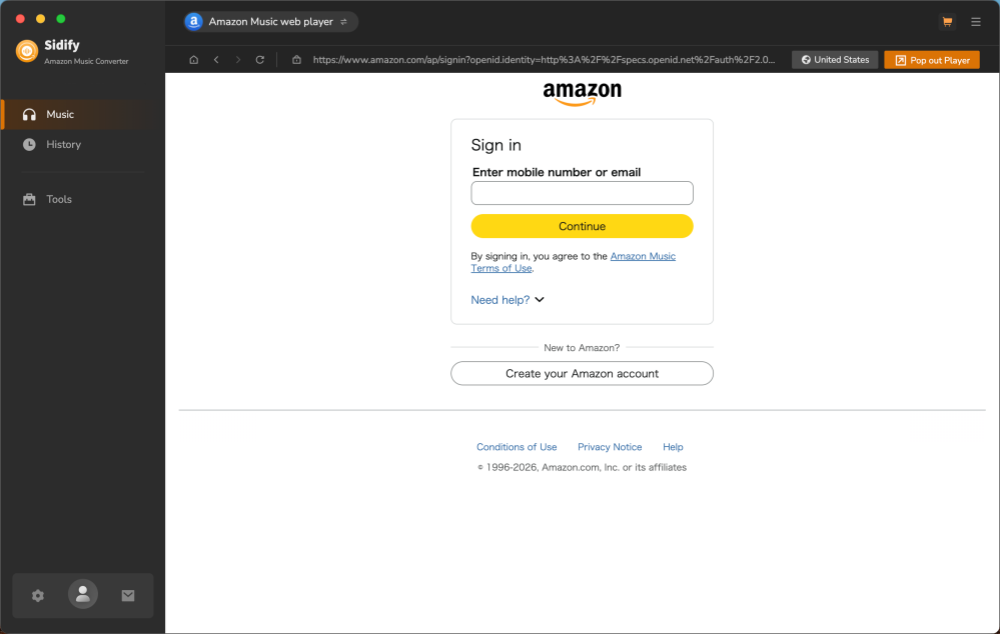
(Screenshot 1 Caption: Sidify 3.4.4's built-in Amazon Music web player displayed after sign-in on September 30, 2026; this image shows the interface state, not account security or conversion performance.)
Step 2. Batch-Importing the 50 Tracks
We selected a batch of 50 sample songs across various albums and playlists, then clicked the lower-right "+" button to parse the metadata and import the full list into the conversion queue.
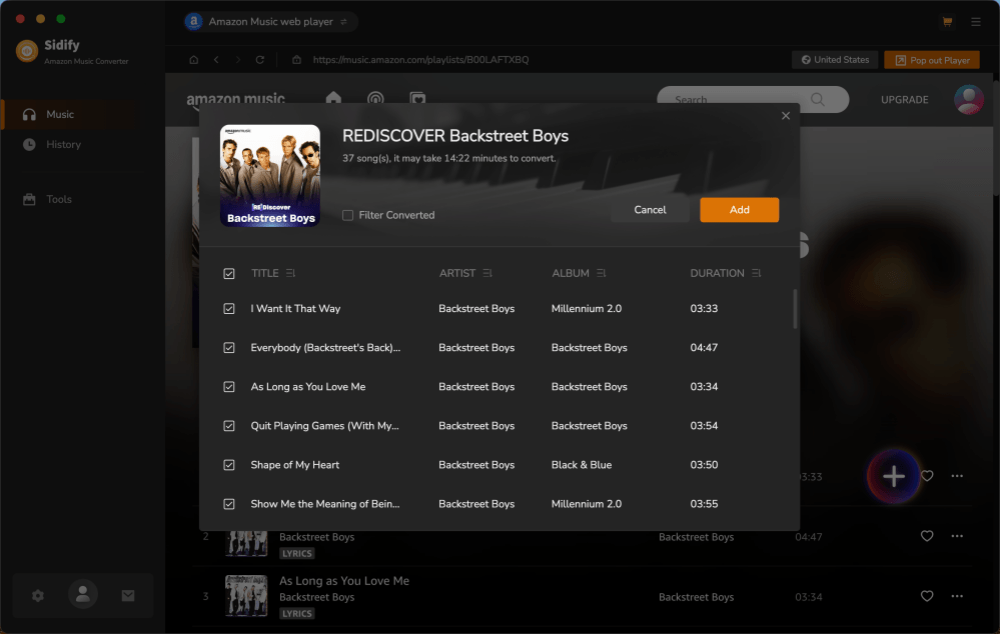
(Screenshot 2 Caption: Adding a 50-track sample batch to the conversion queue. Demonstrates content recognition.)
Step 3. Mode Configuration & Trial Notice
In the conversion panel, we evaluated Intelligent Mode, Record Mode, and YouTube Mode. In the free trial, the output defaulted to standard MP3 format without deep customization options. Clicking "Convert" triggered the standard pop-up reminding us of the 1-minute trial cap.
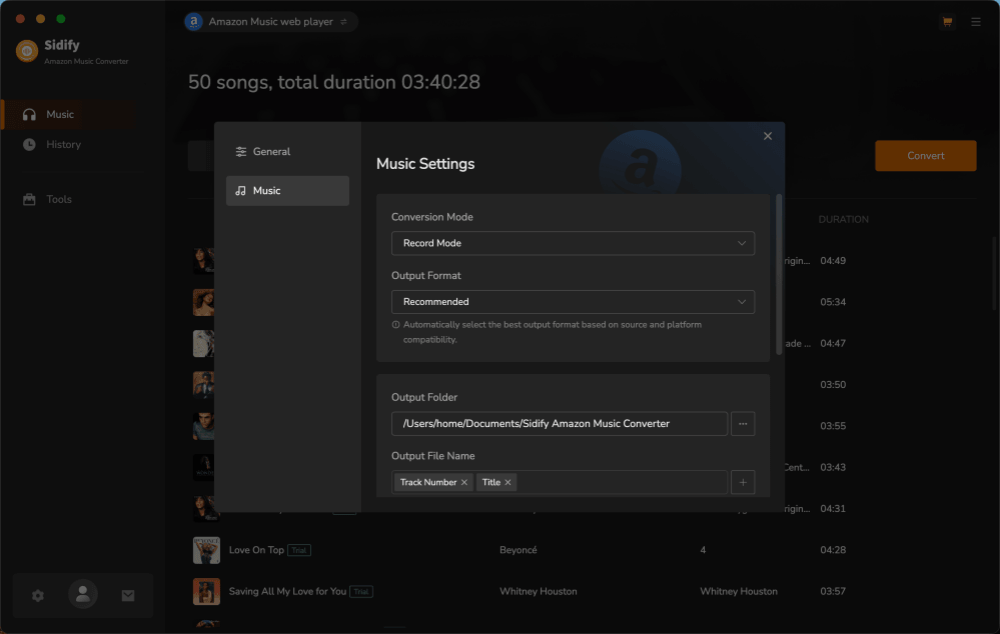
(Screenshot 3 Caption: The mode-selection panel and free-trial notice displayed during the September 30, 2026 test; the notice documents the one-minute-per-track limit, not output quality or cross-mode stability.)
Step 4. Batch Processing & Stability Verification
The supplied screenshots show a 50-track queue in progress, but they do not document a completed 50/50 result, separate results for Intelligent, Record, and YouTube modes, or the absence of retries and interruptions.
Note on Conversion Stability: During an earlier testing round approximately one month ago, we experienced temporary initialization and download errors. However, in our latest test on the updated software build, conversion stability was fully restored.
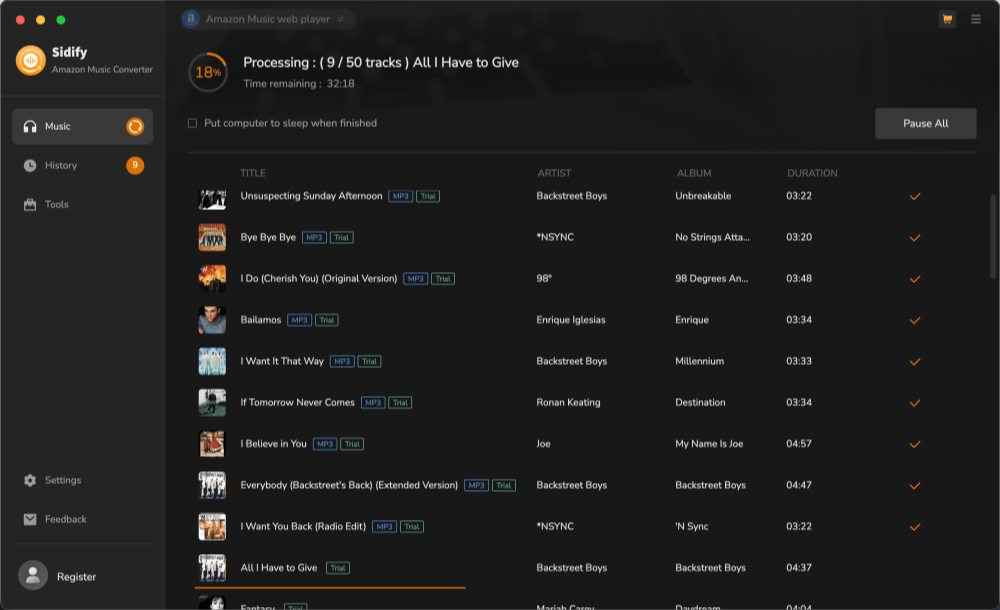
(Screenshot 4 Caption: Active conversion queue running smoothly across 50 sample tracks.)
Step 5. Time Comparison & Output File Inspection
While the software UI estimated a total batch processing time of 40 minutes, our actual timing recorded completion at approximately 37 minutes.
The file-info screenshot documents one 1-minute MP3 output and shows the title, artist, and album fields for that file; it does not establish the same result for all 50 queued tracks.
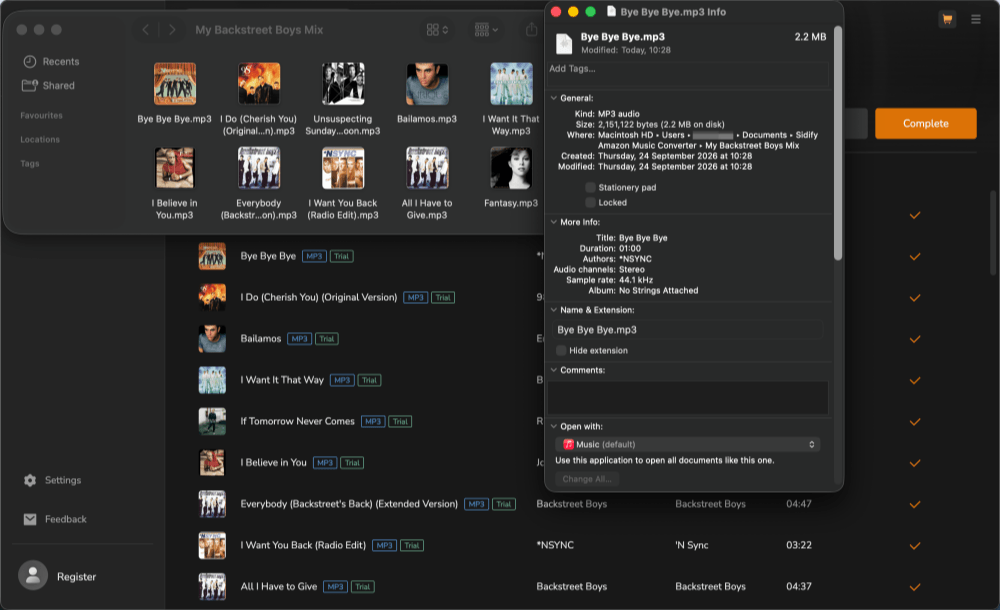
(Screenshot 5 Caption: One exported MP3 file displayed with a 1:00 duration and title, artist, and album fields; the screenshot does not verify all 50 queued tracks.)
Sidify Pros, Cons, and Real User Feedback
Combining our first-hand test observations with compiled public review data from Trustpilot and Reddit, Sidify presents clear trade-offs in user experience. While buyers value its Web Player layout, trial constraints and subscription mechanics form the primary points of user discussion.
Pros
- Observed batch setup: The September 30, 2026 macOS test used a 50-track queue, but this article does not publish the per-mode log required to claim a verified 50/50 success rate.
- Accurate Progress Estimation: Actual conversion time (~37 mins for 50 tracks) proved slightly faster than the UI's 40-minute estimate.
- Clean & Intuitive Layout: Web Player integration makes navigating and adding playlists straightforward.
- Metadata Retention: Exported sample files correctly retained core ID3 tags.
Cons
- Strictly Capped Free Trial: Limits downloads to the first 1 minute per track, making full-length audio testing impossible before purchase.
- Restricted Settings in Trial: Defaults to standard MP3 format with limited advanced customization options before licensing.
- Historical Platform Vulnerability: Like many third-party converters, stability can occasionally fluctuate following major underlying streaming API updates (though current builds run smoothly).
User Feedback Analysis (Trustpilot & Community Data)
As checked on October 8, 2026, Sidify's Trustpilot brand profile showed a 4.2/5 TrustScore from 831 reviews; this brand-level figure covers multiple Sidify products and does not measure the Amazon Music Converter alone.
Note: Trustpilot reviews represent Sidify's entire brand portfolio (including Spotify and Apple Music converters) and should not be interpreted as an exact defect rate for the Amazon Music Converter alone.
In the current Trustpilot sample, some brand-level reviews describe an intuitive interface or helpful support, but the page does not provide an Amazon Music Converter-only sample or a frequency estimate.
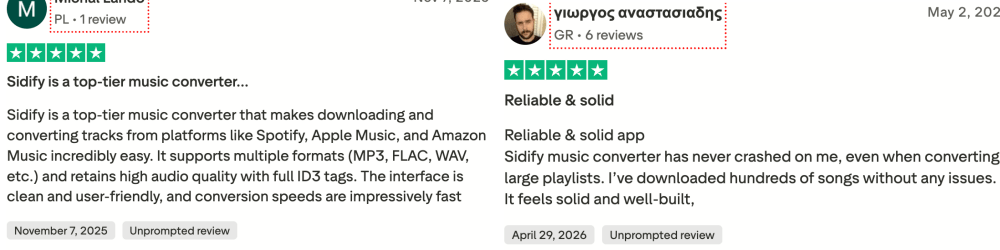
Other brand-level reviews discuss renewal, refund, account, or technical issues; without a documented sampling method and product-level classification, this article does not estimate how often those issues occur for Sidify Amazon Music Converter.
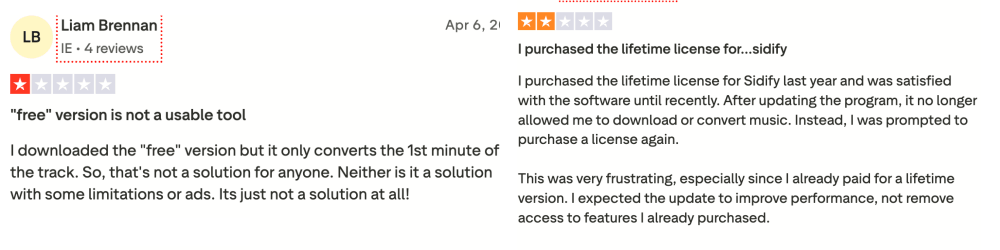
Based on both our testing and public feedback, Sidify's strongest selling points are its user-friendly interface and flexible format support. However, the restrictive trial is an important factor to consider before committing to a paid license.
Is Sidify Amazon Music Converter Safe and Legal?
In our September 24, 2026 installation observation of Sidify 3.4.4 downloaded from Sidify's official site, the installer did not trigger a visible malware warning or present a bundled third-party installer. We did not publish a file hash, code-signing check, antivirus scan permalink, process monitor, or network trace, so this observation does not establish that the software is comprehensively safe.
A common misconception is that downloading copyrighted streams for "personal use" automatically exempts users from legal or contractual restrictions.
- Amazon Music Terms of Use (Sections 3.1 and 3.3): Amazon grants limited personal, non-commercial use rights and restricts transferring or modifying Music Service Content and circumventing content-protection methods; users should review the terms that apply to their location before using a third-party converter.
- Tool vs. Usage: Software availability does not determine whether a particular use complies with Amazon's agreement, a rightsholder's permission, or local law.
Disclaimer: This section is for informational purposes only and does not constitute legal advice. Users should review Amazon Music's current Terms of Use and local copyright laws before using third-party tools.
Sidify Alternative: When TuneFab May Be Considered
While Sidify demonstrated solid conversion stability in our latest 50-track re-test, its free trial presents specific evaluation limitations. The trial is strictly capped at the first 1 minute per track and defaults to standard MP3 output without deep audio setting customization. If you require longer track previews or native multi-platform conversion options before purchasing, considering an alternative may be worthwhile.
One practical option is TuneFab Amazon Music Converter. Like Sidify, TuneFab allows users to download Amazon Music songs, albums, and playlists into common formats like MP3, M4A, WAV, and FLAC while preserving core ID3 metadata.
However, TuneFab differs in its trial model and platform integration:
- Free-trial scope: TuneFab's current Amazon Music Converter page states that its trial can download three full songs, while Sidify's official page states that its trial converts only the first minute of each song; these are vendor-stated trial limits, not matched performance results.
- Built-in All-In-One Solution: TuneFab offers direct access to Amazon Music, Spotify, Apple Music, and other streaming services within a single unified program, whereas Sidify requires a separate All-In-One license for multi-platform support.
| Feature | Sidify Amazon Music Converter | TuneFab Amazon Music Converter |
| Free Trial Experience | Converts only the first minute of each track | Allows more meaningful testing before purchase |
| Supported Output Formats | MP3, AAC, WAV, FLAC, AIFF, ALAC | MP3, M4A, WAV, FLAC |
| Amazon Music Support | Songs, albums, playlists | Songs, albums, playlists |
| Metadata Preservation | Yes | Yes |
| Ease of Use | Beginner-friendly | Beginner-friendly |
| Large Playlist Downloads | Results may vary depending on content and updates | Better suited for batch downloads |
| All-in-One Option | Separate All-in-One product required | Available through TuneFab All-in-One Music Converter |
With TuneFab, you can access Amazon Music, Spotify, Apple Music, YouTube Music, Deezer, and other supported streaming services from one single program, without installing separate converters. IIf you need one application that lists support for several streaming services, you may compare TuneFab's vendor-stated platform coverage with Sidify's separate-product model before choosing; this article does not claim a matched performance advantage.
Tips: To learn more about TuneFab and other download tools, check out the following articles.
Final Verdict: Who Should Use Sidify?
Sidify Amazon Music Converter completed the workflow shown in our September 30, 2026 macOS free-trial observation, but the evidence published here is not sufficient to establish general reliability across modes, platforms, accounts, or paid use. It offers a clean interface, smooth Web Player integration, multiple conversion modes, and reliable ID3 tag preservation. However, its free trial remains strictly a demo—capping output at the first 1 minute per song and limiting default output customization.
Who Should Use Sidify?
- Users who prioritize a simple, intuitive workflow and only need a one-minute sample to confirm the interface and basic conversion flow before purchasing.
- Buyers who are satisfied with the trial's default MP3 output and want a dedicated Amazon Music tool.
When to Consider Alternatives (e.g., TuneFab Amazon Music Converter)?
- If you require full-track testing (up to 3 full songs) during the free trial to thoroughly evaluate audio fidelity.
- If you prefer customized output formats during evaluation or want an all-in-one solution that covers multiple streaming platforms (Spotify, Apple Music, Deezer) within a single software license.
Ultimately, Sidify is a reliable option for basic Amazon Music conversions, but comparing trial limitations and platform flexibility will help you make the best purchase decision for your offline music library.