

"Does anyone have a good free Spotify to MP3 converter tool? Something that can download 2000 songs is preferred. I wanna load up my iPod and Zune."
Spotify Premium downloads are stored as protected offline data and remain playable only within the Spotify app. They are not standard MP3 files that you can copy to an MP3 player, USB drive, or other media device. Fortunately, a reliable free Spotify to MP3 converter makes this possible.
However, finding one that actually works isn't as easy as it used to be. Many so-called free Spotify to MP3 converters are packed with ads, fail to download, or stop working after a few songs. In this guide, we tested today's most popular free Spotify-to-MP3 converters across multiple platforms that still work, explained what "free" really means, and highlighted the limitations you should know before choosing one.
- What Does "Free Spotify to MP3 Converter" Really Mean?
- What to Look for in a Free Spotify to MP3 Converter?
- Best Free Spotify to MP3 Converters That Still Work After Our Test
- Other Free Options with Important Trade-Offs
- Bonus: Best Spotify to MP3 Converter for Stability and Experience 🔥
- Conclusion: Which Free Spotify to MP3 Converter Should You Choose?
- More Useful Tips Before Using Spotify to MP3 Converter
What Does "Free Spotify to MP3 Converter" Really Mean?
A free Spotify to MP3 converter doesn't always mean you can download unlimited songs without restrictions. Some tools are completely free and open-source, while others offer free trials, limit playlist downloads, require an account, or display ads during the conversion process.
Another important difference is how the music is obtained. Many free converters don't extract audio directly from Spotify. Instead, they match Spotify tracks with audio from platforms like YouTube or other music sources, which may result in missing songs, inaccurate metadata, or inconsistent audio quality. That's why it's important to look beyond the word "free" and choose a tool that fits your needs.
Tips: If the free tools don't meet your needs after reviewing these options, check out the posts below for other types of Spotify Music converters!
What to Look for in a Free Spotify to MP3 Converter?
Not all free Spotify to MP3 converters offer the same experience. Before choosing one, it's worth checking a few key factors to avoid wasting time on tools that fail halfway through a download or deliver poor-quality files.
- Free limits – Check whether the tool is truly free, offers only a trial, or restricts playlist size, download quantity, or daily usage.
- Output quality – Some tools claim to produce 320 kbps MP3 files, but the actual quality depends on the audio source and conversion method.
- Playlist support – If you plan to download albums or playlists, make sure batch downloading is supported instead of downloading tracks one by one.
- ID3 metadata – Preserving song titles, artists, albums, and cover art makes it much easier to organize your music library.
- Stability & safety – Choose tools that are regularly maintained and avoid websites overloaded with pop-ups, redirects, or suspicious downloads.
Quick Comparison: Which One Fits You?
Every free Spotify to MP3 converter comes with different trade-offs. The table below highlights the most important differences to help you quickly find the right tool for your needs.
| Tool | Platform | Free Type | Playlist | ID3 Tags | Ad-Free | Batch Download | Best For |
| TuneFab Spotify Music Converter | Win, Mac | Free, with upgraded plans | ✔ | ✔ | ✔ | ✔ | High-quality batch conversion |
| TuneFab Spotify Converter to MP3 Free | Web | Free, with upgraded plans | ✔ | ✔ | ✔ | ✔ | Stable online conversion |
| Spotify-Downloader | Web | Free | ✔ | ✔ | ❌ | ❌ | Single songs |
| SpotiDown | Web | Free | ❌ | ✔ | ❌ | ❌ | Simple downloads |
| Spowlo | Android | Free, open source | ✔ | ✔ | ✔ | ✔ | Android technical users |
| Telegram SpotifySaveBot | Android, iOS | Free | ❌ | ❌ | ✔ | ❌ | Mobile users with Telegram |
| SpotDL | Win, Mac, Linux | Free, open source | ✔ | ✔ | ✔ | ✔ | Technical users |
| Soundloaders Spotify Music Converter | Web | Free | ✔ | ✔ | ❌ | ❌ | Occasional users |
| Audacity | Win, Mac, Linux | Free | ❌ | ❌ | ❌ | ❌ | Recording audio clips |
Important Note: This guide is for informational purposes only. Please use these tools in compliance with Spotify's Terms of Service and local copyright laws, and limit downloads to personal use only.
Best Free Spotify to MP3 Converters That Still Work After Our Test
We tested each free Spotify to MP3 converter based on availability, download success rate, audio quality, playlist support, and overall user experience. The following tools still completed downloads during our testing. Each has its own strengths and limitations, so choose the one that best meets your needs.
TuneFab Spotify Converter to MP3 Free
Work On: Web
Best for: Users who want a cleaner browser-based option and only need a small number of free downloads, with paid access available for higher bitrate and batch use.
Our Testing Result
What We Like
- No software installation is required.
- Supports downloads up to 320kbps.
- Supports both single-track and batch playlist/album downloads.
- Saves ID3 metadata.
- Clean, ad-free interface.
What We Don't Like
- Playlist/album downloads require a login to the user center.
To Learn More: TuneFab Spotify Music Converter Full Review: Is It Worth It?
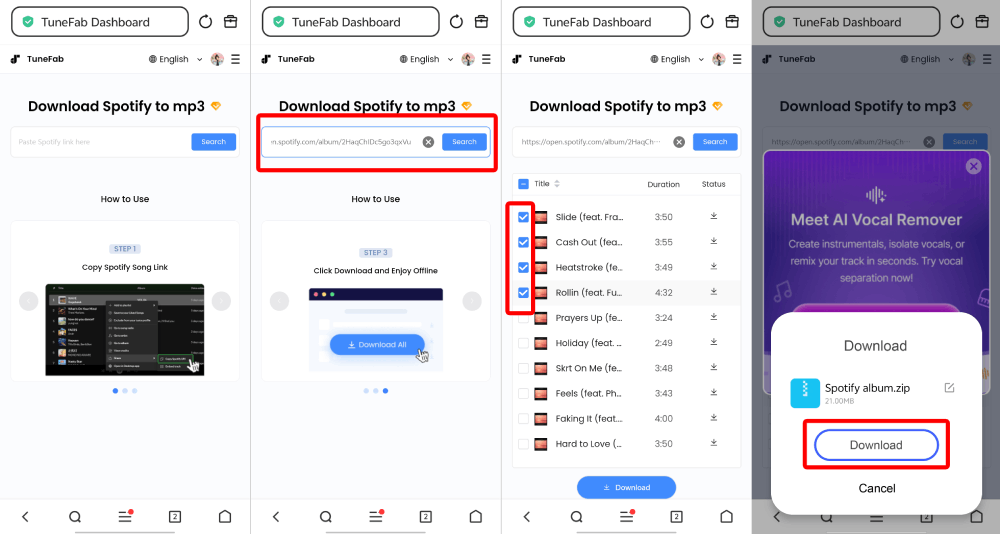
TuneFab Spotify Converter to MP3 Free is a browser-based version of TuneFab's Spotify conversion tool. It works on Windows, Mac, Android, iPhone, and other devices through a web browser, so there's no software to install.
In our testing, the converter successfully downloaded both individual tracks and a 10-song playlist, exporting playlist downloads as a ZIP archive. It supports output quality up to 320kbps and preserves ID3 metadata, making downloaded music easier to organize and play offline.
Spotify Music to MP3 Conversion Process
1. Open the TuneFab Spotify Converter to MP3 Free website in your browser.
2. Paste a Spotify song, playlist, or album link into the search box.
3. Wait for the converter to analyze the content and choose the songs or output quality if needed.
4. Click Download to save the generated MP3 files. Playlist downloads are exported as a ZIP archive.
Spotify-Downloader
Work On: Web
Best for: Users who need an online Spotify to MP3 converter for occasional downloads and can accept compressed audio quality.
Our Testing Result
What We Like
- Free and easy to use.
- Browser-based access without third-party software.
- Claims to support downloads up to 320kbps.
- Converts Spotify playlists and albums.
What We Don't Like
- Ad-based conversion.
- May fail to fetch some Spotify songs.
- May become unavailable from time to time.
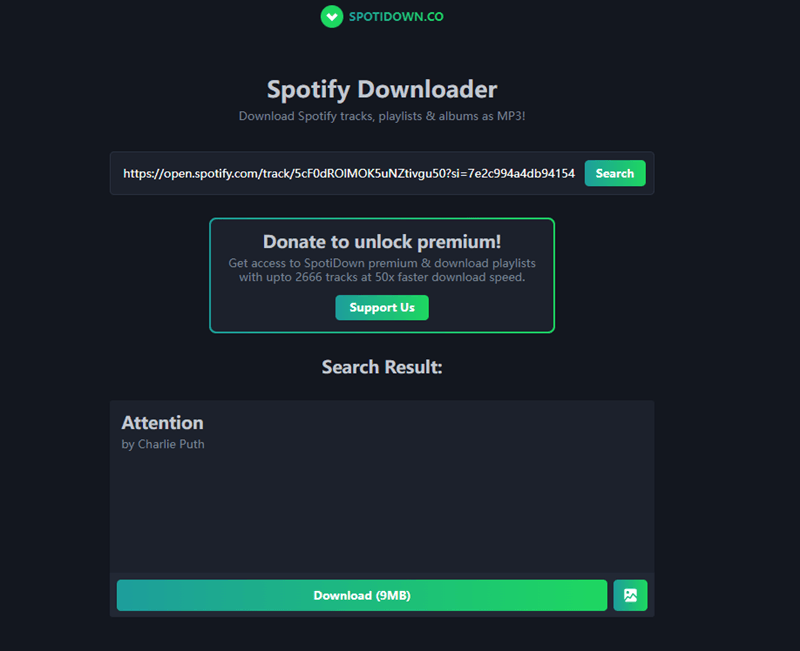
SPOTIDOWN.CO Spotify-Downloader is a browser-based Spotify to MP3 converter that lets you download individual tracks as MP3 files and save playlists or albums as ZIP archives without installing any software. It currently supports browsers including Chrome, Firefox, Opera, Safari, Edge, and so on, and it is also able to run smoothly regardless of what devices you are using.
Better yet, all the conversions will be done in the cloud, so you don't need to download any software. It should be noted that, though this free online Spotify to MP3 converter claims to support downloads with a quality of up to 320kbps, our tests revealed that the actual bitrate is only around 128kbps. If audio quality is your priority, you may want to consider a converter that offers genuine higher-bitrate downloads.
Spotify Music to MP3 Conversion Process
1. Open the SPOTIDOWN.CO Spotify-Downloader website in your browser.
2. Copy and paste a Spotify track, playlist, or album link into the search box.
3. Click Download and wait for the tool to analyze the link.
4. Download the MP3 file directly, or save playlists and albums as a ZIP archive.
SpotiDown Free Spotify Downloader
Work On: Web
Best for: Users who need a quick, no-login Spotify downloader for occasional song downloads.
Our Testing Result
What We Like
- Completely free to use.
- No installation is needed.
- Works across all platforms.
- Preserves ID3 metadata.
What We Don't Like
- The website contains ads.
- Audio quality is limited to 128kbps.
- Unstable performance with a low success rate.
SpotiDown Free Spotify Downloader is a web-based service that requires no software installation and no account registration. Because it runs entirely in your browser, SpotiDown works on Windows, Mac, Android, and iPhone without requiring any software installation or account registration.
As its name suggests, SpotiDown is completely free to use, with no charges or Spotify Premium required. It also supports ID3 tag preservation, such as song title, artist, and album info, making file management much easier. However, our performance tests show this converter cannot provide consistent stability, leading to frequent parse and download failures. It's suitable for occasional downloads, but if you frequently save playlists or large music libraries, a more reliable solution is recommended.
Spotify Music to MP3 Conversion Process
1. Open the SpotiDown Free Spotify Downloader website in your browser.
2. Copy the Spotify song or playlist link and paste it into the search box.
3. Wait for the tool to analyze the link, then click Download.
4. Save the generated MP3 file to your device for offline listening.
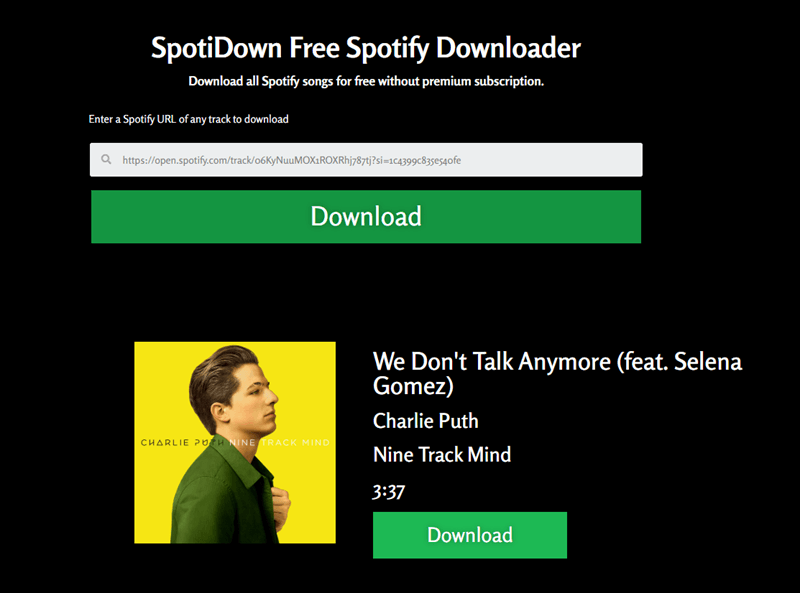
During our testing, three out of five Spotify links were successfully converted. The remaining two either stalled during parsing or redirected to ad pages. Although successful downloads were completed quickly and preserved basic metadata, the inconsistent success rate and intrusive ads reduced the overall user experience.
Spowlo
Work On: Android 8.0+
Best for: Android users looking for a free, open-source Spotify downloader with playlist support.
Our Testing Result
What We Like
- Works without a Spotify Premium subscription.
- Features a user-friendly interface for easy navigation.
- Keeps ID3 tags and lyrics.
- Supports downloading playlists in batches (best for smaller playlists).
What We Don't Like
- Occasional failures or error messages.
- May output incorrect songs or wrong versions.
- Lacks regular maintenance.
- Low output audio quality.
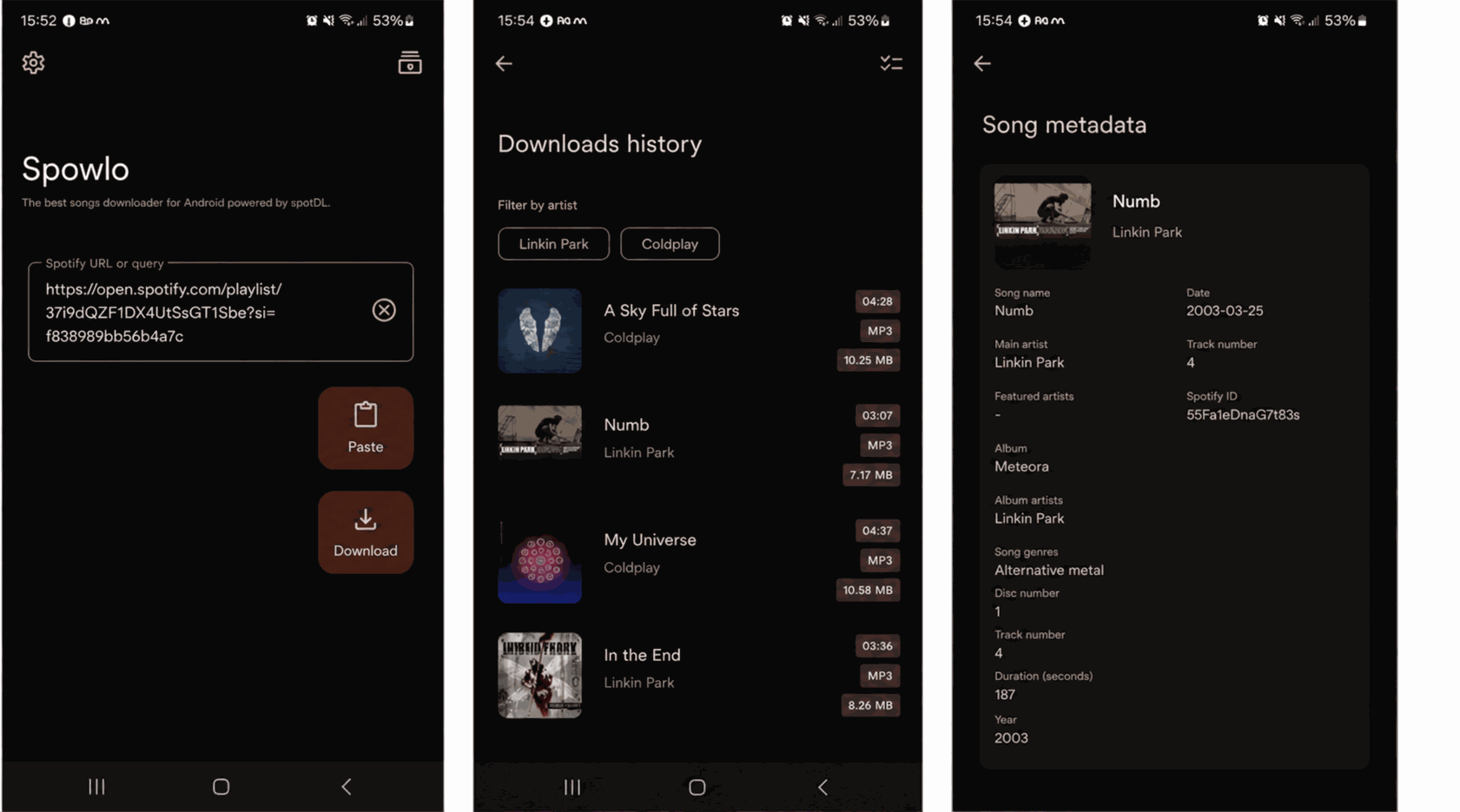
Spowlo is an open-source Spotify to MP3 converter free app for Android devices that helps users save Spotify music without a premium. Since it is based on the spotDL project, Spowlo follows the same process logic by finding matching audio from YouTube or YouTube Music and exporting audio quality based on the matched YouTube source rather than the original Spotify stream.
Since Spowlo isn't available on Google Play, you'll need to install the APK manually from its official GitHub repository. As with any sideloaded app, make sure you download it only from a trusted source. Also, it relies on YouTube matching, so the download results may vary over time as YouTube sources change, occasionally leading to missing tracks, incorrect versions, or failed downloads.
Spotify Music to MP3 Conversion Process
1. Download the Spowlo APK from its official GitHub page and enable Install unknown apps on your Android device.
2. Open the app and search for a Spotify song, album, or playlist, or paste a Spotify link.
3. Tap the Download button to start the conversion.
4. Wait for the download to finish and access the saved MP3 files on your device.
Telegram SpotifySaveBot
Work On: iOS, Android, Windows, Mac (Anywhere Telegram runs).
Best For: Telegram users who want a quick way to download individual Spotify songs without installing dedicated software.
Our Testing Result
What We Like
- Runs entirely within the Telegram app.
- Easy to convert Spotify to MP3 for free.
- Some versions also support links from YouTube and Deezer.
- The response speed is quick.
- No Spotify Premium account is required.
What We Don't Like
- It may fail to detect some Spotify songs.
- Output quality is limited to 128kbps.
- Unable to download Spotify playlists or albums in batches.
- The bot may go offline without notice.
- Availability depends on the bot remaining active.
In addition to messaging, Telegram hosts third-party bots that can convert Spotify links into downloadable MP3 files. SpotifySaveBot is one of the most popular options. There is a bot called SpotifySaveBot on this service that allows users to export Spotify songs as MP3 files without paying a penny.
However, like many free Spotify download bots, SpotifySaveBot doesn't obtain audio directly from Spotify. Instead, it matches tracks from other music sources, which may result in lower audio quality, incorrect versions, or occasional download failures. In addition, bot availability can change without notice, so the service may become temporarily unavailable.
Spotify Music to MP3 Conversion Process
1. Open Telegram and search for SpotifySaveBot.
2. Copy and paste a Spotify song link into the chat.
3. Wait for the bot to process the request and generate a download link.
4. Download the MP3 file directly through Telegram.
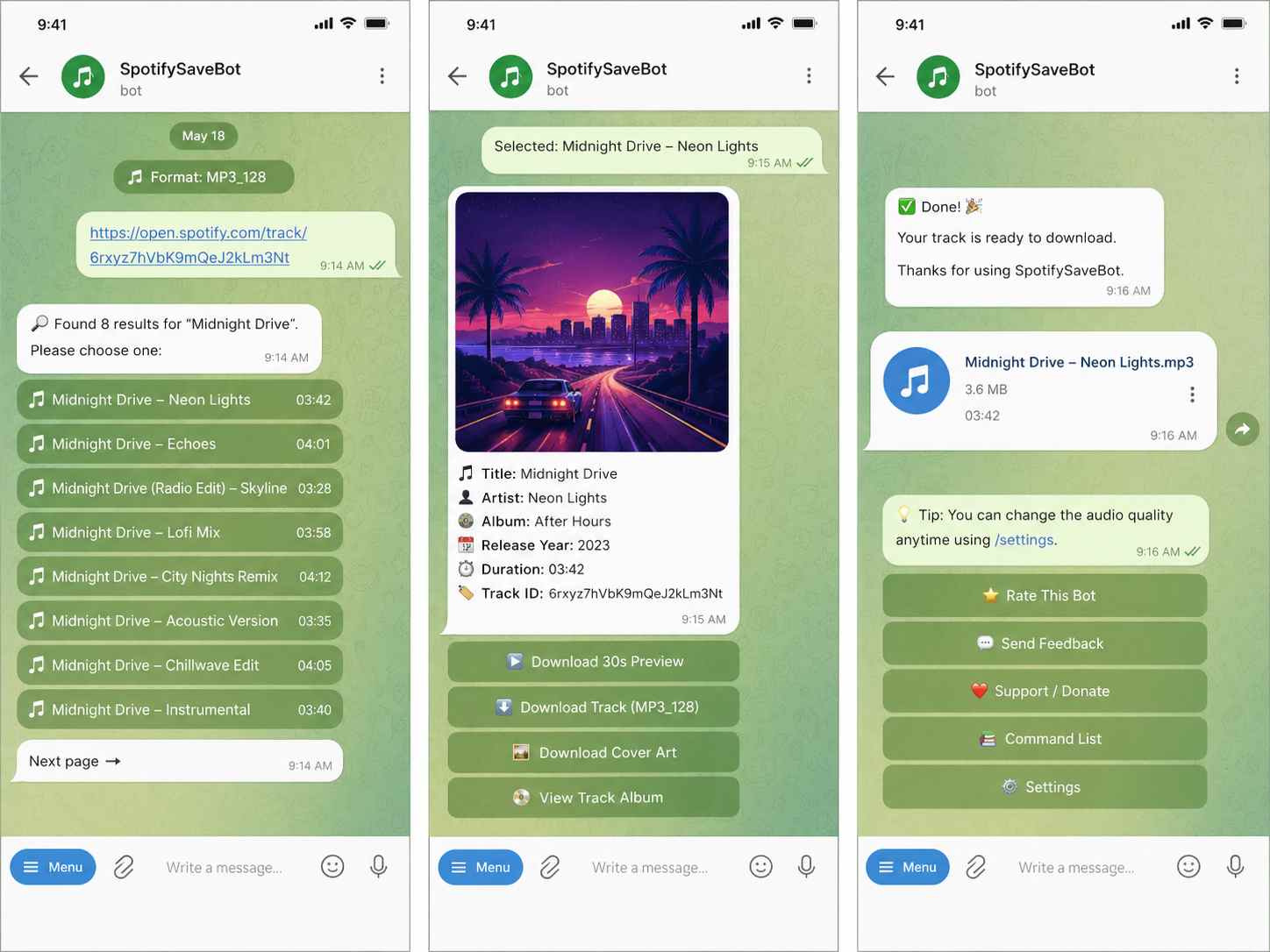
During our testing, most songs were processed within a few seconds, although response times varied depending on server availability. Downloads were completed directly inside Telegram without leaving the app. However, some tracks couldn't be recognized, and the bot occasionally became unavailable, affecting overall reliability.
Other Free Options with Important Trade-Offs
Not every free Spotify to MP3 converter is worth your time. The following tools either require more technical setup, rely on recording instead of direct downloading, or have become less reliable over time. While they may still work in certain situations, we don't recommend them for most users.
SpotDL
Work on: Windows, Mac, Linux
Who may try it: Tech-savvy users who are comfortable with command-line tools and want an open-source Spotify downloader.
Our Testing Result
What We Like
- Completely free and open-source.
- Supports batch converting playlists and albums.
- Preserves metadata and album artwork when available.
What We Don't Like
- Requires a complex command-line setup.
- May include incorrect songs after Spotify to MP3 conversion.
- Quality depends on YouTube/other sources.
- Unstable performance after Spotify updates.
SpotDL is an open-source tool that converts Spotify links by matching them with audio from YouTube or YouTube Music rather than downloading directly from Spotify. It supports playlist downloads, preserves metadata, and offers extensive customization, but its setup process is considerably more complex than most users expect.
Although newer versions provide a web interface, spotDL can be installed through Python, a standalone binary, or Docker, depending on the platform. FFmpeg is still required for audio processing and may need to be installed separately. During our testing, the installation process took significantly longer than browser-based tools, making spotDL less suitable for beginners. Output quality also depends on the matched YouTube source instead of Spotify itself.
Spotify Music to MP3 Conversion Process
1. Install Python, FFmpeg, and spotDL on your computer.
2. Open Command Prompt (Windows) or Terminal (macOS/Linux).
3. Paste a Spotify song, album, or playlist link and run the corresponding "spotdl" command.
4. Wait for the download to finish. The tool matches tracks from YouTube or YouTube Music and saves them locally.
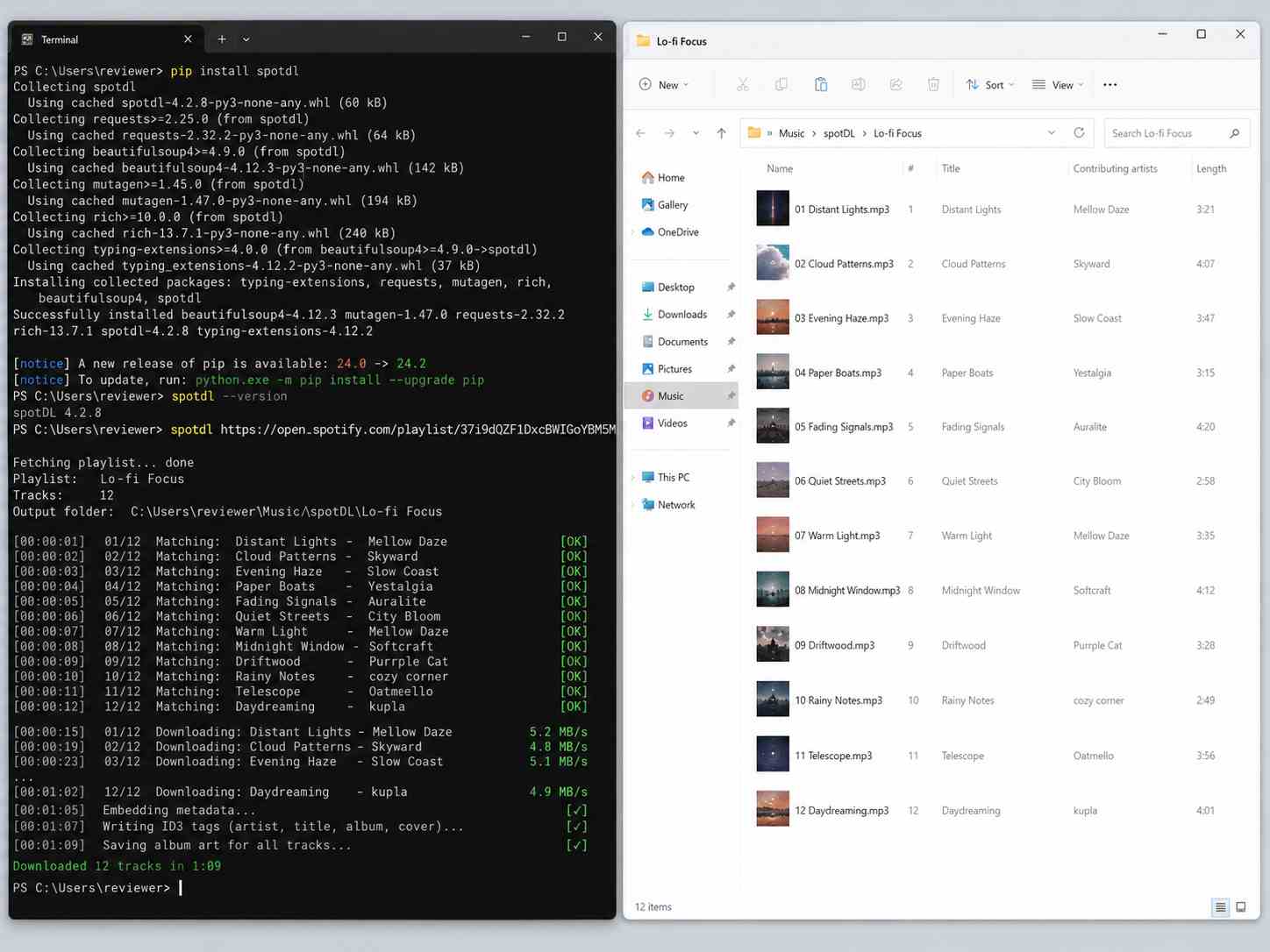
In our testing, individual songs were downloaded successfully, while larger playlists occasionally required manual retries because some tracks couldn't be matched correctly. Since spotDL depends on external music sources, downloaded versions may differ from the original Spotify release.
Soundloaders Spotify Music Converter
Work On: Web
Who may try it: Users who only need to download individual Spotify songs and don't mind occasional failures.
Our Testing Result
What We Like
- Free to use without any fee.
- Simple web-based process for Windows and Mac.
- Easy to use for anyone.
- Supports downloads from multiple music services.
What We Don't Like
- Does not support Spotify playlists and albums.
- Frequent pop-up ads and multiple clicks are required before downloading.
- Outputs lossy audio quality, usually around 128kbps.
- The download success rate is inconsistent.
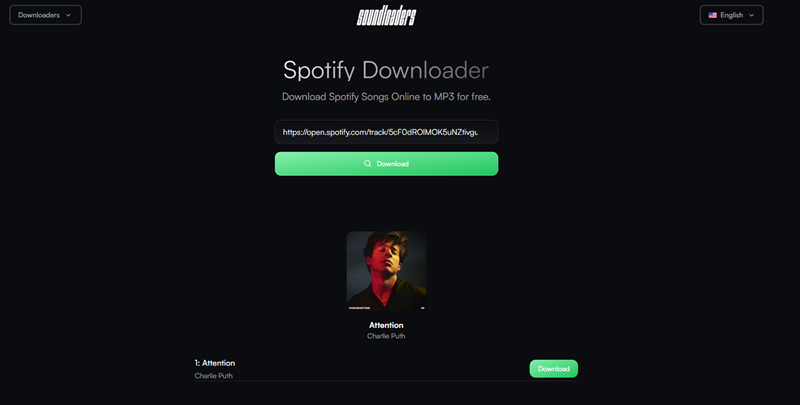
Soundloaders is a browser-based Spotify downloader that lets users convert individual Spotify tracks into MP3 files without installing any software. Simply paste a Spotify URL into the search box, and the site attempts to generate a downloadable MP3 file.
During our testing, however, the overall experience was inconsistent. Besides failing to recognize some Spotify links, the site frequently displayed pop-up ads and required multiple clicks before the actual download started. It also doesn't support playlist or album downloads, making it suitable only for occasional single-track downloads.
Spotify Music to MP3 Conversion Process
1. Open the Soundloaders website in your browser.
2. Paste a Spotify song link into the search box and click Search.
3. Close any pop-up pages if they appear, then continue to the download page.
4. Click Download to save the generated MP3 file if the link is successfully processed.
Audacity
Work on: Windows, macOS, Linux
Who may try it: Users who only need to record a few Spotify songs instead of downloading playlists.
Our Testing Result
What We Like
- Free and open to the public.
- Easy to record audio from the web.
- Edit audio tracks with the default editor.
- Works with virtually any streaming audio source.
What We Don't Like
- It takes a lot of time to record many tracks.
- Spotify Free users may also record audio ads during playback.
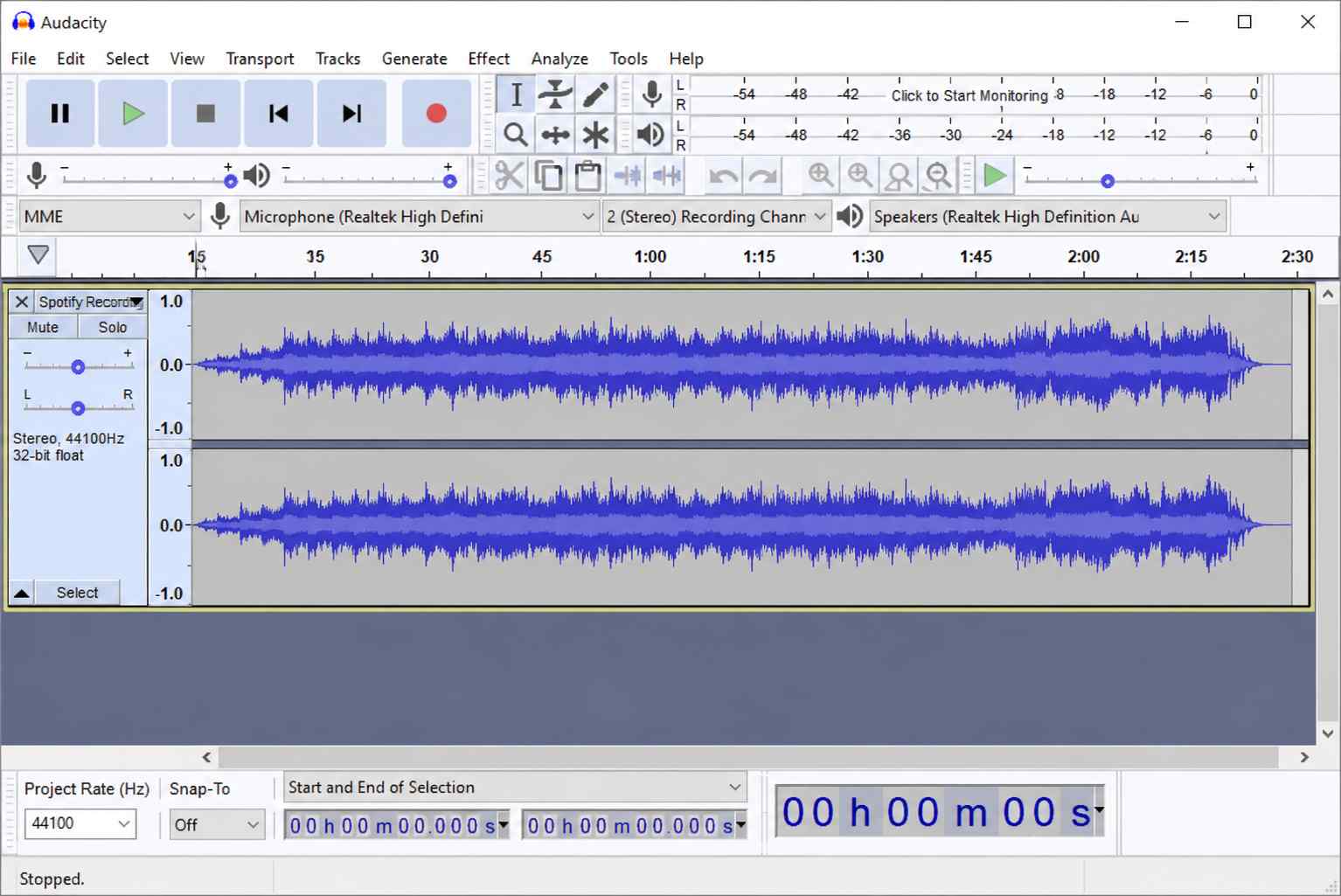
Audacity doesn't convert Spotify links. Instead of processing Spotify links, it records audio in real time while the music is playing. As a free, open-source audio recorder and editor, it works with Spotify as well as virtually any other streaming service.
The biggest drawback is efficiency. Since every song must be recorded in real time, downloading large playlists becomes extremely time-consuming. If you're using Spotify Free, playback advertisements may also be captured in the recording unless you manually remove them afterward.
Spotify Music to MP3 Conversion Process
1. Install and launch Audacity.
2. Configure your recording device (such as Windows WASAPI loopback) to capture system audio.
3. Play the Spotify song and record it in real time.
4. Stop the recording and export the audio as an MP3 file.
Bonus: Best Spotify to MP3 Converter for Stability and Experience 🔥
Work On: Windows 7 or later, macOS 10.15 or higher
Best for: Users who need a stable, high-quality Spotify to MP3 converter for frequent downloads, large playlists, and consistent audio quality.
Every free Spotify to MP3 converter comes with trade-offs, whether it's lower audio quality, intrusive ads, download limits, or unstable parsing. If those limits start getting in the way, a dedicated desktop converter offers a much more consistent experience.
TuneFab Spotify Music Converter stands out in our testing for its stable performance, high success rate, and built-in Spotify web player. Unlike many free tools that rely on third-party online services or alternative audio sources, it processes Spotify content directly within the software, making playlist parsing and batch downloads much more reliable. It supports downloading songs, playlists, albums, and podcasts without requiring Spotify Premium while preserving audio quality up to 320kbps and ID3 metadata.
Key Features of TuneFab Spotify Music Converter:
- Download Spotify songs, playlists, albums, and podcasts without Spotify Premium.
- Convert Spotify music to MP3, FLAC, WAV, M4A, AAC, AIFF, or ALAC.
- Preserve original audio quality up to 320kbps MP3.
- Batch convert entire playlists at speeds of up to 35× faster.
- Keep full ID3 tags, including title, artist, album artwork, and track information.
- Customize settings, including output folders and file naming rules, for easier music library management.
Pro Tip: You can unlock an extra 10% savings on all Tunefab products by applying the discount code "TFWELCOME" at checkout.
Spotify Music to MP3 Conversion Process
1. Launch TuneFab Spotify Music Converter and choose Spotify as the source platform.
2. Browse the built-in Spotify web player and add the songs, albums, or playlists you want to convert.
3. Select MP3 as the output format and adjust the bitrate or other output settings if needed.
4. Click Convert to download the selected Spotify music to your computer.
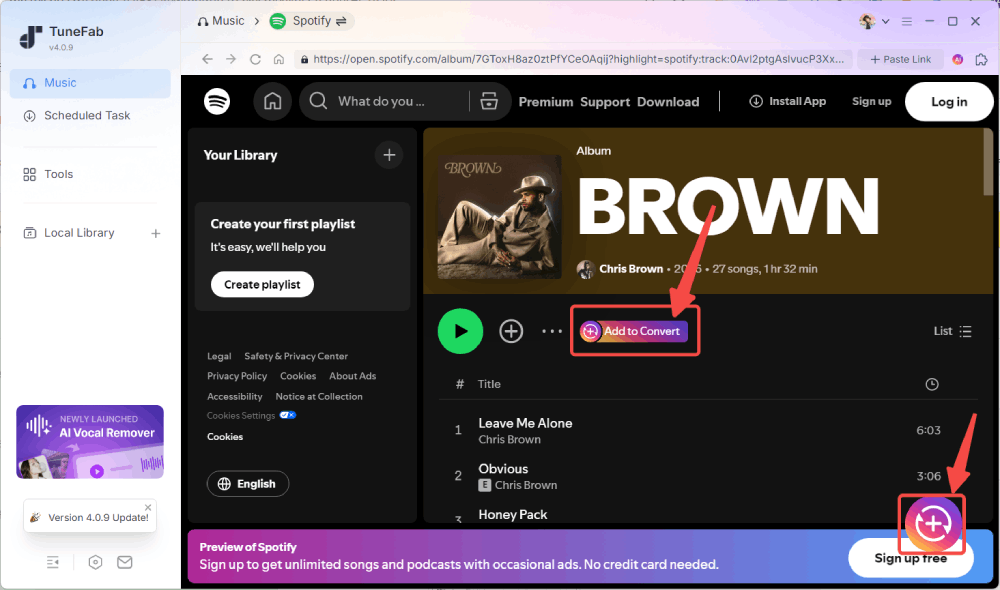
During our testing, TuneFab consistently recognized Spotify content within seconds and handled both single tracks and large playlists without parsing failures. If you only need to download an occasional song, the free options above may be enough, as it includes 3 free downloads for full songs. For unlimited conversions, batch downloads, or more advanced features, you can upgrade to unlock the full version.
Conclusion: Which Free Spotify to MP3 Converter Should You Choose?
There's no single best free Spotify to MP3 converter for everyone—it depends on how you plan to use it.
- For downloading a few songs online without installing software, Spotify-Downloader is a good place to start.
- For occasional playlist downloads in a browser, TuneFab Spotify Converter to MP3 Free offers a cleaner experience with better output quality.
- For Android users, Spowlo is worth trying if you're comfortable installing apps outside the Play Store.
- For Telegram users, SpotifySaveBot provides a quick way to download individual tracks, though batch downloads and long-term stability are limited.
- For advanced users, spotDL offers greater flexibility but requires a more technical setup than most people need.
If you only need to save a few Spotify songs once in a while, these free tools should be enough despite their limitations. However, if you regularly download playlists, care about consistent audio quality, or want a cleaner workflow with fewer ads and parsing failures, TuneFab Spotify Converter to MP3 Free is a solid browser-based choice. For even faster batch downloads, higher stability, and more advanced features, TuneFab Spotify Music Converter remains our top recommendation.
More Useful Tips Before Using Spotify to MP3 Converter
By now, you should have a good idea of which free Spotify to MP3 converter fits your needs. Before you start downloading, here are a few final things worth keeping in mind to avoid common misunderstandings and get the best experience.
- Spotify Premium Doesn't Give You MP3 Files: Spotify Premium lets you download music for offline listening, but those downloads are encrypted and only playable within the Spotify app. If you want standard MP3 files for use on other devices, you'll still need a Spotify to MP3 converter.
- Free Tools May Stop Working After Updates: Most free Spotify to MP3 converters rely on constantly changing online services, so it's normal for a tool that works today to fail after a Spotify update. If one converter stops working, try another option from this guide or check back for our latest test results.
- Choose the Right Tool for Your Needs: Free online tools are great for downloading a few songs, while desktop software is usually the better choice for large playlists, higher audio quality, and long-term reliability. Choosing the right tool for your usage is often more important than simply choosing a free one.