

Spotify offline downloads are encrypted and can only be played within the Spotify app. If you want standalone audio files for an MP3 player, USB drive, SD card, or car stereo, you'll need a reliable Spotify music converter.
We tested 10+ Spotify converters under identical conditions and selected six desktop options for Windows and Mac, including both strong performers and tools with clear limitations. Each one was evaluated for conversion speed, success rate, audio quality, batch playlist handling, pricing, and ease of use. Now, scroll down to find the one that fits you best.
Quick Comparison of the Top Spotify Music Converters
Important Note: If you use a third-party converter, only save content you are authorized to use and follow Spotify's Terms of Use and applicable copyright laws.
| Software | Price | Trial Limit | Best For | Main Drawback | Score |
| TuneFab Spotify Music Converter (Editor's Choice) |
1-month plan: $25.95 1-year plan: $79.95 Lifetime plan: $99.95 |
3 full songs | Frequent playlist and album downloads with stable batch processing | Relatively expensive for short-term users | 9.5/10 |
| NoteBurner Spotify Music Converter | 1-year plan: $44.95 Lifetime plan: $89.90 |
First minute of each song | Users who value fast playlist parsing and reliable performance | No simultaneous downloads and no monthly plan | 9.2/10 |
| Sidify Music Converter | 1-year plan: $44.95 Lifetime plan: $89.90 |
First minute of each song | Users who want extra utilities and better long-term value | Less stable and no simultaneous downloads | 8.8/10 |
| AudFree Spotify Music Converter | 1-month plan: $19.95 1-year plan: $44.95 Lifetime plan: $89.90 |
First 30s of each song | Users who need flexible bitrate and audio settings | Slow conversion speed and occasional download failures | 8.5/10 |
| TuneMobile Spotify Music Converter | 3-month plan: $49.95 1-year plan: $79.90 Lifetime plan: $159.9 |
First minute of each song | Users who want music, podcasts, and radio downloads in one platform | No batch downloads and expensive lifetime plan | 8.3/10 |
| Allavsoft | 1-month plan: $19.99 1-year plan: $29.99 Lifetime: $59.99 |
5 songs | Occasional users who prefer URL-based downloads | Poor reliability and frequent download failures | 7.8/10 |
*The test results and pricing above are based on the U.S. market, verified in September 2026, and may change over time.
How We Tested These Spotify Music Converters
Testing Environment
| Testing Date | September 2026 |
| Device | Windows 10, Intel Core i7, 16GB RAM (Mac testing was not included in this test round.) |
| Network | 500 Mbps wired connection |
| Spotify Account | Spotify Free |
| License Tier | Free trial for all tools, unless a tool note says otherwise |
| Test Library | 1. One 50-song playlist 2. One 29-track album 3. One podcast episode (1 hour 38 minutes) |
| Output Format | MP3 320kbps |
Evaluation Criteria
Each criterion is scored from 1 to 10 based on the observed test results. Unless otherwise noted, all criteria are equally weighted. The overall score is the arithmetic mean of the eight criterion scores. Raw test results, such as conversion time and successful track counts, are used as the basis for the corresponding scores.
- Download Speed: Record the time required to complete downloads.
- Success Rate: Calculate successful conversions against total track attempts and use the resulting rate as the basis for the score.
- Output Quality: Check the exported format, bitrate, and consistency with the selected settings via MediaInfo.
- Batch Parsing and Download Performance: Evaluate playlist/album parsing, batch processing, and simultaneous downloads.
- Metadata Preservation: Check whether ID3 tags, album artwork, and lyrics are retained.
- Ease of Use: Evaluate the overall workflow, including setup, navigation, conversion configuration, and file management.
- Value for Money: Compare current pricing and trial restrictions, and the features available at each price tier.
- Safety: Scan the software with VirusTotal for malware and potentially unwanted programs.
[Test Results] 6 Best Spotify Music Converters for Mac and Windows
#1 TuneFab Spotify Music Converter
If you regularly download full playlists or albums, TuneFab Spotify Music Converter is the strongest fit among the six tools we tested. Its main advantage is not simply the advertised output quality, but how well it handles larger batches without interrupting the workflow.
| Choose It If | You frequently convert full playlists or albums to MP3, FLAC, and other common formats, or need stable batch processing for daily use. |
| Do Not Choose It If | You occasionally need a few tracks or are budget-sensitive and looking for the cheapest subscription. |
Test Results (Version: 4.0.14)
- Compatible with: Windows & macOS
- The workflow was as simple as three steps: Add songs directly from the built-in Spotify web player, choose the output settings, and hit convert. Logging into Spotify is completely optional. Although a prompt suggested, "For the best results, let's connect your account...", our hands-on testing in September 2026 showed that skipping it works just fine for small albums. However, for larger playlists, a few tracks failed to match.
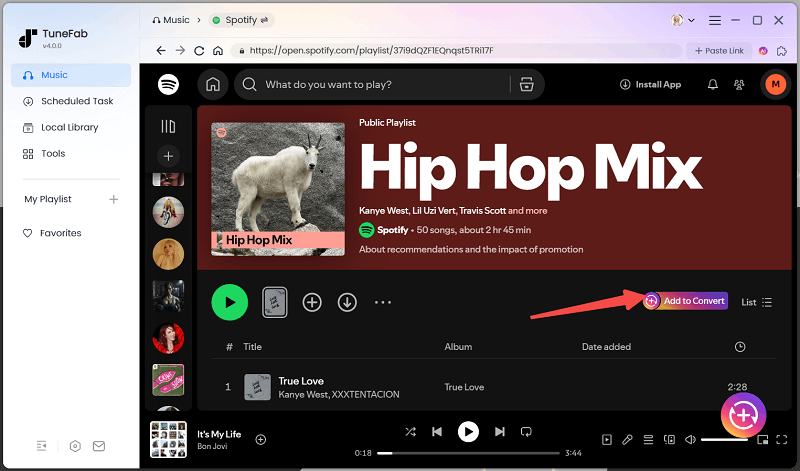
- Performance was fast and stable: In our test, the playlist and album links were parsed in around 12 seconds, while podcast links took about 5 seconds to load. Converting a 3.5-minute track took approximately 7 seconds, roughly 30X faster than real-time playback. No freezing or lag was observed during the conversion process. During our free-trial test, 3 of 3 songs were successfully matched and converted, delivering a near 100% success rate.
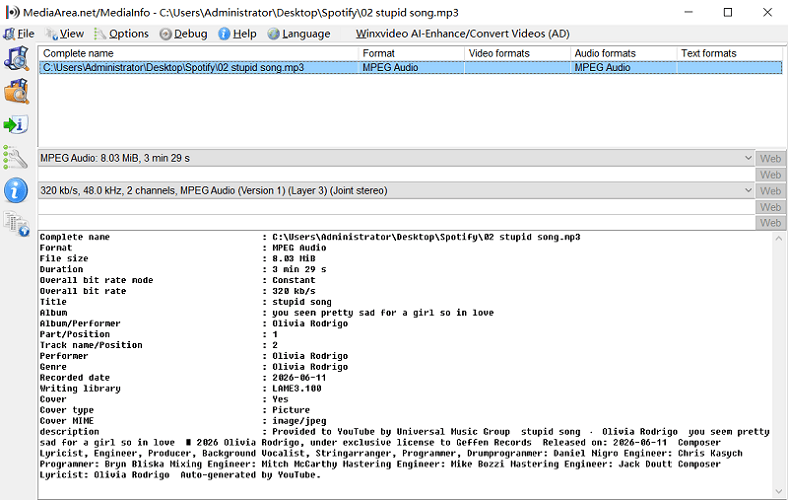
- Flexible Output: Spotify music can be converted into six common formats (MP3, M4A, FLAC, WAV, AIFF, and ALAC) with 128 to 320kbps quality, ID3 tags, album art, and lyrics successfully preserved. MediaInfo confirmed that the output file matched our selected settings.
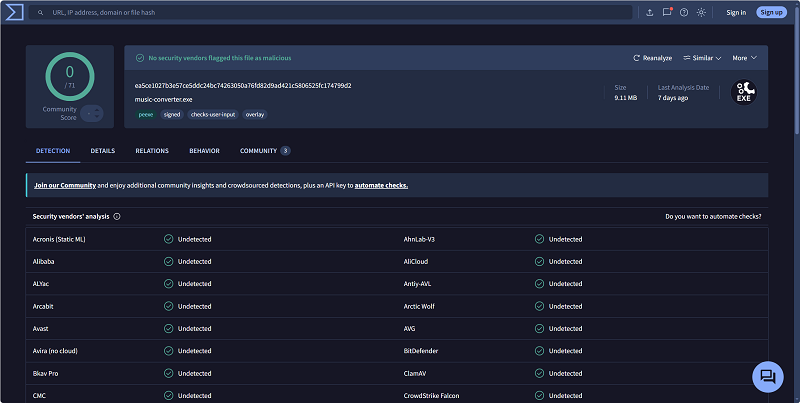
- Safe and Interface-clean: VirusTotal detected no malware, adware, or bundled-software threats in the installer package. During our testing, we also found no ads or intrusive pop-ups in the interface that could lead to accidental clicks on potentially unsafe links.
- Limitations: TuneFab's free trial only allowed 3 full conversions, so it was not enough to handle the entire playlist/album without a subscription. When we skipped Spotify login, a few tracks in larger playlists failed to match. Plus, its pricing may feel relatively expensive for those who only need short-term access.
You May Also Want to Read: Full Review of TuneFab Spotify Music Converter
Pros
- ✔ Saves time on batch Spotify to MP3 conversions by processing up to three Spotify songs simultaneously.
- ✔ Provides more control over converted music with a local file format converter, ID3 editor, LRC lyrics file, proxy support, etc.
- ✔ Provides three full-track conversions in the free trial for a real test before purchase.
- ✔ Multiple conversion modes for balancing speed and stability.
Cons
- ❌ Full features require a paid subscription.
- ❌ Subscription pricing may be high for short-term users
#2 NoteBurner Spotify Music Converter
NoteBurner Spotify Music Converter is a fast and reliable Spotify converter for Windows and Mac that performs especially well in playlist parsing, but is less flexible due to the lack of simultaneous downloads and limited pricing options.
| Choose It If | You have large playlists and value fast playlist parsing and dependable conversion performance. |
| Do Not Choose It If | You require simultaneous downloads or prefer more flexible monthly subscription plans. |
Test Results (Version: 4.6.3.dc2e8950186ae2857d6a)
- Compatible with: Windows, macOS & Android
- Multiple Input Modes: NoteBurner supports importing music through its built-in web player, the Spotify desktop app, or a pasted music URL. During our hands-on testing in September 2026, all three methods worked smoothly.
- Fast Parsing with Stable Sequential Conversion: This Spotify music converter responded quickly during our testing without lag or freezing. Playlist and album links were parsed in about 3 seconds, which was the fastest tool in our test. However, its free trial version is limited to the conversion of the first minute of each track. Across 50 test songs, all one-minute tracks were successfully completed in about 24 seconds, equivalent to roughly 2.5X real-time playback - well below the advertised 40X speed.
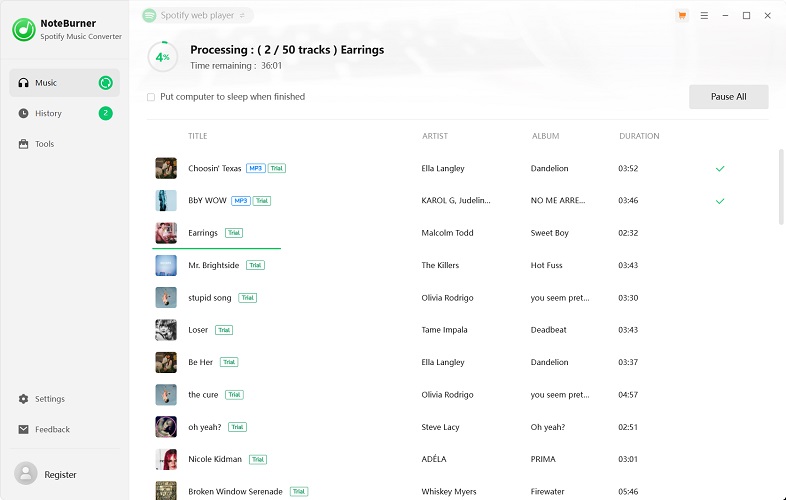
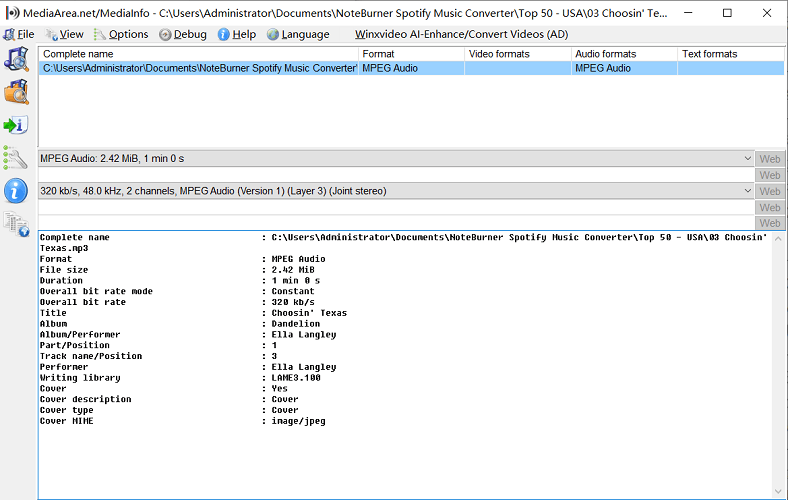
- Accurate Preset Output with Full Metadata: The downloaded audio files maintained a consistent 320kbps quality matching the selected setting. Like TuneFab, it supports common audio formats such as MP3, AAC, FLAC, AIFF, and ALAC, and all output files preserved ID3 tags.
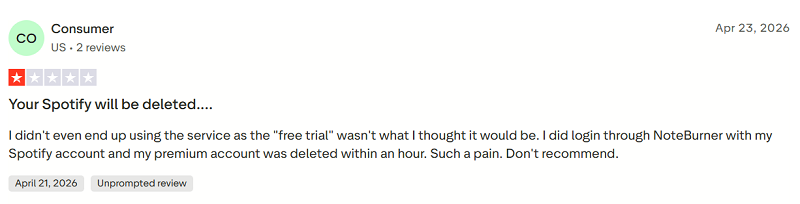
- Clean Installer, Account Ban Concerns: No viruses or malware were detected during our tests. However, we noticed that some users have reported account-related concerns on Reddit and Trustpilot, while there is no way to verify detection methods or enforcement rates.
- Limitations: There is no support for simultaneous downloads, which affects efficiency in bulk conversion scenarios. On top of that, NoteBurner only provides annual and lifetime plans (starting at $44.95), which may feel less flexible for users seeking short-term pricing options.
Pros
- ✔ Fast playlist analysis.
- ✔ Built-in CD burner for creating audio CDs from converted Spotify tracks.
- ✔ Consistent output quality.
- ✔ Supports batch conversion of multiple Spotify tracks.
Cons
- ❌ Free trial limited to one minute.
- ❌ No simultaneous downloads.
- ❌ No monthly subscription option.
#3 Sidify Music Converter
Sidify Music Converter is worth considering if you are looking for a straightforward Spotify converter with reliable output, accurate metadata preservation, and built-in extras, such as a CD burner and tag editor. However, occasional web player loading failures and the lack of simultaneous downloads make it less suitable for large playlists.
| Choose It If | You want extra utilities and long-term value without paying premium prices. |
| Do Not Choose It If | You prioritize maximum stability or need efficient batch downloads for large playlists. |
Test Results (Version: 4.6.3.dc2e8950c748e2857d6a)
- Compatible with: Windows & macOS
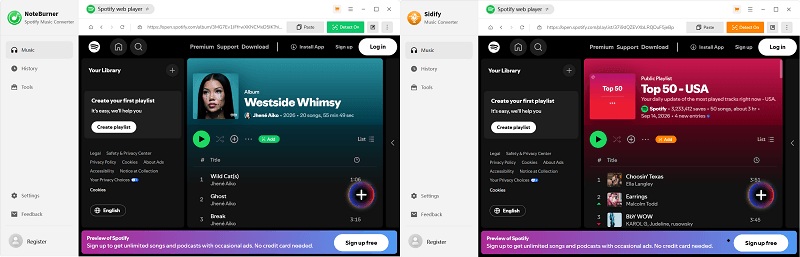
- Highly Similar to NoteBurner: The first time we opened Sidify Spotify Music Converter, we did a double-take - it looks exactly like NoteBurner. Both share the same workflow and advertise core features on their official websites. Reddit discussions also speculate that the two may share the same underlying software. In our September 2026 tests, we didn't find any obvious functional differences, although their performance may still vary depending on backend services.
- Comparable Conversion Speed: Sidify parsed playlists and albums in about 3 seconds and converted a one-minute track in 17–20 seconds during our tests, slightly faster than NoteBurner.
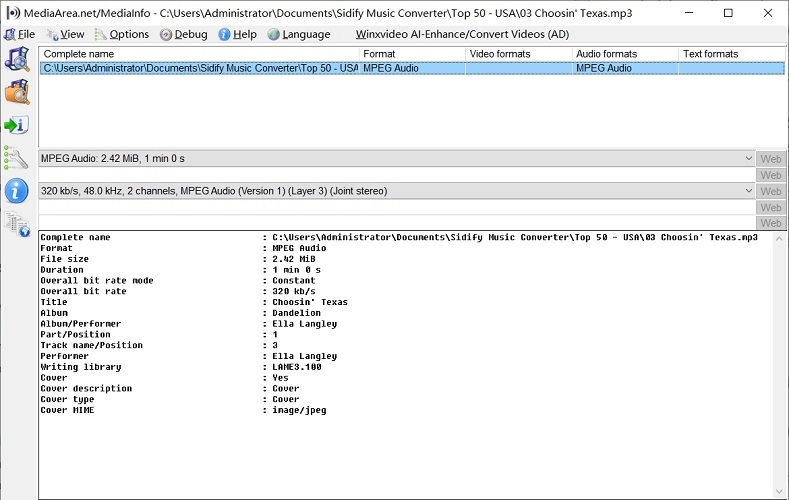
- Stable Output With Complete ID3 Tags: This Spotify music converter defaulted to 256kbps, so we adjusted the setting to 320kbps manually. Plus, MediaInfo verified that the output quality matched our preset and ID3 tags were preserved properly.
- Account Safety Concerns: We didn't encounter any security issues during our testing, but some users on Reddit have recently reported account-related concerns.
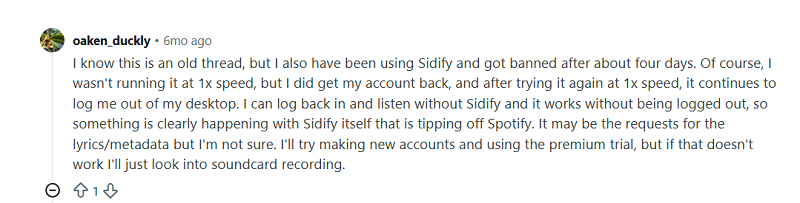
- Limitations: The free trial only allows users to convert the first minute of each track. Although conversion performance was generally smooth, occasional web player loading failures affected overall reliability. In addition, there is no support for simultaneous downloads, which reduces efficiency when handling larger music collections.
Pros
- ✔ Fast conversion speed.
- ✔ Consistent output quality and accurate ID3 tag preservation.
- ✔ Multiple built-in tools and utilities, like CD burning for easy file management.
- ✔ Offers competitive annual and lifetime pricing.
Cons
- ❌ Trial version only converts the first minute of each track.
- ❌ No simultaneous downloads.
- ❌ Occasional web player loading failures.
- ❌ Less stable than some competitors.
#4 AudFree Spotify Music Converter
AudFree Spotify Music Converter is a desktop Spotify converter for Mac and Windows with flexible audio settings, but less suitable for large playlists based on our test.
| Choose It If | You want more control over output settings and prefer having greater flexibility over bitrate, sample rate, and channel configurations. |
| Do Not Choose It If | You frequently download large playlists and prioritize batch conversion efficiency. |
Test Results (Version 4.0.2)
- Compatible with: Windows & macOS
- Login-Required Workflow: AudFree operates similarly to other Spotify music converters above, allowing you to add songs directly from its built-in web player. However, logging into a Spotify account is a must, which may be a concern for privacy-conscious users.
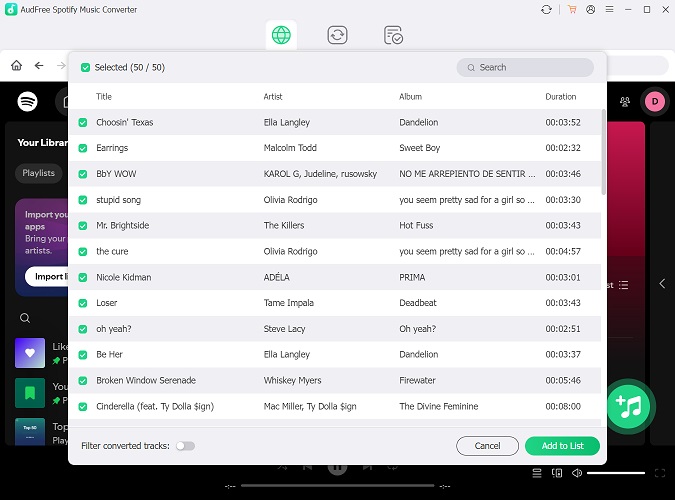
- Fast Link Parsing, but Slower Full-Playlist Conversion: Playlist and album links were parsed in around 10 seconds, while podcast links loaded in about 3 seconds. However, 9 of 50 tracks failed to download, resulting in an 82% completion rate. The first 10+ tracks converted quickly at about 12 seconds each for the trial's 30-second limit, but the speed slowed noticeably afterward, pushing the full process beyond 20 minutes.
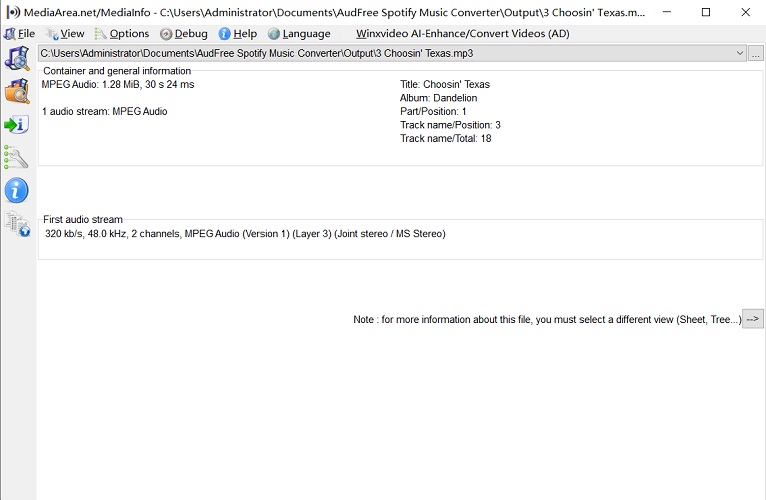
- Extensive Configuration Options with Basic ID3 Tags Retained: AudFree offers more control over audio settings of bitrate, sample rate, and channel than most competitors. The output quality remained consistent with the selected settings, but only basic ID3 tags were preserved.
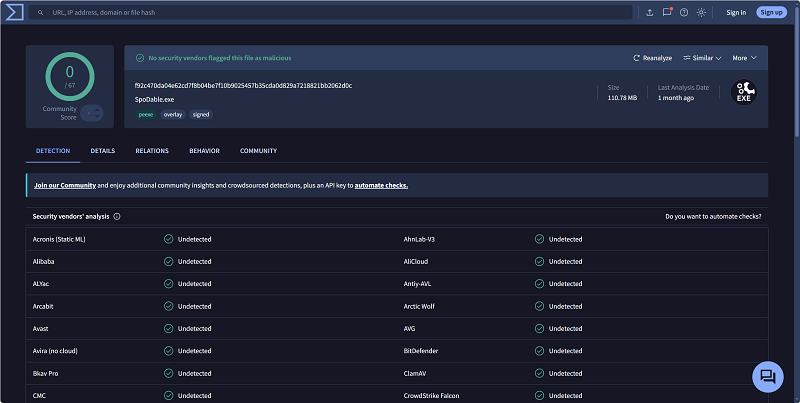
- Clean Installation and Ad-Free Use: We scanned the software with antivirus tools and detected no malware, viruses, or suspicious Trojans. Additionally, no ads or pop-ups appeared during use. It is worth noting that the AudFree installer is named "SpoDable.exe", which may be confusing at first.
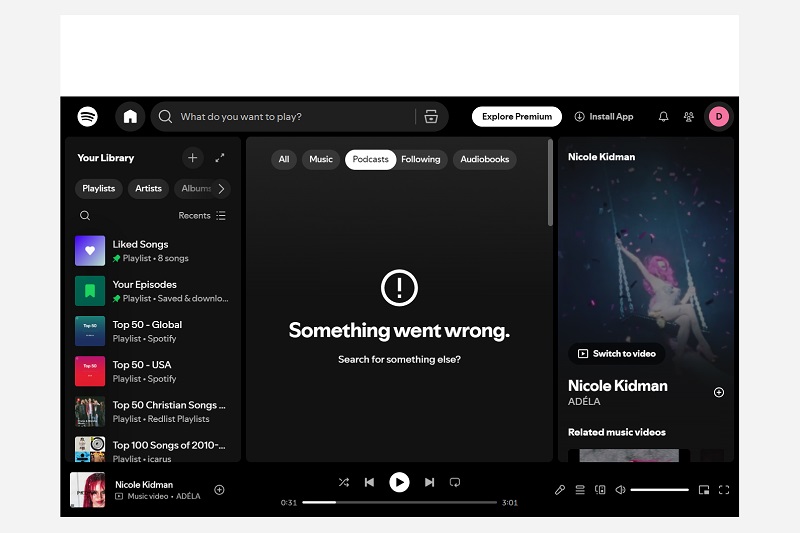
- Frequent Software Crashes: When evaluating the best Spotify music converters, we paid close attention to overall stability and how smoothly each tool runs in everyday use. During our hands-on testing of AudFree, however, we encountered frequent and seemingly random crashes. While restarting the software temporarily fixed the issue, the crashes kept recurring.
- Limitations: The free trial only allows users to convert the first 30 seconds of each track. Besides, the tool does not support batch downloads, meaning that songs must be processed individually. In addition, unlike the previous options, AudFree does not include extra utilities or built-in tools beyond music conversion.
Pros
- ✔ Useful post-conversion actions, including sleep, shutdown, and auto-exit options.
- ✔ Flexible bitrate, sample rate, and channel settings.
Cons
- ❌ Trial version only converts 30 seconds.
- ❌ No simultaneous downloads.
- ❌ Lacks additional tools and utilities found in some competitors.
- ❌ Occasional software crashes.
#5 TuneMobie Spotify Music Converter
TuneMobie Spotify Music Converter is a multi-service desktop downloader that goes beyond Spotify music by also supporting other streaming platforms. This makes it useful for users who want multiple services in one app, but the lack of simultaneous downloads and inconsistent conversion speeds make it less attractive for large Spotify playlists.
| Choose It If | You want to download not only Spotify music but also podcasts and radio content in one platform. |
| Do Not Choose It If | You prioritize fast, efficient batch music conversion. |
Test Results (Version: 1.2.3.dc2e895015a0e2857d6a)
- Compatible with: Windows & macOS
- Multi-Service Support: TuneMobie Spotify Music Converter is actually a component of its all-in-one software suite. It allows users to extract music info directly from the Spotify web player, the Spotify app, or via pasted links. In addition to music, the platform also provides a broader content experience with dedicated podcast and radio sections.
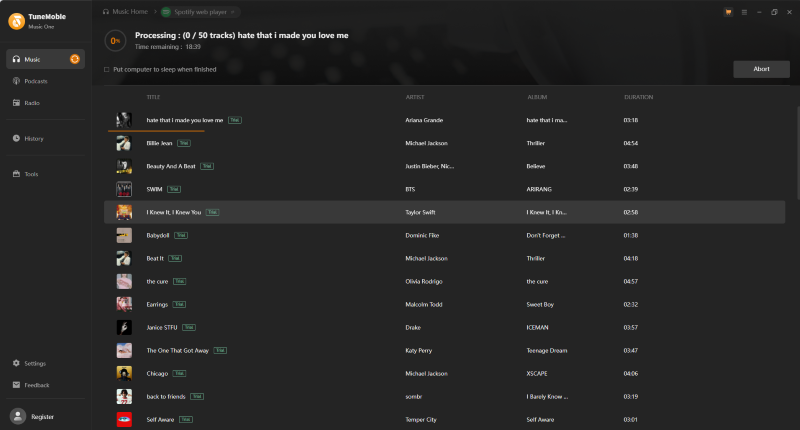
- Generally Steady Downloads, but Speed Can Vary: During our September 2026 testing, most 1-minute tracks under the trial limitation were downloaded in around 25 seconds, while some songs took up to nearly 40 seconds. While its official website claims to offer up to 40X speed, the actual efficiency may be less ideal than expected.
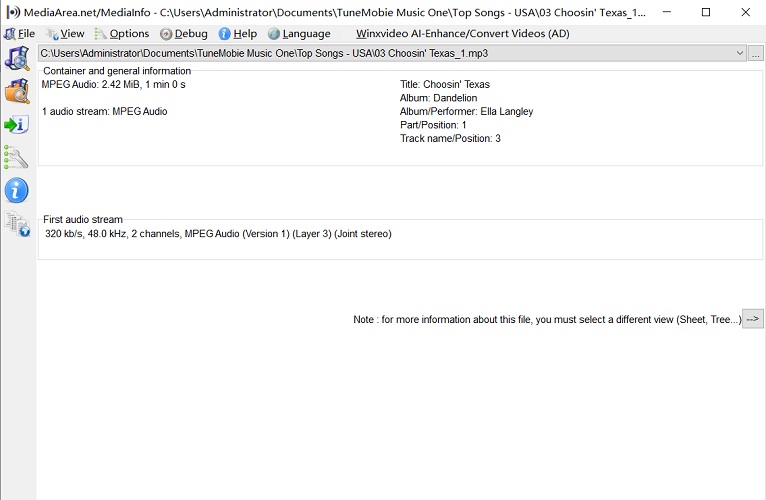
- Reliable High-Quality Audio and Basic Metadata Output: Audio quality can reach up to 320kbps, and the final output consistently matches the selected quality settings across all tested tracks. However, MediaInfo verified that only basic ID3 tags were preserved. We also confirmed that TuneMobie supports converting Spotify music and podcast videos to MP4.
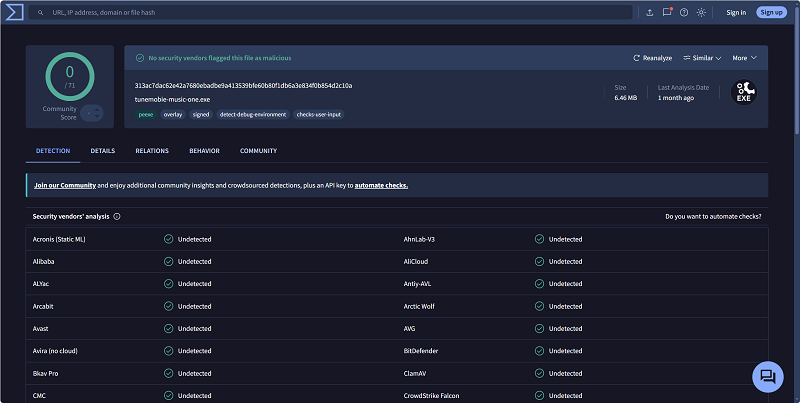
- Clean Setup and Ad-Free Experience: No bundled software was detected during installation, and security scans showed no signs of malware. The software was also free from ads and intrusive pop-ups during use.
- Limitations: Despite its polished interface and additional content features, TuneMobie does not allow multiple conversions at once, which limits efficiency when handling larger playlists. In addition, its lifetime plan was the most expensive option in our comparison.
Pros
- ✔ Supports Spotify, Apple Music, Amazon Music, and other streaming services in one platform.
- ✔ Includes dedicated podcast and radio sections beyond standard music conversion.
- ✔ Supports saving Spotify music videos and podcast videos in MP4.
Cons
- ❌ Higher price.
- ❌ Inconsistent download speeds.
- ❌ No concurrent downloads.
#6 Allavsoft
Allavsoft is better treated as a general URL-based downloader. It may work for occasional single-track attempts, but it is not ideal for Spotify playlists or users who need consistent output quality.
| Choose It If | You occasionally convert Spotify music by URL and don't mind signing in to Spotify when needed.. |
| Do Not Choose It If | You need stable playlist downloading or consistent conversion reliability. |
Test Results (Version: 3.29.4.9738)
- Compatible with: Windows & macOS
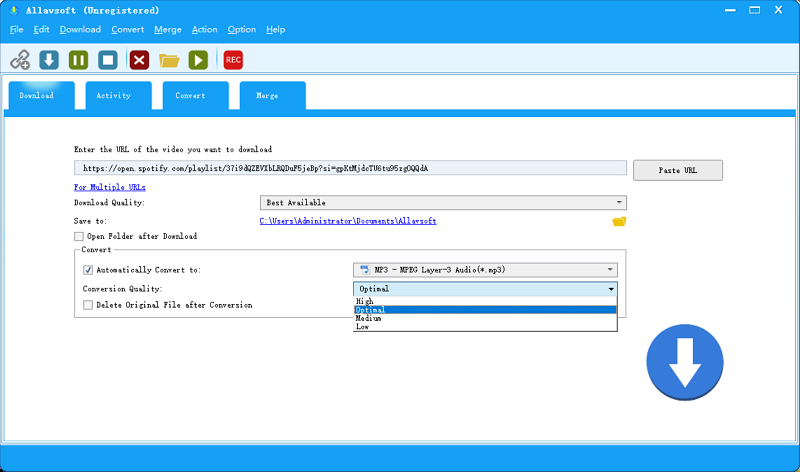
- URL-Based Import with a Less Intuitive Workflow: Unlike the previously tested Spotify converters, Allavsoft relied on pasting a URL to fetch music information. Additionally, logging into a Spotify account is required for every conversion test. Paired with its outdated UI, the overall user experience feels clunky and unintuitive.
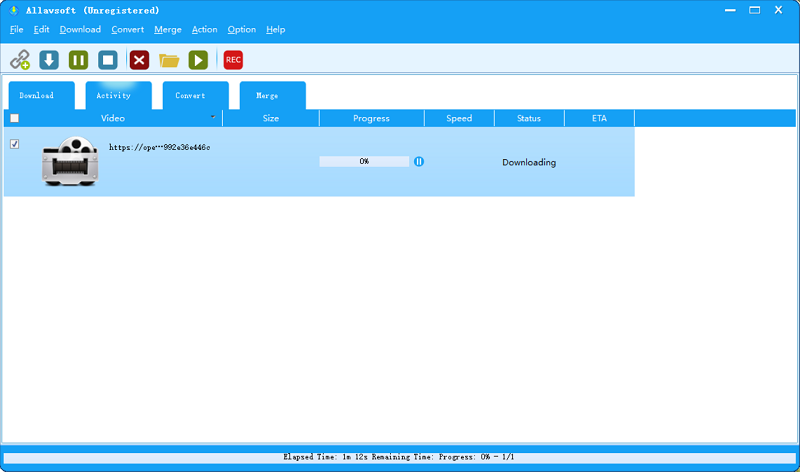
- Repeated Failures and Poor Spotify Reliability: Both playlist and album conversions encountered repeated failures. Interestingly, some failed downloads succeeded after repeated attempts. Similar issues have also been reported by other users on Reddit. In many cases, the progress bar remained stuck at 0%, and even successful downloads generally took longer than expected. Moreover, Allavsoft only managed to fetch the very first song from the playlist or album.
- Unknown Audio Source with Inconsistent Output: Based on user reports on third-party platforms such as Reddit and Trustpilot, Allavsoft typically outputs audio at up to 128 kbps. There is also a common observation among users that Allavsoft does not directly extract Spotify streams. Instead, it appears to use the track information contained in Spotify URLs to locate matching audio sources on other public platforms, such as YouTube or Deezer.
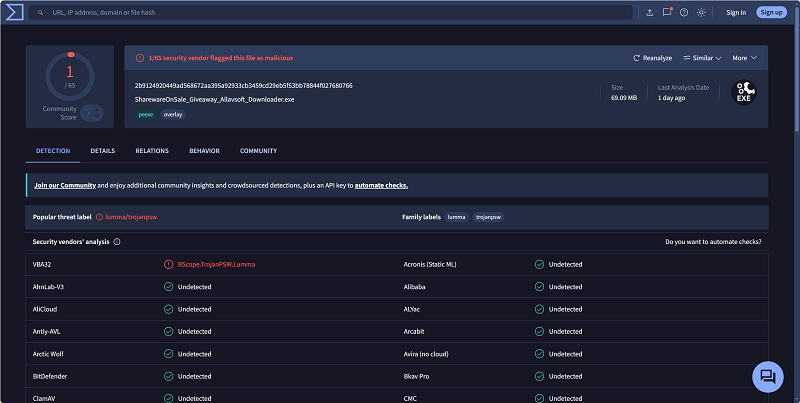
- Heavier Installation Process: When launched the installer, a system alert popped up warning that a suspicious file was detected. Moreover, the download and installation process took noticeably longer than expected, partly because additional bundled programs were included (verified in VirusTotal). However, during our actual use, we did not encounter malware, intrusive pop-up ads, or other obvious security issues.
- Limitations: Despite its lower price point and flexible URL-based design, Allavsoft showed poor reliability during testing, particularly when handling Spotify content, where multiple download attempts failed.
Pros
- ✔ No Spotify login required.
- ✔ Supports multiple output formats.
- ✔ Lightweight URL-based workflow.
- ✔ Relatively low pricing.
Cons
- ❌ Repeated Spotify account login prompts.
- ❌ Outdated interface design and bundled setup options.
- ❌ Unstable conversion performance.
- ❌ Downloads frequently fail.
Alternatives to Desktop Spotify Music Converters
Desktop converters are a better fit for frequent or large Spotify downloads, but they are not the only option. Various tools can serve specific Spotify music conversion needs, especially when you only need a few tracks, do not want to install software, or prefer a recording-based workflow.
○ For browser-based tools, read our Spotify to MP3 Converter Online Best List.
○ For free tools and trial limits, read our Spotify to MP3 Converter Free guide.
○ For large playlists, read our Spotify Playlist Downloader guide.
○ For a full method overview, read our Spotify Downloader guide.
Final Verdict: Which Desktop Spotify Converter Is Best?
We have reviewed six Spotify music converters, covering their key features, strengths, and limitations. If you are short on time, here are our quick recommendations:
- TuneFab Spotify Music Converter: Best overall for heavy users and batch playlist or album conversions.
- NoteBurner or Sidify: Good long-term budget picks but no simultaneous downloads.
- AudFree: Best for audio parameter control, but weaker on large playlists.
- TuneMobie: Best for multi-platform, podcast, and radio content.
- Allavsoft: Not recommended for converting Spotify playlists and albums.
- If you are still unsure, take advantage of the free trials to test the options yourself and find the one that best fits your needs.