

If you want to save Apple Music tracks as local audio files such as MP3, FLAC, WAV, or M4A, a desktop Apple Music converter can provide more control than Apple Music's built-in offline download option. However, these tools differ in output options, Apple Music workflow, metadata handling, and licensing terms.
This guide compares three desktop Apple Music converters for Windows and Mac: TuneFab Apple Music Converter, ViWizard Apple Music Converter, and NoteBurner iTunes Audio Converter. We put these tools through real-world testing to show you their trial limits, supported formats, account requirements, batch workflow, metadata handling, and compatibility, so you can get a clearer idea of what to expect before buying.
- Why We Chose These 3 Apple Music Converters
- How We Tested These Apple Music Converters
- Which Desktop Apple Music Converter Fits Your Needs
- Detailed Reviews of 3 Desktop Apple Music Converters for Windows and Mac
- TuneFab Apple Music Converter
- ViWizard Apple Music Converter
- NoteBurner iTunes Audio Converter
- Desktop Apple Music Converter Comparison at a Glance
- FAQs about Desktop Apple Music Converters
- Which Apple Music Converter Should You Choose
Why We Chose These 3 Apple Music Converters
There are many desktop Apple Music converters for Windows and Mac, so we tested several popular options, and then narrowed the list down based on their overall performance, ease of use, features, and workflows.
The three products that stood out in our testing were TuneFab Apple Music Converter, ViWizard Apple Music Converter, and NoteBurner iTunes Audio Converter. Rather than offering exactly the same experience, each has a different strength worth considering.
That does not mean these are the only good Apple Music converters or objectively the three best products on the market. Our goal is to highlight three options that performed well in our evaluation and offer meaningful differences for different types of users. If none of them matches your specific needs, other converters may be worth exploring as well.
Looking for a different type of Apple Music converter?
This guide focuses on desktop Apple Music converters for Windows and Mac. If you're looking for other ways to download Apple Music, see: Compare Apple Music download methods: desktop, online, CLI & recorder
How We Tested These Apple Music Converters
Rather than relying solely on advertised features, we tested all three converters on the Windows 10 device and under the consistent conditions listed below, using the same criteria to evaluate their real-world performance.
Testing Environment
| Operating System | Windows 10 |
| Test Time | September 2026 |
| Test Device | Windows desktop PC |
| CPU | Intel Core i7 |
| RAM | 16GB |
| Network | 26 Mbps Wi-Fi |
| Test repetitions | 2 runs per product |
| Apple Music Account | Free |
| Converter License | Free trial |
| Test Track/Album | Track: Maroon 5 - Animals (3:51); Album: Maroon 5 - V (Deluxe) (12 songs) |
| Output Format Selected | MP3 |
| Bitrate Selected | 320 kbps |
Testing Criteria
| Test area | What we evaluated |
| Trial experience | Whether the free trial allows complete-song conversion or limits how much of each track can be processed. |
| Apple Music workflow | How songs, albums, and playlists are added, processed, and converted. |
| Conversion performance | Conversion time, completion rate, and stability under the same test conditions. |
| Batch processing | Whether multiple tracks can be processed together and how the batch workflow works. |
| Output options | Supported formats and available audio settings. Note on audio quality: We verified the selected output format and bitrate but did not independently verify the source audio's lossless status, sample rate, or bit depth. Therefore, we do not treat FLAC or WAV output as proof of lossless source quality. |
| Metadata | Whether song information and other metadata are retained or can be edited after conversion. |
| Compatibility | Supported Windows and macOS versions and the desktop environment required to use the software. Notes: The hands-on tests in this article were conducted on Windows 10. macOS versions listed in the comparison table refer to the software's stated compatibility, not to a separate Mac performance test. |
Which Desktop Apple Music Converter Fits Your Needs
The three Apple Music converters featured in this guide each have their own strengths and are suited to different needs. Before diving into the detailed reviews, check the table below for a quick overview of which converter may be the best fit for you.
| Your priority | Consider | Why |
| Test complete songs before buying | TuneFab Apple Music Converter | Its official trial allows 3 full-song downloads, so you can evaluate the complete-song workflow before purchasing. |
| Prefer a simple desktop workflow | ViWizard Apple Music Converter | It provides a dedicated desktop workflow for Apple Music songs, albums, and playlists, with multiple output formats. |
| Want more conversion modes and audio tools | NoteBurner iTunes Audio Converter | It offers multiple conversion modes and includes audio editing tools such as tag editing. |
Detailed Reviews of 3 Desktop Apple Music Converters for Windows and Mac
TuneFab Apple Music Converter
TuneFab Apple Music Converter is a desktop tool for Windows and Mac that lets you convert Apple Music songs, albums, and playlists into commonly used audio formats. It uses a built-in Apple Music web player, so you can browse and select music within the converter. Beyond basic conversion, it offers features such as batch processing, multiple output formats, and metadata retention, which we examined as part of our hands-on evaluation.
Hands-on Testing
Software version: 4.0.13
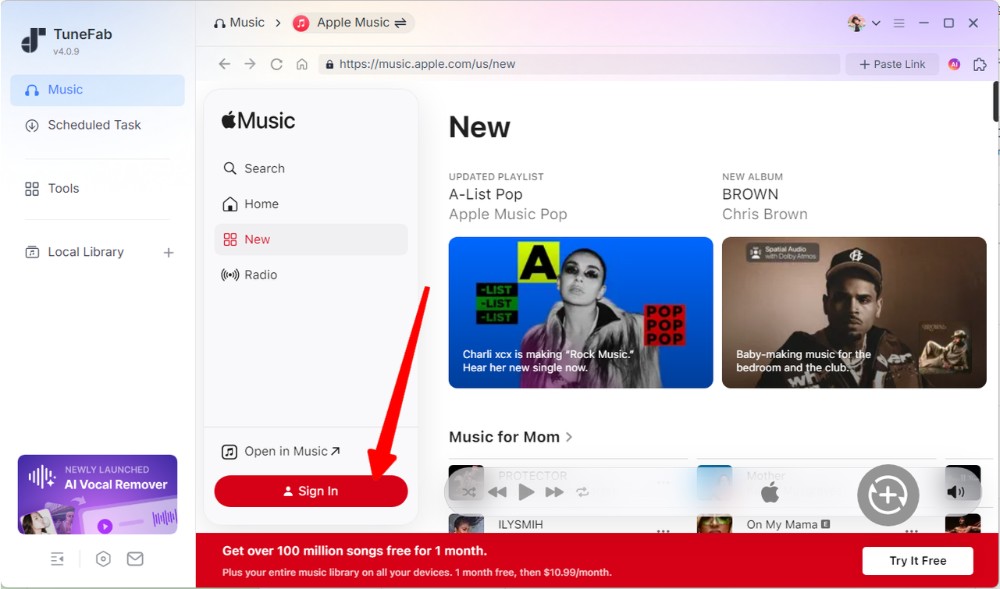
After opening the software, we saw an interface that closely resembled Apple Music, along with additional options such as Tools and Local Library in the left sidebar. We then quickly searched for our test track within the software and added it to the conversion queue. The initial workflow was smooth and straightforward.
In the first round of testing, we did not sign in to an Apple Music account. We were able to start the conversion without signing in, but the software took about 20 seconds to process the first 30-second segment. In the second round, we signed in to an Apple Music account, and the software processed the same 30-second segment in 13 seconds. In our testing, the signed-in session completed this 30-second segment faster than the unsigned session.
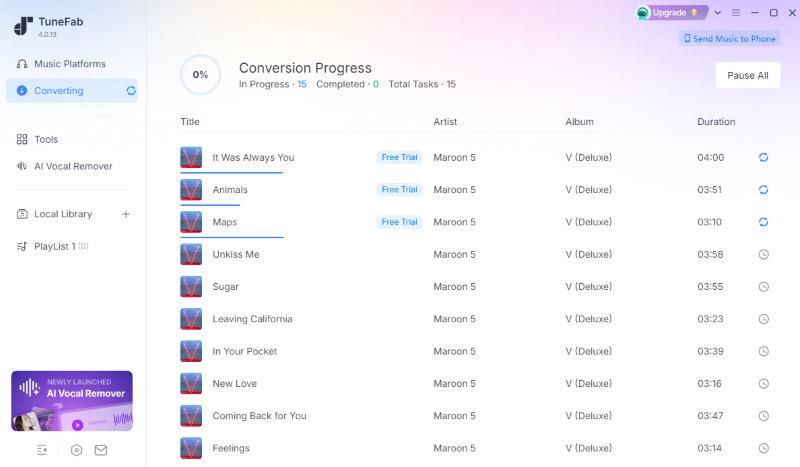
TuneFab Apple Music Converter's trial version allows users to download three complete songs before purchasing. We also converted the full 3:51 track in a separate test, and the conversion took about one minute. After conversion, the output format and bitrate matched our preset settings, while metadata such as the track title and album artwork was retained. The file also played normally on another device. We tested album batch conversion as well, and TuneFab could add multiple tracks at once and process up to three songs simultaneously.
Pricing (checked in September 2026)
- Monthly: $25.95/PC
- Yearly: $79.95/PC
- Lifetime: $99.95/PC
- Refund: 7 days for monthly / yearly plans; 30 days for lifetime purchases.
Pros & Cons
Pros
- Trial allows 3 full-song downloads.
- Supports songs, albums, and playlists.
- Offers batch processing and simultaneous downloads.
- Built-in Apple Music web-player workflow.
Cons
- Subscription is required after the three-song trial.
- Its real conversion speed may vary depending on system setup and track length.
Best for:
Users who want to test full-song conversions before purchasing and prefer a desktop Apple Music converter that can process up to three songs simultaneously.
Not ideal for:
Budget-conscious users looking for a more affordable Apple Music converter.
ViWizard Apple Music Converter
ViWizard Apple Music Converter is a Windows and Mac desktop tool for converting Apple Music songs, albums, and playlists into common audio formats. Its built-in Apple Music web player provides a focused workflow for browsing, selecting, and converting music, which may suit users who prefer a simple desktop interface.
Hands-on Testing
Software version: 5.0.1
The built-in Apple Music web player gives ViWizard a clean and familiar interface without unnecessary tools. ViWizard Apple Music Converter requires users to sign in to an Apple Music account before starting the conversion workflow.
After logging in, we quickly searched for "Animals" by Maroon 5, and the song was successfully parsed and added to the queue within a few seconds. In our test, ViWizard's trial version took approximately 15 seconds to convert a 30-second segment of the song.
The converted file matched our preset bitrate of 320 kbps and retained metadata such as the track title and album artwork. We also tested album conversion. Multiple songs could be added to the queue at once and converted successfully, although conversion times varied noticeably between tracks.

Pricing (checked in September 2026)
- Monthly: $19.95/PC
- Yearly: $49.95/PC
- Lifetime: $89.95/PC
- Refund: 14 days for monthly plan; 30 days for yearly plan and lifetime purchases.
Pros & Cons
Pros
- Metadata was retained in our test.
- Built-in Apple Music web player provides a clean and straightforward workflow.
- Allows users to add multiple tracks to the conversion queue at once.
Cons
- Trial is limited to the first 30 seconds of each song.
- An Apple Music account is required to complete the conversion workflow.
- Conversion times varied between tracks in our batch testing.
- Some online user reviews report occasional audio skips or inconsistent performance at higher acceleration settings, although we did not encounter audio skips during our trial testing.
Best for:
Casual users looking for a simple desktop workflow at a relatively affordable price.
Not ideal for:
Users who want to test full-length songs before purchasing or prefer a converter that does not require an Apple Music login.
NoteBurner iTunes Audio Converter
NoteBurner's Apple Music product is currently presented as iTunes Audio Converter on its official site. It combines an Apple Music web player with multiple conversion modes, including Intelligent, Record, and YouTube, and provides various audio settings and editing tools directly in the interface. This gives NoteBurner a more feature-rich workflow than those offered by simpler converters.
Hands-on Testing
Software version: 6.4.3
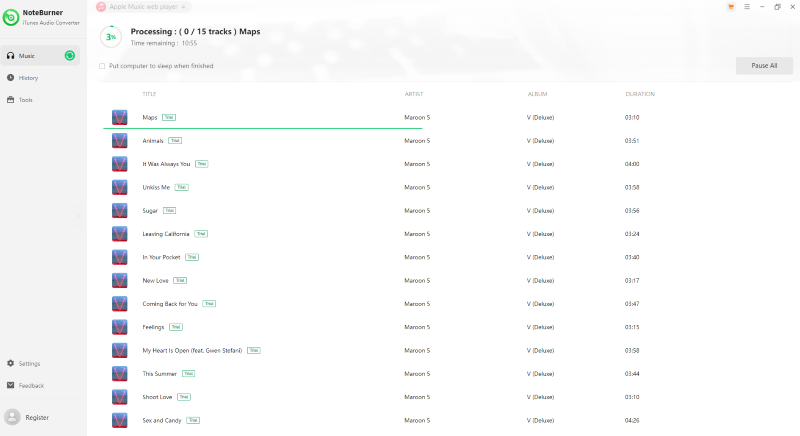
NoteBurner iTunes Audio Converter features a menu on the left with additional tools and settings, while the Apple Music web player is displayed on the right. We could search for our test track and add it to a playlist without any noticeable lag. During the process, a pop-up prompted us to sign in. We were able to start the conversion without logging in, but the conversion eventually failed partway through. The conversion completed successfully only after we signed in to our Apple Music account.
The trial version allows users to convert the first minute of each song. In our test, processing the first 30 seconds of the track took approximately 18 seconds. The converted file retained its metadata, while the output format and bitrate matched our selected settings.
NoteBurner offers three conversion modes (Intelligent, Record, and YouTube) and flexible customization options. In addition to the Apple Music web player, it provides a built-in iTunes mode that allows users to drag local iTunes songs into the software for format conversion.
Pricing (checked in September 2026)
- Yearly: $44.95/PC
- Lifetime: $89.90/PC
- Refund: 5 days for the yearly plan and 30 days for the lifetime plan.
Pros & Cons
Pros
- Offers three conversion modes and flexible output settings.
- Provides both an Apple Music web player and an iTunes mode.
- Supports multiple output formats and customizable audio settings.
- Metadata was retained and the output settings matched our presets in testing.
- Includes additional audio tools and tag-editing features.
Cons
- Free trial is limited to the first 60 seconds of each song.
- Requires an Apple Music account login to complete the conversion in our test.
- The shortest paid plan is a one-year subscription, which may not suit users who only need the software temporarily.
Best for:
Users who want more conversion modes, flexible audio settings, and additional audio editing tools.
Not ideal for
Users who need only a short-term solution or want to test full-length songs before purchasing.
Desktop Apple Music Converter Comparison at a Glance
The three desktop converters share similar core functions, but they differ in trial limits, login requirements, workflow, and additional features. The table below summarizes the key results from our hands-on testing along with current pricing and feature information.
| Feature | TuneFab Apple Music Converter | ViWizard Apple Music Converter | NoteBurner iTunes Audio Converter |
| Best for | Full-song trial + format flexibility | Straightforward conversion workflow | Output controls and conversion modes |
| Officially stated compatibility | Windows 7 or later (64-bit required) macOS 10.15 or later |
Windows 7, 8, 10, or 11 (32-bit and 64-bit); macOS 11 or later | Windows 10 or later (32-bit & 64-bit) macOS 11 or later |
| Free trial | 3 full songs | Unlimited tracks, first 30 seconds of each song | Unlimited tracks; the first minute of each track |
| Supported output formats | MP3, WAV, FLAC, AIFF, M4A (AAC and ALAC codecs) | MP3, AAC (.m4a), FLAC, WAV, AIFF, ALAC (.m4a) | MP3, WAV, FLAC, AIFF, M4A (AAC and ALAC codecs) |
| Album support | ✔ | ✔ | ✔ |
| Metadata Retention | ✔ | ✔ | ✔ |
| Login | Not required in our test | Required to complete conversion in our test | Required to complete conversion in our test |
| Timing observation | Approximately 13 seconds to process 30 seconds of audio in our test. | Approximately 15 seconds to process 30 seconds of audio in our test. | Approximately 18 seconds to process 30 seconds of audio in our test. |
| Pricing | Monthly: $25.95 Yearly: $79.95 Lifetime: $99.95 |
Monthly: $19.95 Yearly: $49.95 Lifetime: $89.95 |
Yearly: $44.95 Lifetime: $89.90 |
| Refund policy | 7 to 30 days, depending on the plan | 14 to 30 days, depending on the plan | 5 to 30 days, depending on the plan |
FAQs about Desktop Apple Music Converters
Q1. Are Apple Music converters safe to use?
There is no universal way to guarantee that every third-party Apple Music converter is completely safe. Before installing one, download the software from the developer's official website and check its current version, privacy policy, and requested permissions where available. We checked the official download sources and publicly available product information, but we did not independently perform malware scanning, source-code review, or a full privacy audit. Therefore, this article does not make a blanket security guarantee.
Q2. Is it legal to use an Apple Music converter?
It depends on what you convert and how you use the resulting files. Apple Music's official offline download feature is designed for listening within the Apple Music app, while third-party converters can create local audio files. The fact that you use a converter for personal purposes does not automatically make the conversion permitted. Apple Media Services Terms also contain restrictions on copying, scraping, circumventing protections, and accessing the service through unauthorized software. Check Apple's current terms and make sure you have the necessary rights to any content you convert.
Q3. Can Apple Music converters download songs as MP3 or FLAC?
Apple Music's built-in download feature lets subscribers save songs for offline listening, but those downloads remain within the Apple Music app rather than becoming ordinary MP3 or FLAC files. Desktop Apple Music converters, on the other hand, may offer local output formats such as MP3, FLAC, WAV, or M4A.
Which Apple Music Converter Should You Choose
The right choice depends on which parts of the workflow matter most to you. If you want to test complete songs before purchasing, TuneFab's trial allows three full-length conversions. If you prefer a simpler desktop workflow and are comfortable with a 30-second trial limit and the requirement to sign in to Apple Music, ViWizard may fit your needs. If you need multiple conversion modes and additional audio editing tools, NoteBurner's feature set may be more relevant.