

SpotifyDown Spotify Downloader was once a popular free online tool for downloading music from Spotify. However, if you've searched for it recently, you may have noticed that its original domain, spotifydown.com, no longer leads to the downloader users were familiar with.
So, what happened to SpotifyDown? Has the service moved to another domain, and what alternatives are available today? Below, we cover where the original SpotifyDown site stands now, how its domain changed, and what is known about its history, then look at alternatives, from online Spotify converters to desktop software.
Related Reading:
Free Spotify to MP3 Converters: Available Options and Limitations
What Happened to SpotifyDown?
As of November 3, 2026, the original website is no longer accessible as a Spotify music downloader. Visiting spotifydown.com redirects users to Spotify's web player. The change did not happen overnight. Archived pages and community discussions provide some clues about the website's history.
SpotifyDown Domain Change Timeline
Here's a brief timeline based on archived webpages and community posts:
- February 10, 2025: The Wayback Machine still showed the original SpotifyDown download page. Users could access its interface for processing Spotify links.
- February 22, 2025: Archived records began showing redirects from spotifydown.com to spotidownloader.com.
- March 22, 2025: A moderator in the r/spotifydown Reddit community posted about the old domain being discontinued and mentioned spotidownloader.com as the new domain.
- April 14, 2025: The Wayback Machine showed that spotifydown.com had started redirecting to the Spotify web player.
- August 26, 2025: The same Reddit account posted that ads had been removed following complaints about malicious redirects.
- November 3, 2026: Our latest domain check found that spotifydown.com still redirected to Spotify's web player.
Notes: It's worth clarifying that the information about the domain change comes from a Reddit community moderator, not a verified official announcement from the service operator. The reason behind the change has not been independently confirmed. We also haven't tested the new website mentioned in that post, so we can't confirm whether it is an official continuation of SpotifyDown.
Is It Safe to Use SpotifyDown or Similar Websites?
As discussed above, the original SpotifyDown website no longer leads to its former online downloader. However, before the original domain stopped serving the download page, users had reported some usability concerns.
Archived versions of the website showed that users could encounter advertising redirects during the download process. A Reddit community post dated August 26, 2025, also mentioned that ads had been removed following complaints about malicious redirects. However, these reports do not establish that the original website contained built-in malware. We also haven't conducted malware or privacy audits of the original service.
What about the website mentioned in discussions about domain change? During our visit on November 3, 2026, spotidownloader.com was accessible, but we did not test its downloading functionality or security, nor could we verify its relationship with the original SpotifyDown service.
Other sites use names similar to SpotifyDown, such as spotifydown.net, trackdowner.com, and spotdown.org. We haven't verified their relationship with the original service or tested their functionality and security either, so we can't recommend them or confirm that they're safe to use.
It's better not to assume that a website is safe simply because it uses the SpotifyDown name or offers a similar download interface. Avoid entering your Spotify login credentials on unverified third-party websites, and be cautious about unexpected redirects and download prompts.
What Did SpotifyDown Offer? Features of the Original Site
Although the original SpotifyDown Spotify Downloader is no longer available in its former domain, its archived webpages give us an idea of what the service used to offer. According to the archived versions from May 2024 and February 10, 2025, SpotifyDown advertised an online Spotify-to-MP3 conversion service. It claimed to support individual tracks, playlists, and albums, with a verification step required before downloading.
Here's a closer look at the features advertised by the original website.
#1 Simple Online Interface
SpotifyDown was designed as a browser-based downloader, so users didn't need to install a separate desktop application. Its original interface included a field for pasting Spotify links and instructions explaining how to submit them. You pasted a link, clicked a button, and got the file, so there wasn't much to figure out.
#2 Spotify Link Conversion
The original website advertised support for converting Spotify links into downloadable audio files. Its archived pages listed individual songs, playlists, and albums among the supported content types. Users also had to complete a verification step before downloading.
#3 MP3 and Other Audio Formats
SpotifyDown advertised MP3 conversion and referred to support for other audio formats on its original webpage. However, we can't confirm the actual output formats, audio quality and ID3 tag preservation of the original service through a current working download process.
Best SpotifyDown Alternatives for Different Needs
If you're looking for a tool with similar features, several alternatives are worth considering. The right option depends on what you want to do. If you don't want to install software, see our comparison of online Spotify to MP3 converters. If you need to download an entire playlist, explore our guide to Spotify playlist downloaders. If you're still deciding which type of tool to use, our Spotify downloader guide covers options for different devices and needs.
Choose an Online Spotify Downloader If You Don't Want to Install Software
If you only need to download a few Spotify tracks and don't want to install additional software, an online Spotify-to-MP3 converter may be a convenient option. These tools run in your browser, so you can submit Spotify links without installing a desktop application. However, free access may come with limitations. Some tools require verification, restrict the number of downloads, or support only certain output formats.
Choose a Playlist Downloader If You Need to Save Entire Playlists
If your main goal is to download multiple songs rather than individual tracks, look for a tool that explicitly supports Spotify playlist downloads. Pay attention to whether it can process an entire playlist, whether downloads are limited to a certain number of tracks per batch, and whether a paid plan is required.
Try a Desktop Alternative: TuneFab Spotify Music Converter
If you regularly convert Spotify tracks or manage larger music collections, a desktop application may be more practical than relying on an online downloader. Though they may require a program installed, they usually come with comprehensive features and a safer UI without pop-up ads and malware.
One option worth considering is TuneFab Spotify Music Converter, a Windows and macOS application developed by TuneFab. Unlike browser-based downloaders, it provides a built-in Spotify web player, allowing users to browse and select Spotify content within the program.
Main Features:
- Multiple content types: Supports converting individual songs, playlists, albums, podcasts, and audiobooks.
- Batch conversion: Allows users to add multiple tracks for conversion, with advertised speeds of up to 35X.
- Multiple output formats: Exports to 6 formats, including MP3, M4A, WAV, FLAC, and AIFF.
- Metadata preservation: Retains ID3 information to help organize converted music files.
TuneFab is not completely free. Its trial version allows you to convert 3 complete songs without restrictions on output format or audio quality. After that, you'll need a paid license to continue using the software.
As checked on November 3, 2026, its pricing plans are as follows:
| Plan | Price |
| 1-Month Plan | $25.95 |
| 1-Year Plan | $79.95 |
| Lifetime License | $99.95 |
Prices may change, so check the official website before purchasing.
If you want to learn more about its actual performance, limitations, and conversion results, read our detailed TuneFab Spotify Music Converter review.
How to Download Spotify Music with TuneFab Spotify Music Converter?
If you decide to try TuneFab, here's a quick overview of how to use its desktop application.
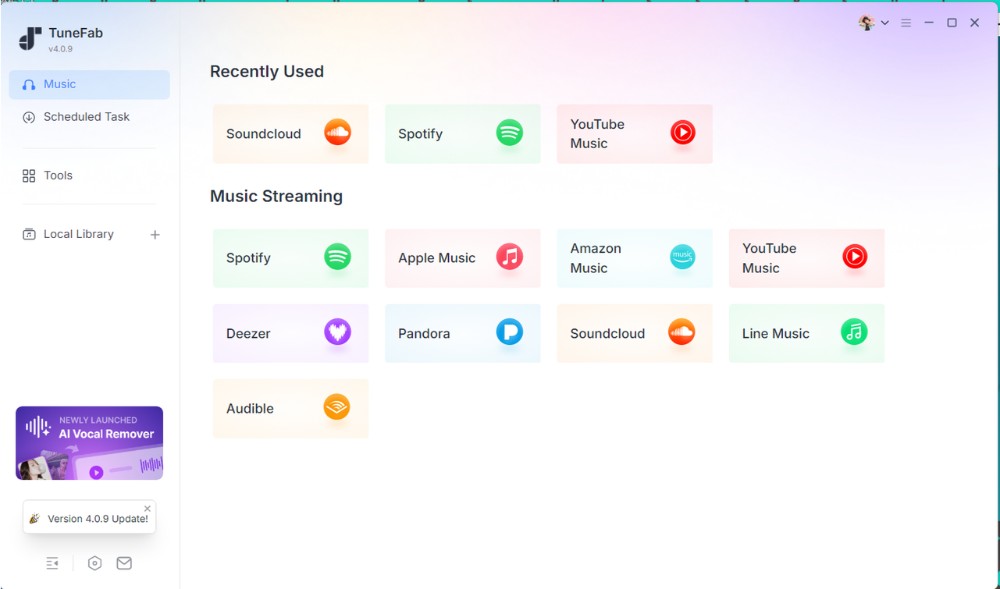
Step 1. Launch TuneFab Spotify Music Converter
Download and install the software on your Windows PC or Mac. Open the program and select the Spotify platform from the available music services.
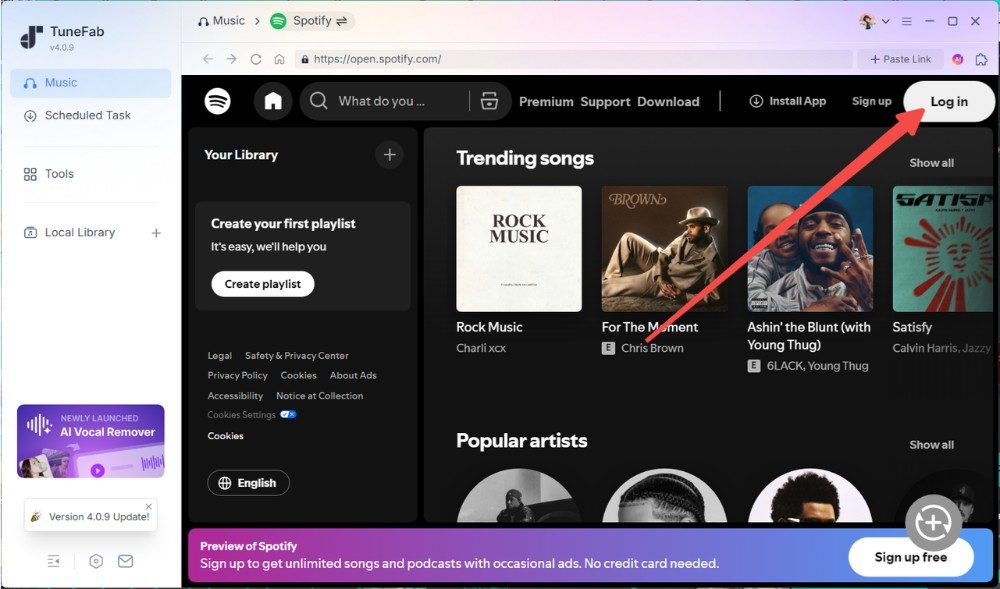
Step 2. Access the Spotify Web Player
Open the built-in Spotify interface. You can log in to your Spotify account, then browse or search for the songs, albums, or playlists you want to convert.
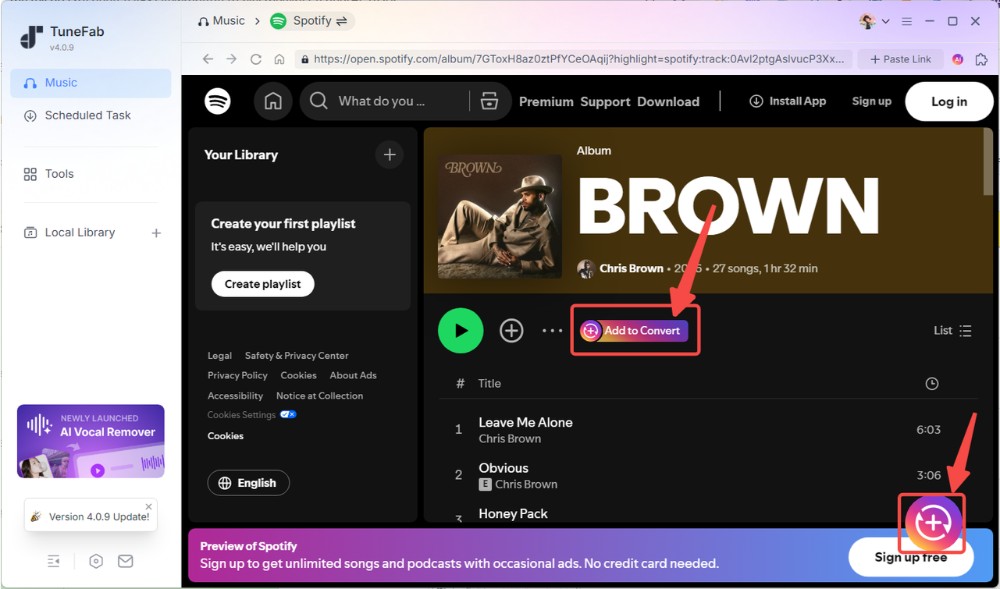
Step 3. Add Spotify Songs to Convert
Open the content you want to convert and select the songs. Click the Add to Convert button or use the circular button in the lower-right corner to add your selections to the conversion list.
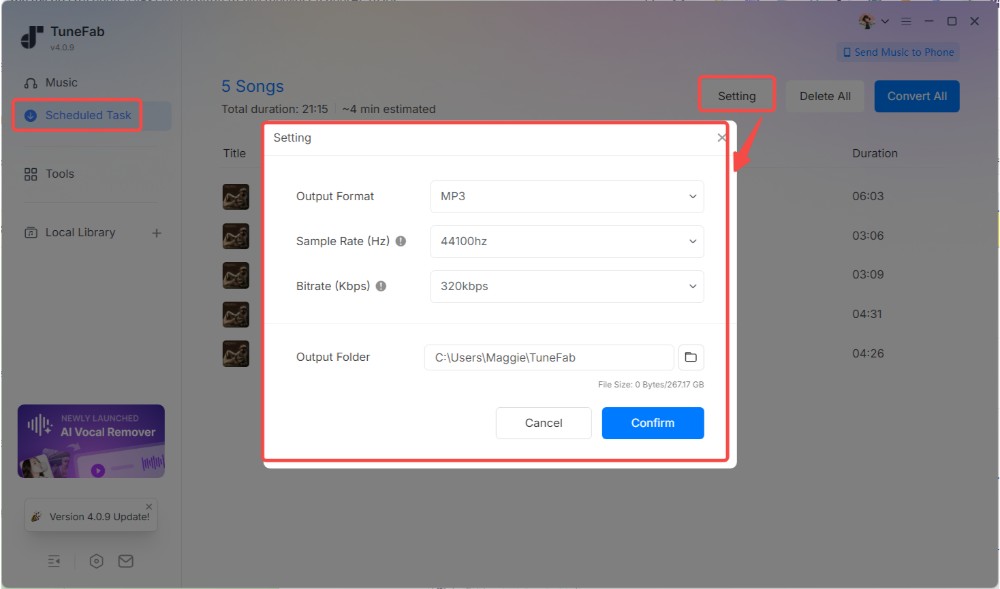
Step 4. Adjust the Output Settings
On the Scheduled Task page, click Setting to configure the output parameters, including the audio format and other available settings. Choose the format that best suits your playback needs.
Step 5. Start the Conversion
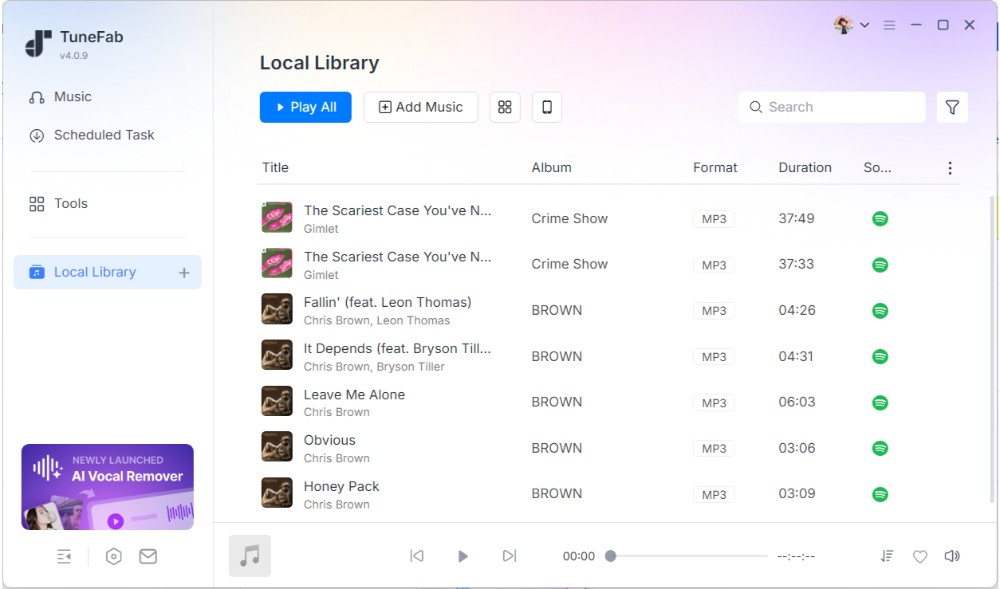
Confirm your selections and start the conversion process. You can follow the progress on the conversion page. Once the process is complete, go to the "Local Library" section to check files in your local folders.
Bottom Line
The original SpotifyDown downloader is no longer available at spotifydown.com, which currently redirects to Spotify. Archived pages show that SpotifyDown once advertised online conversion of Spotify tracks, playlists, and albums. However, these historical features don't establish that the service is still available or functional today. Although a Reddit community discussion mentioned spotidownloader.com as a new domain, its relationship with the original service remains unverified.
If you're looking for an alternative, the right choice depends on how you plan to use it. Online converters may suit occasional downloads, playlist downloaders can be useful for saving multiple tracks, and desktop tools such as TuneFab Spotify Music Converter offer another option for managing your music library.
Before choosing a tool, check its current availability, supported features, free-use limits, and pricing. Don't rely on advertised capabilities alone.