

If you're searching for a Deezer playlist downloader, finding a suitable option involves more than checking whether it recognizes a playlist URL. You also need to know how many tracks it can process, whether the exported files are complete, how it handles missing or mismatched tracks, and what happens if a task fails.
In this guide, we compare 5 Deezer playlist download tools, focusing on their workflows, output quality, account requirements, processing speed, playlist size limits, and pricing. We distinguish between advertised features and actual test results to help you understand each tool's strengths and limitations before making a choice.
- Quick Pick: Which Deezer Playlist Downloader Is Better?
- Why We Chose These 5 Deezer Playlist Downloaders
- #1. TuneFab Deezer Music Converter
- #2. DeeKeep Deezer Music Converter
- #3. DRmare Deezer Music Converter
- #4. Audials One
- #5. Telegram Deezer Bots
- FAQs About Deezer Playlist Downloaders
- Final Verdict
Quick Pick: Which Deezer Playlist Downloader Fits Your Needs?
Before choosing a third-party tool, note that Deezer offers an official offline download feature. If you hold an active Deezer Premium, Family, or Student account, you can download playlists directly within the official Deezer app on iOS, Android, and desktop for offline playback. Always check out Deezer's Terms of Service and the local laws beforehand.
Our October 2026 review compares 5 Deezer playlist downloaders with different workflows and usage requirements. The table below summarizes how each tool works and what to check before choosing one.
| Downloader | Workflow | Key Strength | Main Limitation | Recommended For |
| TuneFab Deezer Music Converter | Desktop converter with an integrated Deezer player | Stable playlist recognition + rich format support | Paid features required for full use | Users who want reliable MP3/FLAC downloads with minimal setup |
| DeeKeep Deezer Music Converter | Desktop converter with an integrated Deezer player | Straightforward Deezer-only interface | Free version heavily restricted | Users who prefer a clean, dedicated Deezer downloader |
| DRmare Deezer Music Converter | Desktop converter with an integrated Deezer player | Very fast conversion speed across services | Trial limitations on audio length | Users who want faster conversion speed |
| Audials One | Records streaming audio in real time | Works across all platforms, high-quality recording | Real-time process is time-consuming | Users who want a universal recorder tool |
| Telegram Deezer Bots | Processes submitted links through a chat interface | No installation, very fast access | Unstable quality and reliability | Users who need quick downloads on mobile devices |
Why We Chose These 5 Deezer Playlist Downloaders
Deezer playlist download tools vary in their workflows, access requirements, and file-handling capabilities. We selected five options covering different approaches, including desktop converters, real-time audio recording, and chat-based link processing. This range allows us to compare their workflows, practical limitations, and suitability for different use cases, while distinguishing documented features from results verified during testing.
Testing Environment
To keep the comparison as fair as possible, all Deezer downloaders for playlists were tested under similar conditions:
| Test Date | October 2026 |
| Devices | A MacBook running macOS 26 and a Windows PC running Windows 11. |
| Account State | Deezer Free account |
| Test Sample | Top 100 USA (100 tracks); Global Hits (50 tracks) |
| Network | A stable, 500 Mbps Wi-Fi connection |
We considered the following factors when reviewing their documented features and available test results:
- Playlist Handling: Whether a tool accepts playlist links and what its documented workflow supports.
- Track Completion: Whether available test results confirm that tracks were exported successfully, including any missing, duplicated, or mismatched songs.
- Output and Metadata: Supported formats and the available evidence for track information, such as titles, artists, albums, and cover art.
- Usage Requirements: Account or subscription requirements, installation steps, trial restrictions, and other access limits.
- Failure Handling: Whether the tool provides options such as retrying failed tasks, resuming downloads, or organizing completed files.
Results were recorded separately for each tool and workflow in the following sections. Features that could not be verified or compared directly were identified accordingly.
#1. TuneFab Deezer Music Converter
| Support OS | Download Format | Max Quality | ID3 Tags | Speed | Best For |
| Windows, macOS | MP3, FLAC, WAV, AIFF, M4A, AAC, ALAC | Up to 320kbps MP3 and HiFi FLAC | Preserved | Fast | Users who want an easy-to-use Deezer playlist downloader with flexible formats and batch downloads |
TuneFab Deezer Music Converter is a dedicated Deezer downloader that combines a built-in Deezer web player with playlist downloading and format conversion features. It can download Deezer music, including songs, albums, playlists, and podcasts, to MP3 and other common formats. In our testing, it delivered a smooth experience, with fast playlist recognition and accurate metadata retention. It also includes useful extras such as an ID3 editor, local music player, and audio format converter for managing offline music libraries.
Our Testing Experience
We reviewed TuneFab Deezer Music Converter v4.0.14 with a Deezer Free account, focusing on playlist importing, output configuration, batch conversion, and exported-file verification. We tested playlists containing 50 and 100 tracks to assess how the software handled larger batches. Here is the step-by-step evaluation workflow:
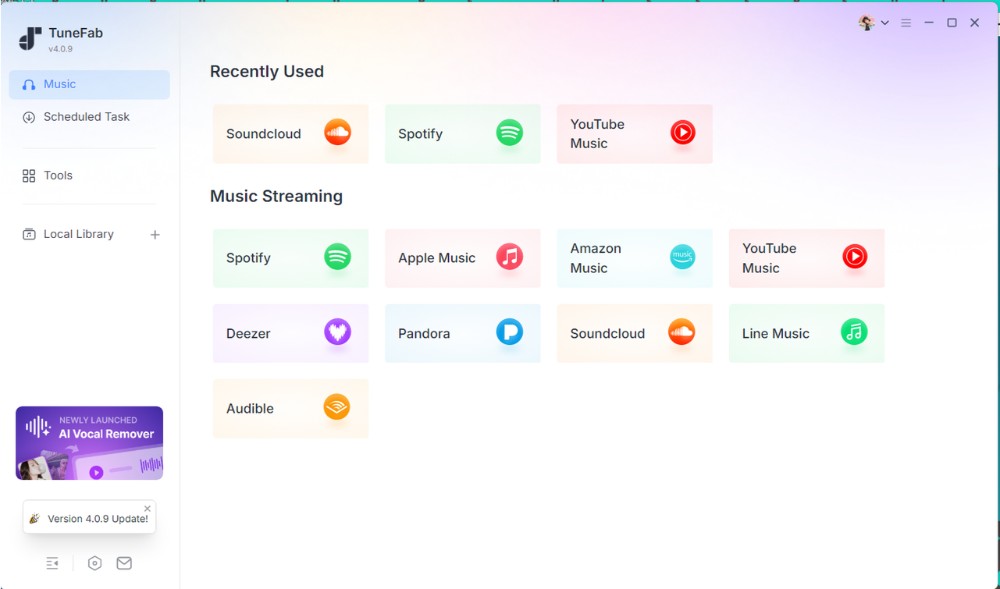
Step 1. After launching TuneFab, we found that it supports multiple streaming platforms in a single program. Selecting Deezer opened the built-in Deezer web player directly, without requiring a separate browser.
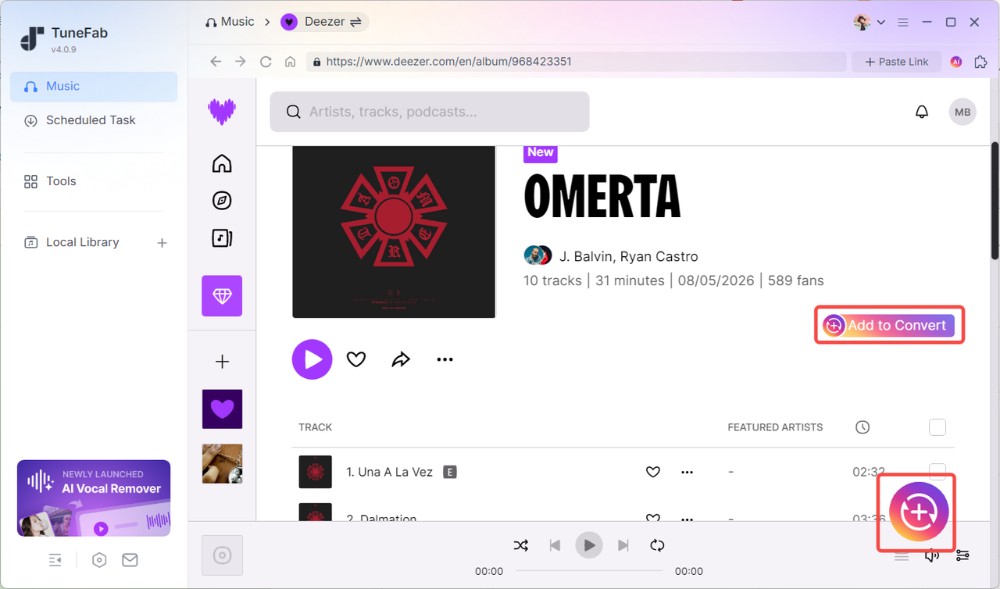
Step 2. We signed in using a Deezer Free account and accessed Top 100 USA (100 tracks) and Global Hits (50 tracks) playlists. The playlist appeared automatically inside the integrated player. Clicking "Add to Convert" successfully analyzed all tracks and added them to the conversion queue.
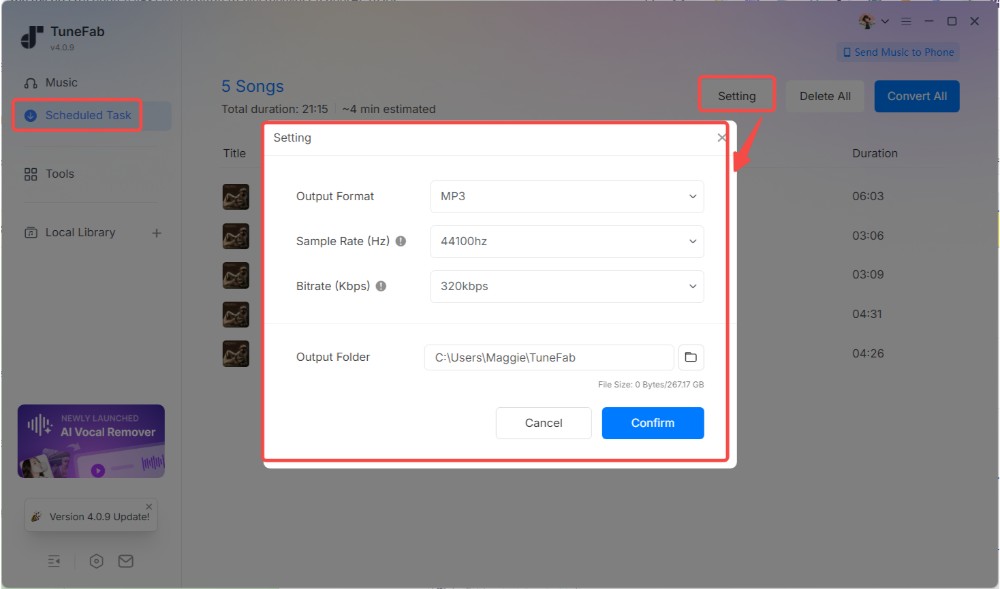
Step 3. Before downloading, TuneFab prompted us to select the output format, audio quality, and save location. For our output-file checks, we selected MP3 at 320 kbps and 48 kHz.
The free trial also clearly displayed its limitations (up to 3 songs per supported platform) and provided pricing information without interrupting the workflow.
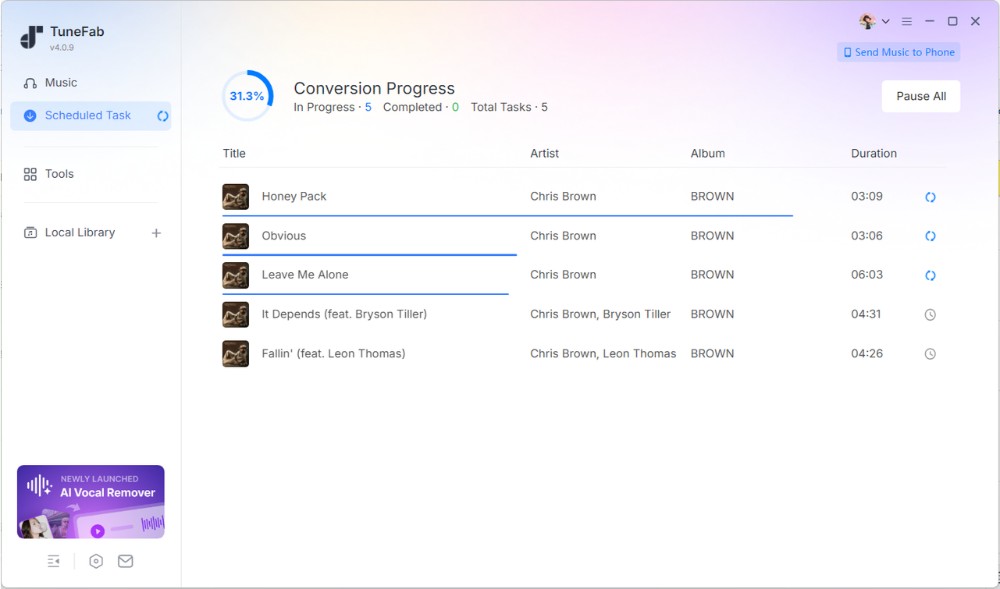
Step 4. After clicking "Convert All", TuneFab began processing the queued tracks. In our tests, the 50-track playlist took approximately 10 minutes to convert, while the 100-track playlist took approximately 20 minutes. We ran into a few failed tracks during conversion, but hitting "Retry Now" fixed it, and everything downloaded fine. The completed files were available under the "Local Library" tab.
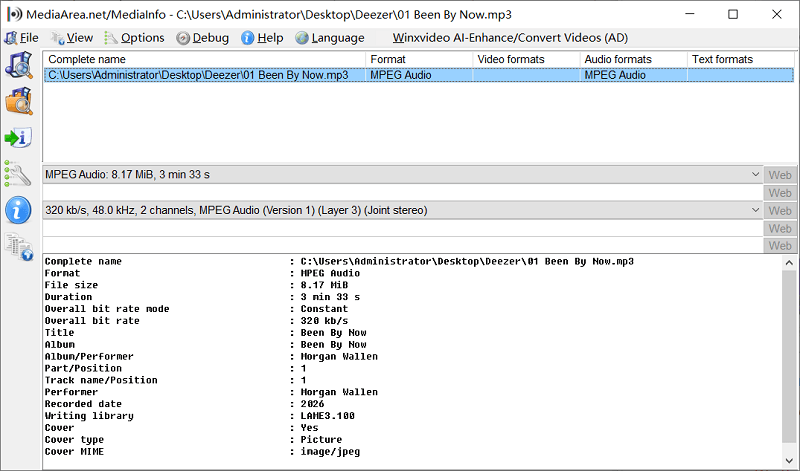
We then checked the exported audio files with MediaInfo. The reported bitrate and sample rate matched our selected output settings of 320 kbps and 48 kHz. Song titles, artists, album information, and cover artwork were retained as expected.
Pros
- Imports Deezer playlists directly through its built-in player
- Processes large playlists in batches, with 50- and 100-track playlists successfully processed in our tests
- Includes configurable output format, audio quality, and custom archive options
- Supports up to 3 simultaneous batch downloads
- Retains song titles, artist and album information, and cover artwork in the files we checked
Cons
- Free trial is limited to 3 songs, requiring a paid upgrade to process full playlists
👉 For More Info: TuneFab Deezer Music Converter Review: Out of Expectation
#2. DeeKeep Deezer Music Converter
| Support OS | Download Format | Quality | ID3 Tags | Speed | Best For |
| Windows, macOS | MP3, AAC, WAV, FLAC, AIFF, ALAC | Up to HiFi Quality | Preserved | Medium | Users who want a simple Deezer downloader with basic features |
DeeKeep Deezer Music Converter is another dedicated Deezer downloader that uses an integrated Deezer web player to download songs, albums, playlists, and podcasts. It supports multiple output formats, including MP3, AAC, WAV, FLAC, AIFF, and ALAC, while preserving metadata and lyrics. Compared with others, DeeKeep offers a more Deezer-focused experience from the start, as the software launches directly into the Deezer login page without requiring users to select a streaming service first.
Our Testing Experience
We ran this test on DeeKeep Deezer Music Converter version 3.4.3, using our Deezer Free account.
Step 1. After installing DeeKeep, the software opened directly to the built-in Deezer web player login page. Unlike some all-in-one converters, there were no additional platforms or menus to navigate. Since we use a Deezer Free account, ads appeared in the player during testing. This differed from our TuneFab test, in which no ads appeared in the web player under the same conditions used.
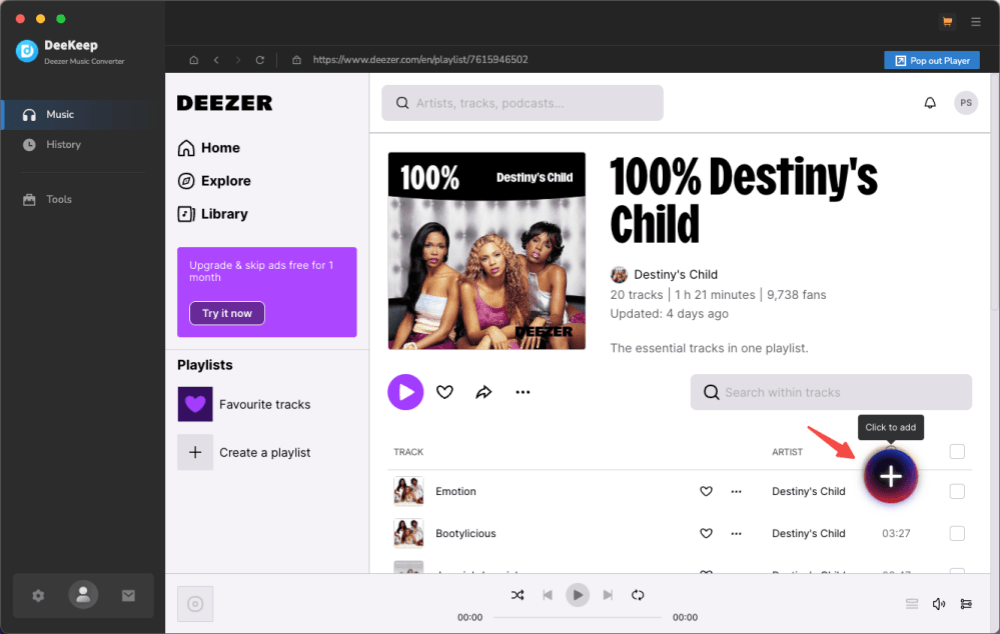
Step 2. We navigated to our test playlists (the 100-track Top USA chart and the 50-track Global Hits chart) and clicked the "+" button in the lower-right corner. DeeKeep successfully analyzed the playlist in around 5 seconds and added all available tracks to the download queue.
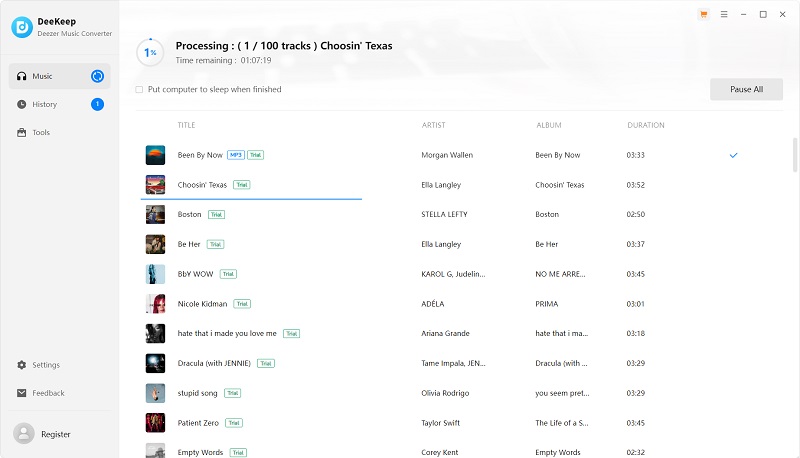
Step 3. Before starting the download, we opened "Settings" > "Music" and set the output format to MP3, with a bitrate of 320 kbps and a sample rate of 48 kHz. When we proceeded with the task, the software enforced its free trial restriction, which limits output to the first minute of each track.
Step 4. The download page displayed an estimated completion time before conversion started. In practice, each track took roughly 20 seconds to process. For our 50-song test playlist, the entire task finished in approximately 17 minutes. The 100-track playlist run took about 35 minutes.
It is worth mentioning that when a conversion failed, we could not retry the failed task directly using a dedicated retry button. Instead, we had to add the track to the conversion queue again. These results show that DeeKeep can process large playlists in batches, but processing even one-minute previews took a considerable amount of time for larger playlists.
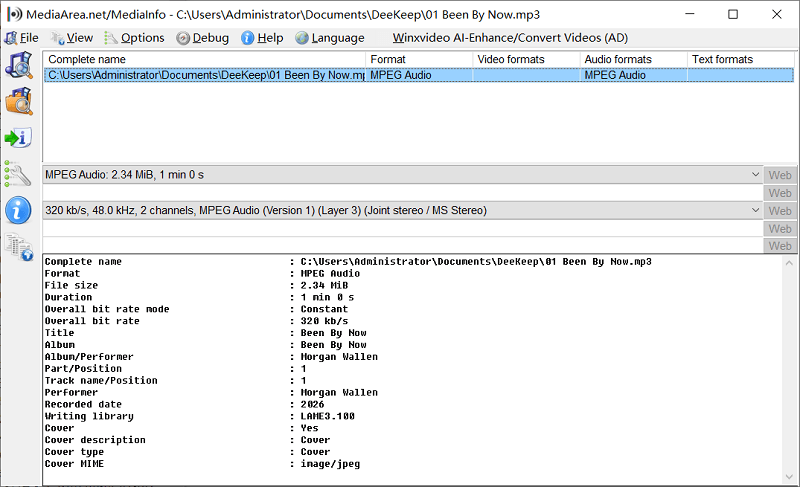
Step 5. We checked the exported files with MediaInfo. They were encoded as MP3 at 320 kbps and 48 kHz, matching our selected settings, and the ID3 tags were retained.
Pros
- Provides a straightforward Deezer playlist download workflow without requiring manual track-by-track imports
- Processed playlists containing 50 and 100 tracks in our test results
- Preserves ID3 tags and lyrics information (if provided) in the exported trial files
- Includes extra tools such as tag editing, CD burning, and format conversion
Cons
- Free trial only downloads the first minute of each song
- Failed tracks must be added to the queue again, lacking a retry button
- Does not process multiple conversion tasks simultaneously
- Conversion speed during testing was slower than that of some competitors
#3. DRmare Streaming Audio Recorder
| Support OS | Download Format | Quality | ID3 Tags | Speed | Best For |
| Windows, macOS | MP3, FLAC, WAV, AIFF, M4A, M4B | Up to HiFi Quality | Preserved | Fast | Users who want a multi-platform streaming ripper with fast conversion speed |
DRmare Streaming Audio Recorder is a more comprehensive tool that supports not only Deezer but also other major streaming platforms such as Spotify, Apple Music, Tidal, Amazon Music, and SoundCloud. Compared to more Deezer-focused tools, DRmare positions itself as an all-in-one streaming audio solution. It provides a built-in Deezer music player and supports exporting tracks into multiple formats, including MP3, FLAC, WAV, AIFF, M4A, and M4B, while keeping metadata and audio structure intact.
Our Testing Experience
Our evaluation of DRmare Streaming Audio Recorder v3.1.3 focused on playlist recognition, trial-version restrictions, processing time, failure recovery, and the exported audio files.
Step 1. After installation, we opened its built-in Deezer web player and logged in with a Deezer Free account. Then, we noticed that a banner ad appeared in the player during testing.
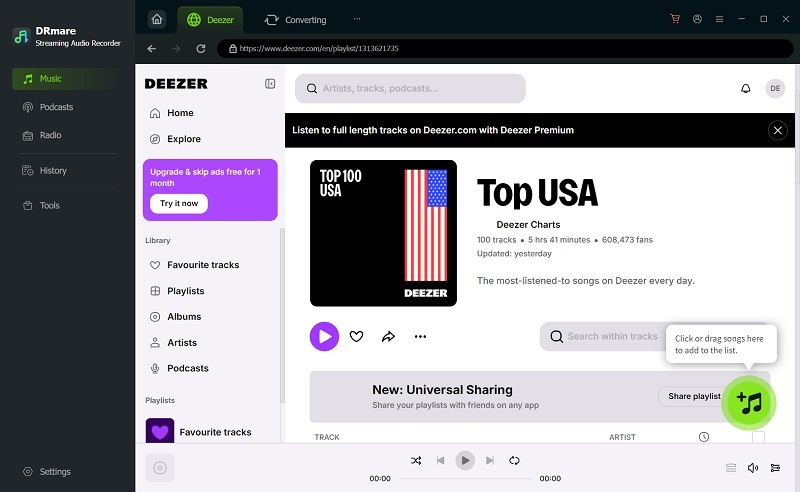
Step 2. We accessed our test playlists (Top 100 USA and Global Hits) and clicked the "+" icon to import all tracks into the conversion list. The software responded quickly and parsed the playlist without noticeable delay.
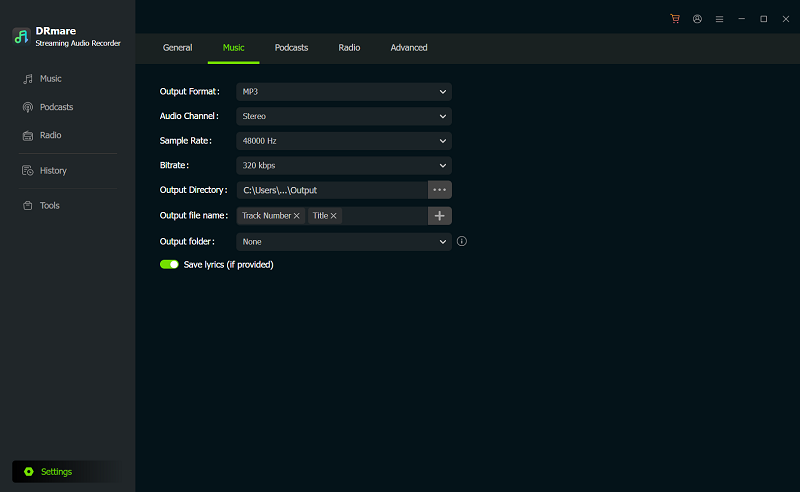
Step 3. We then went to "Settings" > "Music" and set the test output settings to MP3 with a bitrate of 320 kbps and a sample rate of 48000 Hz.
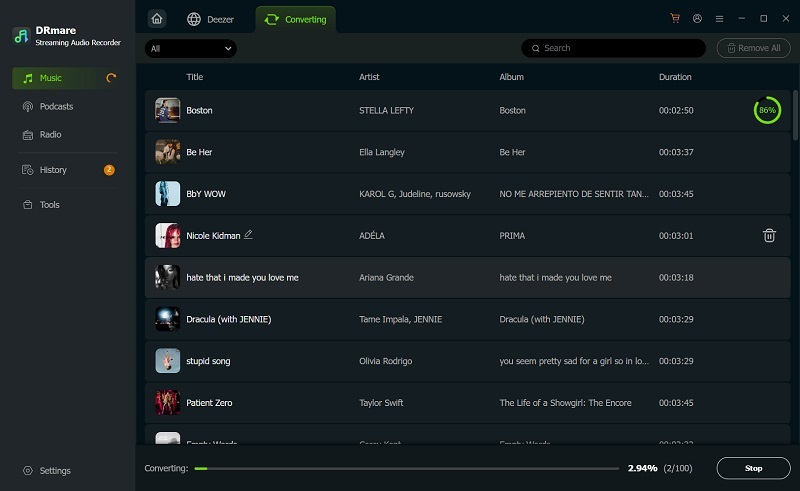
Step 4. When we clicked the "Convert" button, its free trial restrictions popped up. It exported only the first 30 seconds of each track.
In our October 2026 test, processing a playlist containing 50 tracks took around 9 minutes, while a 100-track playlist took approximately 18 minutes. However, because the trial exported only 30-second clips, these timings do not represent the time required to export complete songs.
Pros
- Supports queuing multiple playlists in one conversion
- Simple workflow with built-in Deezer web player
- Supports multiple output formats, including FLAC and WAV
- Retains basic ID3 tags and album information, with convenient post-conversion tag management
- Supports multiple major streaming platforms beyond Deezer
Cons
- Free trial only exports the first 30 seconds of each track
- Our test results did not support the advertised claim of speeds up to 46X
- Failed conversions cannot be resumed in place
- Strict trial restrictions prevent a meaningful assessment of full-track conversion speed and output behavior
#4. Audials One
| Support OS | Download Format | Quality | ID3 Tags | Speed | Best For |
| Windows Only | MP3, FLAC, AAC, M4A, AIFF | Up to 24-bit | Preserved | Slow (real-time recording) | Users who want a streaming recorder that works across multiple platforms |
Audials One takes a different approach compared to traditional Deezer playlist downloaders. Instead of directly converting or extracting files, it records audio in real time while you stream music from services like Deezer. This makes it a more universal solution that works across multiple platforms, not just Deezer. It automatically detects songs during playback and saves them as individual audio files, while also organizing metadata such as track titles and album information.
Our Testing Experience
We evaluated Audials One v2027.0.101.0 using a Deezer Free account. Since Audials captures audio in real time during playback, our assessment focused on recording workflow, system impact, output validation, and free-trial limitations.
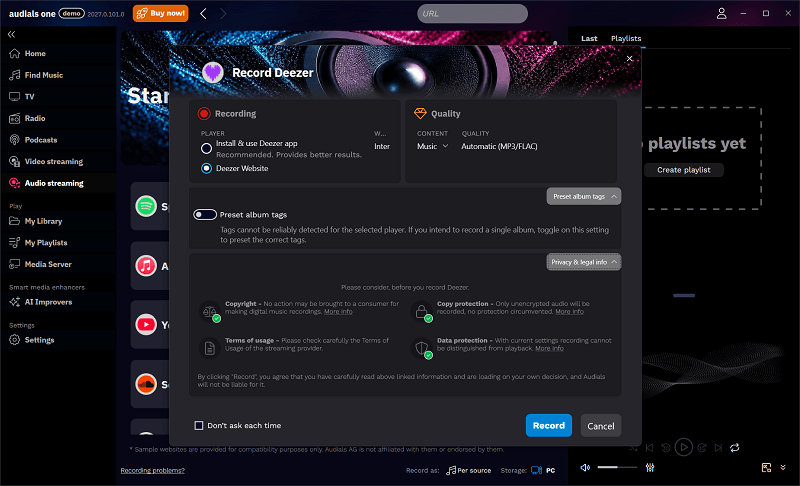
Step 1. After opening Audials One, we navigated to "Audio streaming" and selected Deezer. The software then asked us to choose an audio source: either "Install & use Deezer app" or "Deezer Website". To keep the setup consistent with our tests of other tools, we selected "Deezer Website" and clicked "Record" to continue.
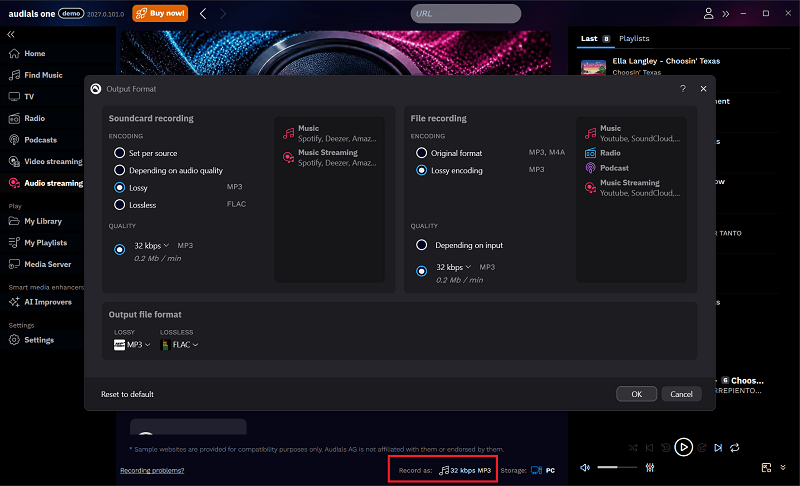
Step 2. Before opening the Deezer web player, we used the "Record as" option at the bottom of the interface to configure the output format. For our test, we selected MP3 at 320 kbps.
Step 3. Once inside the Deezer player, we played a test playlist as usual. Audials automatically detected the streaming audio and began recording in the background without requiring manual input for each track. Unlike converters, Audials records in real time, meaning the duration of the process depends entirely on the length of the playlist.
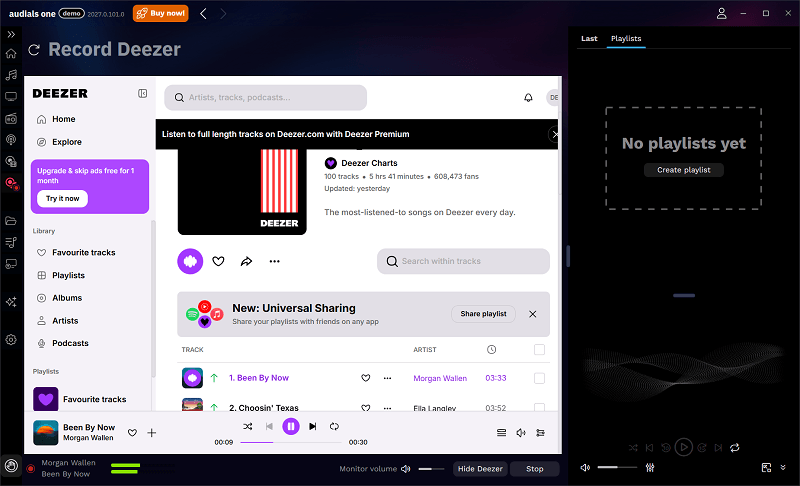
Note. Because we were using a free Deezer account, we ran into some frustrating limitations: the web player only played 30-second previews, and audio ads kept popping up between tracks, which were captured as well.
Moreover, the free version of Audials One allows only 10 recordings total. All these restrictions made it easy to use up the limited trial allowance without realizing it, before we could properly evaluate how the software handled full playlists.
Step 4. Upon finishing, we clicked "Stop", and the recorded tracks were automatically routed to the "My Music" section under "My Library". We did not encounter a recording failure during our test, although the workflow took some time to get used to it.
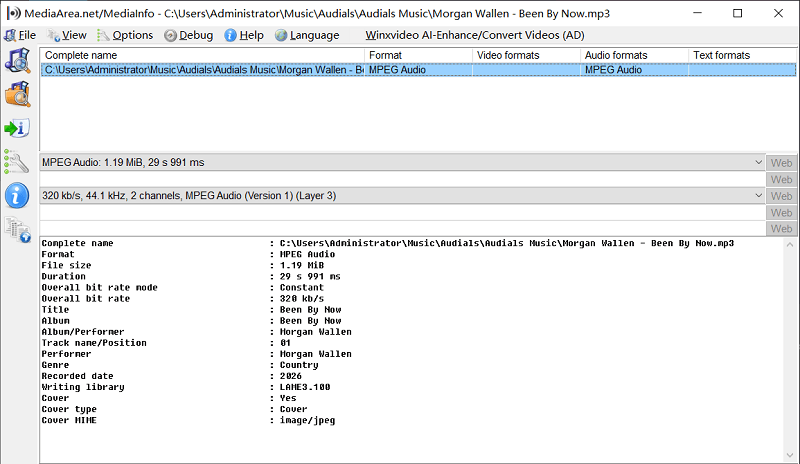
Step 5. We inspected captured audio files via MediaInfo. Output matched our configured 320 kbps setting, with a sample rate of 44.1 kHz. ID3 tags were retained across recorded clips, though the overall audio quality may be restricted by the source bitrate provided by Deezer Free.
Pros
- Works across multiple streaming platforms, not limited to Deezer
- Automatically records and splits songs into individual files
- Supports batch saving Deezer playlists
- Offers audio trimming, sound enhancement, AI-generated lyrics, and ID3 tag editing for working with recorded files
Cons
- Real-time recording makes the process significantly slower
- Recording quality may be affected by other apps or network conditions
- Interface and workflow are more complex than converter-based tools
- Audio ads were recorded in our Deezer Free test
- GPU usage rose sharply during recording
#5. Telegram Deezer Bots
| Support OS | Download Format | Quality | ID3 Tags | Speed | Best For |
| Android, iOS, Desktop | MP3, AAC (varies by bot) | Lossy | Preserved | Fast | Users who want a quick mobile-friendly Deezer playlist downloader without installing desktop software |
If you mainly need a mobile-friendly way to download Deezer playlists, Telegram bots can be a surprisingly convenient option. Instead of installing desktop software, you can handle the entire download process inside a chat interface, making it especially useful for quick, on-the-go playlist saving. However, stability and output quality can vary depending on the bot you use.
Our Testing Experience
Note: Telegram Deezer bots are third-party services, and their availability, features, and download limits can change without notice. Some bots may stop responding or disappear entirely. Choosing a bot with an established user base may be a useful starting point.
In this test, we used DeezLoad (@deezload2bot) as an example. For more options, you can check the guide: Deezloader Alternatives to Get Free Deezer Music
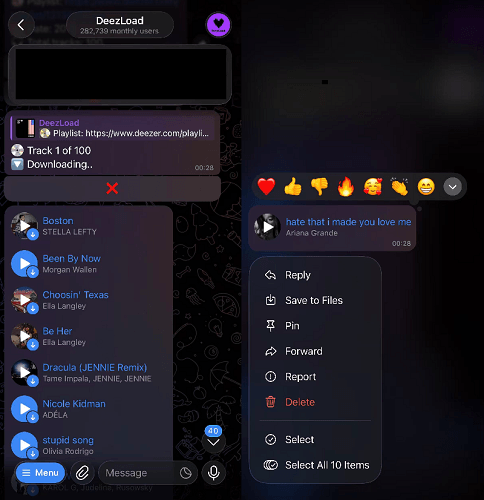
Step 1. We searched for @deezload2bot on Telegram and entered the bot chat. After starting it, the bot prompted us to join an additional channel to receive updates and service notifications.
Step 2. Next, we opened the Deezer app/web player and selected a playlist. Using the share option, we copied the playlist URL and sent it directly to the Telegram bot.
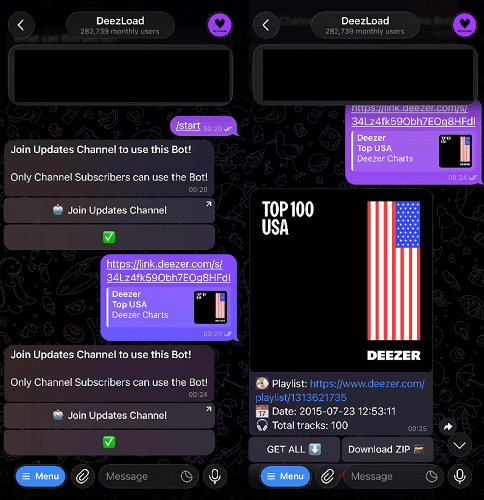
Step 3. The bot quickly parsed the link and displayed the playlist content, including cover art and track listings. This step only took a few seconds, and no additional setup was required.
Step 4. We then tapped "Get All" to start downloading the tracks from the test Deezer playlist. In our runs, the 100-track playlist took about 28 minutes, and the 50-track playlist about 19 minutes. We did not encounter failure tests, so claims about occasional incomplete playlists remain community-reported rather than verified here.
It should be noted that the "Download ZIP" option was restricted to users who donated to the service. After downloading, we could find completed items in the Music section of the bot's profile page.
However, getting those tracks onto a phone involved additional work. We had to long-press each track individually and select "Save to Files". During our test, this process frequently resulted in missed tracks, and checking and saving the files took considerable time. As a result, a playlist appearing in the bot's download area did not necessarily mean that every track had been saved successfully to the phone.
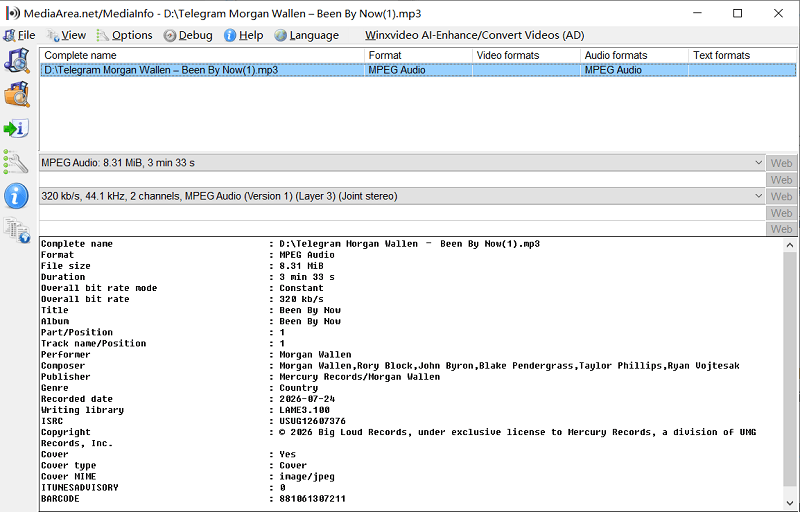
Step 5. DeezLoad listed MP3 output at 128 kbps or 320 kbps, as well as FLAC. We inspected the exported files with MediaInfo and found that the files checked retained their ID3 tags and reported a bitrate of 320 kbps and a sample rate of 44.1 kHz.
Pros
- No installation required, fully chat-based workflow
- Works on mobile (Android and iOS) and desktop Telegram
- Fast playlist parsing and download initiation
- Supports bulk download via the ZIP option
- Simple and beginner-friendly experience
Cons
- Telegram bots can be removed or changed without notice, not ideal for long-term playlist backup
- Some exported tracks sounded noticeably degraded despite the reported output bitrate
- Non-donated users must manually save tracks one by one from the chat window
Tip. If you need free ways to save your favorite songs and playlists, check out our guide on How to Download Deezer Music for Free
FAQs About Deezer Playlist Downloaders
Can I Download a Deezer Playlist as MP3?
Yes, many Deezer playlist downloaders support exporting Deezer Music as MP3 files. Options mentioned above, like TuneFab, DeeKeep, and DRmare, are workable. This allows you to burn Deezer music to CD or transfer your music to MP3 players, car stereos, or USB drives for offline playback.
Do I need Deezer Premium to download playlists?
It depends on the tool. Some Deezer downloaders require a logged-in account but work with both Free and Premium users, while others may offer better quality or fewer restrictions with Premium accounts. In general, Premium is not always required, but it can improve playback quality and access in certain tools.
Is there a Deezer playlist downloader for Android?
Yes, there are Android-based solutions, including certain apps and Telegram bots that allow playlist downloads directly on mobile devices. However, compared to desktop software, Android options are usually less stable and may have more limitations in terms of quality, batch downloads, or reliability.
Are Deezer playlist downloader APKs safe?
APK-based Deezer downloaders can be risky, especially when downloaded from unofficial sources. Some may contain ads, malware, or unstable modifications. If you choose to use an APK, it's important to be cautious and understand that desktop-based tools are generally more secure and reliable.
Why can't I find a Deezer playlist downloader online?
Many online Deezer playlist downloaders have been taken down or no longer work reliably due to platform restrictions and frequent updates. Deezer also makes it difficult for web-based tools to maintain stable access, which is why most current working solutions are desktop applications or bot-based tools instead of simple online converters.
Final Verdict
The best Deezer playlist downloader depends on your playlist size, preferred workflow, and need for control over exported files. Based on our tests, here is how the options compare by use case:
- For large playlists of around 100 tracks: TuneFab Deezer Music Converter, based on its playlist-processing results in our tests.
- For a Deezer-focused desktop workflow and process one playlist at a time: DeeKeep Deezer Music Converter, which offers a built-in Deezer player and batch processing.
- For converting audio from multiple streaming platforms under one license: DRmare Streaming Audio Recorder.
- For cross-platform audio recording when real-time playback is acceptable: Audials One.
- For a free, mobile option for a small playlist: Telegram bot
- And if you only need offline listening inside the Deezer app: use Deezer's official offline mode on a paid plan.
Before purchasing a license or using a third-party service, check the current trial restrictions, verify the features that matter to you, and review Deezer's terms and the copyright rules applicable to your situation.